Ecommerce Marketing Automation: How to Automate Your Funnel
 Jakub Neander
Nov 18, 202614 min read
Ecommerce marketing automation is the closest thing to a second shift that a small store can hire. It sends the right message when a shopper does something, it never forgets, and once it is set up, it costs almost nothing per message. It also goes wrong quietly: flows that keep emailing people who already bought, texts to people who never agreed to them, and a dashboard that takes credit for sales that would have happened anyway. This guide walks the funnel stage by stage, shows which automations to build first, covers email, SMS, onsite and ad audiences, and explains how to tell whether any of it is working.
What Ecommerce Marketing Automation Actually Is
Marketing automation means sending a message or making a change because a customer did something, not because it is Tuesday and you planned a newsletter. A campaign goes to a list at a time you pick. An automation (also called a flow or a workflow) runs on its own, for one person at a time, whenever its trigger fires.
Every automation, however fancy the tool, is built from the same five parts:
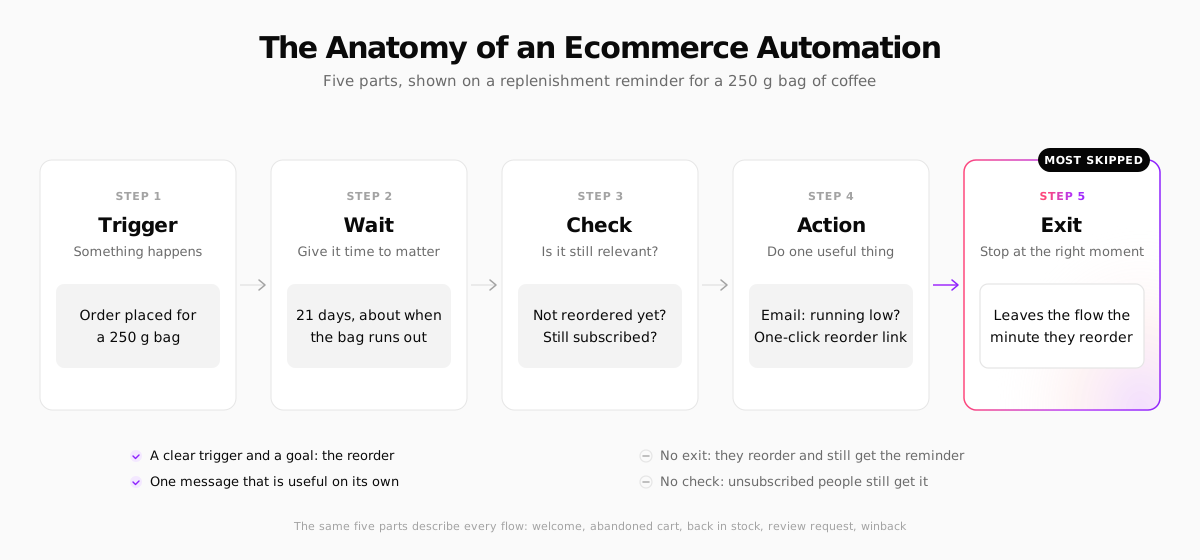
- Trigger: the event that starts it. Signed up, added to cart, placed an order, product back in stock.
- Wait: how long to hold before acting. Minutes for an abandoned cart, weeks for a refill reminder.
- Check: conditions that decide whether the message still makes sense. Has the person bought since? Are they still subscribed? Is the product in stock?
- Action: the useful thing you do. Send an email or text, show an onsite message, add the person to an ad audience, tag them as a VIP.
- Exit: the goal that ends the flow early. Most broken automations are missing this one, which is how a customer who just reordered gets a "running low?" email the next morning.
If you can describe an automation in those five parts, you can build it in any tool. If you can't, the tool won't save it.
Why Automate: The Numbers
Automations are a small share of what stores send and a large share of what they earn. Omnisend's 2026 ecommerce marketing report, based on 2025 data from its customers, found that:
- Automated emails were 2% of email sends but 30% of email-driven revenue.
- Each automated email earned $2.87 per send, against $0.18 for scheduled campaigns.
- Abandoned cart and welcome messages drove 76% of all orders that came from automations.
- Back-in-stock emails converted best of any automation type, at 6.46%.
- Automated SMS earned $0.74 per send against $0.15 for SMS campaigns.
Those are vendor figures from the vendor's own customers, and "revenue from email" counts some orders that would have happened anyway (more on that below). The direction is still consistent across every dataset we have seen: messages sent because of what a shopper did beat messages sent because of the calendar.
Automate Your Funnel Stage by Stage
The easiest way to plan ecommerce marketing automation is to walk the customer journey and ask, at each stage, "what does the shopper do here, and what would help them next?"
| Funnel stage | Automation | Trigger | Best channel |
|---|---|---|---|
| First visit | Signup offer | Time on site or exit intent | Onsite popup |
| Subscribed | Welcome series | Joined the list | |
| Browsing | Browse abandonment | Viewed a product, no add to cart | |
| Browsing | Back in stock | Product goes from 0 to available | Email, SMS |
| Cart | Abandoned cart / checkout | Cart or checkout idle for hours | Email, then SMS |
| Bought | Order and shipping updates | Order placed, shipped, delivered | Email, SMS |
| Bought | Review request | Delivered plus a few days | |
| Bought | Cross-sell | First order, after delivery | |
| Repeat | Replenishment | Expected use-up date | Email, SMS |
| Repeat | Loyalty updates | Points earned, tier reached | |
| Lapsed | Winback | No order in 2-3x the usual gap | Email, ads |
| Everyone | Ad audience sync | Bought, subscribed, lapsed | Meta, Google |
You don't need all of these. Most small stores get most of the value from five or six.
Before the first order
The job here is to capture an identity (an email or phone number) and use it while interest is high. A signup offer, a short welcome series and browse abandonment cover it. The welcome flow and email foundations (authentication, consent, list growth) are covered step by step in our guide to ecommerce email marketing, so we won't repeat them here.
Back in stock deserves more attention than it gets. The shopper already chose the product; your only job is to tell them when they can have it. It needs a "notify me" form on sold-out products and nothing else.
At the cart
Cart and checkout recovery is the automation with the clearest return, because the shopper has already chosen the product and the price. Our abandoned cart email guide has the three-message sequence, timings and subject lines. Two things to add once email is running:
- An SMS step for shoppers who gave a phone number and agreed to marketing texts. Send it after the first email, not instead of it.
- A check for "already bought". A shopper who abandoned on mobile and bought on desktop must not get reminders. Most tools handle this if the order event reaches them; test it anyway.
After the purchase
This is where most stores under-automate. The order is in, and the customer is paying more attention to you than they will at any other point. Useful automations:
- Shipping and delivery updates that are honest and on time. They are transactional, so they need no marketing consent, but keep them free of hard selling.
- A review request a few days after delivery, not after the order. Asking before the parcel arrives gets you reviews of the shipping.
- One cross-sell for an item that goes with what they bought, sent after delivery.
- A how-to or care email for products people can get wrong (skincare routines, plant care, coffee grind sizes). It cuts returns and support tickets.
Repeat and lapsed customers
Replenishment is the most underrated flow for anything consumable. Work out how long a typical unit lasts, wait that long, check whether they have reordered, and send a reminder with a one-click path back. If you sell subscriptions, this flow is your nudge toward one.
Winback goes to customers whose gap since the last order is two to three times your usual repeat gap. One email that reminds them what they liked and what is new; a second, later one with an incentive if your margin allows it. After that, stop and suppress them, which also protects your sender reputation.
If you run a loyalty program, its emails (points earned, a reward unlocked, points about to expire) are automations too, and the expiry reminder is often the best performer.
Beyond Email: SMS, Onsite and Ad Audiences
Email is the backbone because it is cheap and almost everyone has an address. The other channels each do one job better.
SMS is fast and personal, and expensive per message. Keep it for things that are time-sensitive or high-intent: shipping updates, back in stock, the second cart reminder, a limited drop. Texting people your weekly newsletter is the quickest way to an unsubscribe.
Onsite automation reacts while the shopper is still on the site: a signup popup that waits 20 seconds, a free-shipping progress bar in the cart, recommendations based on what is in the cart. It needs no consent to message, because you aren't messaging anyone.
Ad audiences are the automation most stores forget. Sync your customers and subscribers to Meta Custom Audiences and Google Customer Match, then:
- Exclude recent buyers from acquisition campaigns, so you stop paying to reach people who just bought.
- Target lapsed customers with a winback ad when the winback email goes unopened.
- Build lookalike audiences from your best customers.
The exclusion alone often pays for the setup. Uploading customer lists needs a lawful basis under GDPR in the EU and UK, and the ad platforms have their own terms, so check both before you sync.
Operational automations are marketing too, even if they don't feel like it: tagging customers as VIP after their third order, alerting you when a bestseller is low on stock before you run out mid-campaign, or pausing ads on a product that just sold out.
The Data Your Automations Run On
Automations are only as good as the events behind them. You need four things to flow reliably from your store into your marketing tool:
- Identity: an email or phone number tied to the session, captured at signup, login or checkout.
- Behavior events: viewed product, added to cart, started checkout. These usually come from a script on the storefront.
- Order events: placed, fulfilled, refunded, with line items and value. These should come from your server, not the browser, so ad blockers and closed tabs can't drop them.
- Consent: whether the person agreed to marketing email and, separately, to marketing SMS.
On Shopify and most hosted platforms, the big tools collect most of this through a native integration or add-on. On a headless or custom store without one, you send the events yourself, which is more work and more control. Here is what a server-side "Placed Order" event looks like with Klaviyo's Create Event API:
The unique_id matters more than it looks. Order events get retried, and without a stable ID a retry counts the same order twice, inflating every revenue number your flows report.
Ecommerce Marketing Automation Tools
You have three kinds of tools to choose from: all-in-one marketing platforms, general automation tools that connect everything else, and what your commerce platform does on its own. Our comparison of email marketing platforms for ecommerce goes deeper on pricing and deliverability; here is the short version for automation.
Klaviyo
Klaviyo is the default choice for growing DTC brands. Its flow builder, segmentation and ecommerce data model are the most complete in this list, it covers email, SMS and push, and it increasingly suggests or builds flows with AI. Pricing scales with your contact count, so it gets expensive as your list grows, and it pays to prune inactive contacts.
Omnisend
Omnisend covers the same core flows (welcome, cart, browse, post-purchase, winback) with email and SMS in one builder, and is generally cheaper than Klaviyo at small and mid-size list sizes. Prebuilt workflows make it a fast start for a store that wants the basics running this week.
Zapier
Zapier is the glue for everything your marketing tool doesn't do natively: post a Slack alert for orders above $500, add new wholesale leads to a spreadsheet, create a support ticket when a one-star review comes in. It has the largest catalog of app integrations and is the easiest to start with. Costs rise with the number of tasks you run, so high-volume flows (one run per order) get pricey.
n8n
n8n does the same job for teams with a developer nearby. You can self-host it, write code in any step and branch logic freely, which makes high-volume or custom flows much cheaper than per-task pricing. The trade-off is that someone has to maintain it.
A sensible default stack for a small store: your commerce platform's built-in emails for orders, carts and stock alerts, one marketing platform for the multi-step flows and SMS, and Zapier or n8n only for the edges.
Consent Rules for Automated Marketing (US, EU, UK)
Automation makes it easy to message a lot of people correctly, and just as easy to message them unlawfully at scale. The main rules:
Email in the US. CAN-SPAM doesn't require opt-in consent for marketing email, but every message needs an accurate sender, a non-deceptive subject line, your postal address and a working unsubscribe link that you honor within 10 business days.
Email in the EU and UK. Under the ePrivacy rules (PECR in the UK), marketing email to individuals needs prior consent, with one main exception: the "soft opt-in" for existing customers, which lets you market similar products to people who bought from you, as long as you offered an opt-out when you collected their address and in every message. Abandoned cart emails sit in a grey area in some countries, so many stores only send them to people who opted in. Our GDPR guide for ecommerce covers consent in detail.
SMS in the US. Under the TCPA, automated marketing texts need the recipient's prior express written consent, and opt-out requests ("STOP", and other reasonable ways of saying no) must be honored. The FCC's planned "one-to-one consent" rule was struck down by the Eleventh Circuit in January 2025 before it took effect, but some states have their own texting laws and quiet hours. SMS providers also require you to register your sender before you can send at volume.
SMS in the EU and UK. The same consent rules as email apply, including the soft opt-in where your country allows it for texts.
Transactional vs marketing. Order confirmations and shipping updates are transactional and don't need marketing consent. Adding a promotion to them can change that, so keep them about the order.
Always check the current rules where you sell. This guide summarizes US, EU and UK rules for automated email and SMS marketing as of November 2026. Consent, privacy and telemarketing rules change and vary by country and US state, so confirm the details with a privacy lawyer or your local data protection authority before you launch new flows. This is general information, not legal advice.
How to Measure Ecommerce Marketing Automation
Every marketing tool reports "attributed revenue": orders placed within a few days of someone opening or clicking a message. It is a useful trend line and a poor measure of value, because many of those customers were going to buy anyway. Your welcome flow gets credit for the order of someone who was already on their way to the checkout.
Better ways to measure:
- Holdout groups. Most flow builders let you randomly skip a share of people, say 10%. Compare the conversion rate of people who got the flow with those who didn't. The difference is what the flow really adds.
- Revenue per recipient, not open rate. Apple Mail Privacy Protection inflates opens, so open rates say little now.
- Unsubscribes and spam complaints per flow. A flow that earns money and burns your list is a slow leak.
- Repeat purchase rate by cohort for the post-purchase and replenishment flows. Our ecommerce analytics guide covers cohort reports, and our post on ecommerce A/B testing explains why you need enough volume before trusting any difference.
What Nobody Tells You About Marketing Automation
- Flows collide. A customer can be in the welcome series, an abandoned cart flow and a back-in-stock flow on the same day. Set a frequency cap or flow priorities, or they will get four emails before lunch.
- Flows go stale. The automation you built last year still mentions a discontinued product, an old returns window and a discount you no longer offer. Put a quarterly review in the calendar and read every flow as a customer would.
- Discounts in flows train people. If every abandoned cart gets 10% off, regulars learn to leave carts behind. Start the first reminder without a discount and test whether adding one pays.
- The exit condition is the most important line. Most automation complaints ("I already bought this!") come from a missing exit or a delayed order event.
- Moving platforms means rebuilding. Flows don't export cleanly between tools. Keep a plain-language document of each flow's five parts, so you can rebuild it anywhere.
Marketing Automation Built Into Your Next Store
Your Next Store is an AI-powered commerce platform with a managed backend and an open-source Next.js storefront. The automations most stores need first are built in, so they run without a separate app:
- Abandoned cart reminders for carts left idle by shoppers who left an email, with a recovery rate on the Carts page.
- Back-in-stock alerts that go out by themselves the moment a sold-out variant is restocked, once per person per restock.
- Welcome emails for every new subscriber, with a shared code, a unique single-use code per subscriber, or no code at all.
- Order emails (confirmation, shipped, delivered, refunded) and custom emails for specific products, such as setup instructions sent after the order confirmation.
- Newsletters to subscriber groups, with an AI button that drafts the campaign from a short brief.
All of them are edited in one place, with a version per language for stores that sell in several.
To be clear about the limits: each built-in automation is a single email tied to one event. There is no visual builder for multi-step branching flows, no SMS, and no automatic wishlist or winback email today. For those, connect a dedicated platform. Klaviyo, GetResponse and MailerLite are available as add-ons with no code: your products, customers and orders sync across, so their flows can act on what people actually bought. Any other tool can read orders, customers and carts through the REST API, and an AI agent can work with your store through the MCP server.
Plans start at $30 a month with 0% platform transaction fees, and the storefront code is open source on GitHub.
FAQ
What is the first marketing automation an online store should set up?
Abandoned cart recovery, followed closely by a welcome email for new subscribers. Together they drove 76% of automation orders in Omnisend's 2025 data, and both reach people who have just shown clear intent. Add back-in-stock alerts next if you ever sell out.
How is ecommerce marketing automation different from email marketing?
Email marketing includes newsletters and campaigns you schedule by hand. Ecommerce marketing automation covers anything triggered by a customer's behavior, across email, SMS, onsite messages and ad audiences, plus operational steps like tagging VIP customers. Email is its largest channel, but not the only one.
Do I need consent to send automated emails?
In the US, CAN-SPAM lets you email without prior consent, as long as you identify yourself and honor unsubscribes. In the EU and UK, you generally need prior consent, except for the soft opt-in for existing customers. Transactional emails such as order confirmations don't need marketing consent. Automated marketing texts need prior express written consent in the US and consent in the EU and UK.
How much does marketing automation software cost?
Most email and SMS platforms price by the number of contacts and messages, with free or low-cost tiers for small lists. Costs grow with your list, so prune inactive contacts regularly. General automation tools such as Zapier charge by the number of tasks, while n8n can be self-hosted.
Related Blog Posts
Before you spend more on ads,
check your store.
Get a free 25-point checklist to find what could be holding back your sales, from product pages to checkout.