GDPR for Ecommerce: What Every Online Store Needs
 Jakub Neander
Nov 4, 202612 min read
GDPR applies to your online store if you sell to people in the EU, wherever your business is based. It is not a pop-up you install, it is a set of habits: collect less, say why, get consent only where you need it, protect what you keep, and answer people who ask about their data. This guide covers what GDPR for ecommerce actually requires, where stores most often get it wrong, and a checklist you can finish in an afternoon.
Does GDPR Apply to Your Store?
The General Data Protection Regulation (EU) 2016/679 applies in two situations that matter for stores:
- You are established in the EU or EEA, even if your customers are elsewhere.
- You are outside the EU but offer goods to people in the EU or monitor their behavior, for example with analytics and ad tracking (Article 3).
So a US, UK or Australian store that ships to Germany and France is in scope. Merely being reachable from the EU is not enough, but targeting signals such as euro pricing, EU shipping options or translated pages count.
Two related regimes sit alongside it:
- UK GDPR and the Data Protection Act 2018 apply to UK customers. They closely mirror the EU rules, with the ICO as regulator.
- The ePrivacy Directive (the "cookie law") governs cookies, tracking and marketing messages and is enforced separately by national authorities.
There is no small-business exemption from the core duties. Smaller companies get relief on a few paperwork items, but not on lawfulness, transparency or security.
Always check the current rules where you sell. This guide summarizes EU, UK and US-facing GDPR obligations for online stores as of November 2026. Privacy law changes and national authorities interpret it differently, so confirm the details with your data protection authority or a privacy specialist before you rely on it. This is general information, not legal advice.
The Core Idea: Personal Data, Controllers and Processors
Personal data is anything that identifies a person directly or indirectly: name, address, email, phone number, IP address, device ID, order history, and cookie identifiers.
A store typically holds a lot of it:
- Customer accounts and order history
- Billing and shipping addresses
- Email and marketing preferences
- Support messages
- Analytics and advertising identifiers
- Reviews with names or photos
Two roles decide who owes what:
- Controller: you. You decide why and how customer data is used, so you carry the main legal duties.
- Processor: a vendor that handles data on your behalf, such as your ecommerce platform, email tool, payment processor or helpdesk. Processors need a written contract, called a data processing agreement (DPA), under Article 28.
Some vendors are controllers in their own right for part of the data, payment processors for fraud screening being the common example. Read their terms rather than assuming.
Pillar 1: A Lawful Basis for Every Use of Data
You need one of six lawful bases for each purpose. A store mostly uses three, and consent is the one it needs least.
| Purpose | Typical lawful basis | Consent needed? |
|---|---|---|
| Processing an order, shipping it | Contract (Art. 6(1)(b)) | No |
| Invoices, tax and accounting records | Legal obligation (Art. 6(1)(c)) | No |
| Fraud prevention, basic security | Legitimate interests (Art. 6(1)(f)) | No, but document it |
| Non-essential cookies, ad pixels, most analytics | Consent (ePrivacy plus GDPR) | Yes |
| Marketing emails to people who are not customers | Consent | Yes |
| Marketing to existing customers about similar products | Depends on national rules (soft opt-in) | Often no, with easy opt-out |
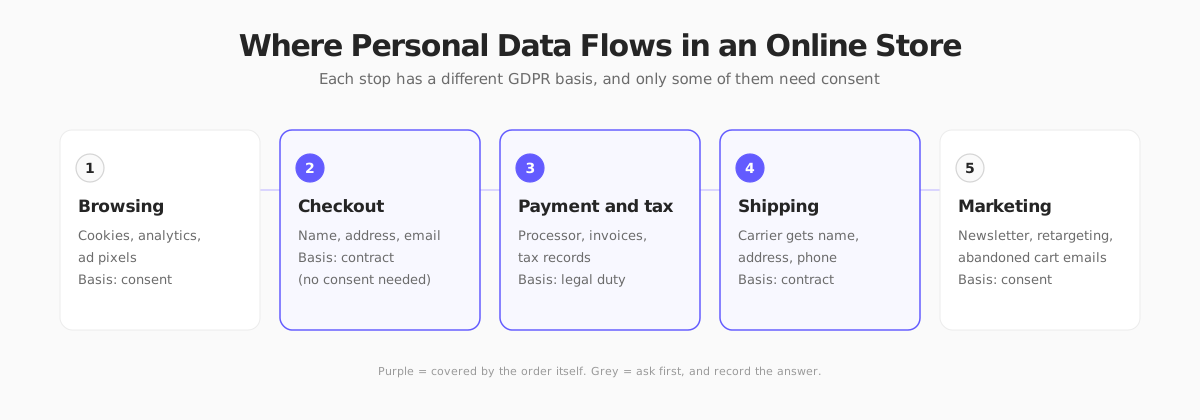
The single most common mistake is demanding consent for things the order already covers. You do not need a checkbox to ship a parcel to the address on the order. A consent box for an unnecessary purpose is not harmless: consent has to be freely given, so bundling it into the purchase can invalidate it.
What valid consent looks like
Under Article 7 and the EDPB guidelines on consent, consent must be:
- Freely given: not a condition of buying, unless the data is genuinely required.
- Specific: one purpose per choice, not "marketing and partners and profiling" in one box.
- Informed: the person knows who is asking and why.
- Unambiguous: a clear action. The Court of Justice ruled in Planet49 that pre-ticked boxes are not consent.
- Withdrawable: as easy to withdraw as to give.
Record who consented, when, and to what, because you must be able to prove it.
Pillar 2: Cookies and Tracking
This is where stores get most of their complaints and fines, because the banner is the only part of GDPR customers can see.
Under the ePrivacy rules, storing or reading non-essential data on a device needs consent first. Essential cookies (cart contents, login session, security, load balancing) do not.
Practical rules for a compliant banner:
- Do not set non-essential cookies or load tracking scripts before the visitor chooses. A banner that appears while the pixel has already fired is decoration.
- Make "Reject all" as easy as "Accept all", on the first layer, with equal prominence. Several regulators, including France's CNIL, have sanctioned banners that bury refusal.
- No cookie walls that block the whole store unless you accept.
- List categories and vendors clearly, and let people change their mind later from a footer link.
- Log the choice and respect it across sessions.
Strictly necessary cookies are narrowly defined. Analytics is often not in that category, though some regulators exempt privacy-friendly, first-party measurement. Rules differ by country, so check yours.
For site speed, note that consent tools can affect Core Web Vitals. A heavy banner script is a real cost, covered in our site speed guide.
Pillar 3: Transparency and a Real Privacy Policy
Articles 13 and 14 require you to tell people what you do with their data, in plain language, at the time you collect it. Your privacy policy should state:
- Who you are and how to contact you (and your EU representative if you are based outside the EU, Article 27)
- What data you collect, why, and on what lawful basis
- Who you share it with (payment processors, carriers, email provider, analytics)
- Whether you transfer data outside the EU or EEA, and the safeguard used
- How long you keep it
- The rights people have and how to use them
- The right to complain to a supervisory authority
Link it from the footer, the checkout, the signup form and the cookie banner. A policy copied from another store, listing tools you do not use, is a liability.
Pillar 4: Customer Rights Requests
People can ask you to act on their data, and you generally have one month to respond (extendable for complex requests, Article 12). The rights stores see most:
| Right | What it means in a store |
|---|---|
| Access (Art. 15) | Send a copy of the data you hold: account, orders, support history |
| Rectification (Art. 16) | Correct a wrong address or name |
| Erasure (Art. 17) | Delete the account and data you no longer need |
| Objection (Art. 21) | Stop marketing and profiling immediately, no exceptions for direct marketing |
| Portability (Art. 20) | Provide data in a structured, machine-readable format |
Erasure has limits. You cannot delete invoices you must keep for tax purposes. The usual answer is to delete or anonymize what you can, keep only what the law requires, and tell the person what you kept and why. Retention periods vary by country, so confirm yours with your accountant.
Set up a simple process before the first request arrives:
- A dedicated email address, such as
privacy@yourstore.com - A way to verify the requester is who they claim to be
- A one-page checklist of where customer data lives: platform, email tool, helpdesk, spreadsheets, analytics
- A log of requests and the dates you responded
Pillar 5: Vendors, Transfers and Security
Data processing agreements
Every tool that touches customer data needs a DPA. Most reputable vendors publish a standard one you accept online. Make a list of your stack and tick off each one: platform, payments, shipping, email, analytics, reviews, chat, helpdesk, backups.
International transfers
Sending personal data outside the EU or EEA, to the US for example, needs a valid mechanism. The usual routes are the EU-US Data Privacy Framework for certified US companies (adopted by the European Commission in July 2023) or standard contractual clauses (SCCs). Check your vendors' status rather than assuming, and keep their transfer documentation on file.
Security and breaches
Article 32 requires "appropriate" security. For a store, that realistically means:
- HTTPS everywhere and a PCI-compliant payment flow. Never store card numbers yourself, let your payment provider handle them.
- Strong, unique admin credentials with two-factor authentication.
- Least-privilege access: staff and contractors see only what they need.
- Prompt updates for platform and plugins.
- Backups you have tested.
If a breach risks people's rights, you must notify your supervisory authority within 72 hours of becoming aware of it (Article 33), and tell the affected people without undue delay when the risk is high. Write the plan down now, not during the incident.
What Do the Fines Look Like?
Under Article 83, the maximum fines are up to €20 million or 4% of worldwide annual turnover, whichever is higher, for the serious infringements, and up to €10 million or 2% for the lesser ones. In practice, regulators weigh size, intent, cooperation and harm, and small stores are far more likely to receive a reprimand, an order to fix things or a modest fine than a headline penalty.
The more realistic risks are a complaint from a customer, a data protection authority audit triggered by a cookie banner, and lost trust. Compliance is cheaper than any of them.
GDPR Beyond the EU: The UK and the US
- United Kingdom: UK GDPR applies. Rules on cookies and marketing sit in PECR, enforced by the ICO. International transfers use the UK addendum or the UK-US data bridge for certified companies.
- United States: there is no federal equivalent. A growing set of state laws, such as California's CCPA and CPRA, give residents access, deletion and opt-out rights, with different thresholds for who must comply. If you sell to EU customers and US ones, a GDPR-grade setup covers most of what the state laws ask, but not all of it. Check each state's thresholds.
How Your Next Store Fits In
Your platform is a processor, so it should make your duties easier and not harder. Your Next Store keeps your commerce data (products, customers, orders) in a single managed backend, with data isolated per store, and handles payments through Stripe so card details never touch your own code. Customer and order data is reachable through the admin and the REST API, which makes access and erasure requests a lookup in one place instead of a hunt across tools. Check your plan and your own retention duties before you automate deletions.
What it does not do: write your privacy policy, pick your cookie banner vendor or decide your lawful bases. Those stay with you. If you add third-party scripts to your storefront, you own the consent logic for them, and you should sign the DPA of whichever tools you connect.
A GDPR Checklist for Your Store
- Map the personal data you collect, where it lives and who can see it
- Assign a lawful basis to each purpose and write it down
- Remove checkboxes for data you do not need consent for
- Use unticked, specific boxes for marketing, with a clear opt-out in every email
- Install a consent banner that blocks non-essential scripts until the visitor chooses
- Make "Reject all" as prominent as "Accept all"
- Publish an accurate privacy policy and link it at checkout and signup
- Sign a DPA with every vendor that handles customer data
- Confirm the transfer mechanism for each non-EU vendor
- Set up a privacy email address and a one-month response process
- Define retention periods and delete data you no longer need
- Turn on two-factor authentication and review staff access
- Write a 72-hour breach response plan
- Appoint an EU representative if you are outside the EU and targeting EU customers
FAQ
Do I need a cookie banner if I only use analytics?
Often yes. Most analytics tools set identifiers that need consent under the ePrivacy rules. A few regulators allow limited, privacy-friendly first-party measurement without consent, but the conditions are strict and differ by country. Check your national authority's guidance.
Do I need a Data Protection Officer?
Usually not. Article 37 requires one for public bodies and for organizations whose core activities involve large-scale monitoring or special-category data. A typical small or mid-sized store does not meet that test, though it still needs someone responsible for privacy.
Can I email customers after they buy?
You can send transactional emails (order confirmation, shipping updates) under the contract basis. Marketing email is different: it generally needs consent, with a limited "soft opt-in" for similar products to existing customers in some countries. Always include an easy unsubscribe. See our guide to ecommerce email marketing.
Does GDPR apply to a store outside the EU?
Yes, if you offer goods to people in the EU or track their behavior. You may also need to appoint a representative in the EU under Article 27, unless an exemption applies.
How long can I keep customer data?
Only as long as you need it for the purpose you collected it for, plus any legal retention period. Tax and accounting records often must be kept for several years, while marketing data should go as soon as someone unsubscribes. Set the periods in writing.
Final Takeaway
GDPR for ecommerce comes down to one habit: for every piece of customer data, be able to say why you have it, who sees it and when it goes away. If you can answer those three questions, the banner, the policy and the vendor contracts mostly follow. Stores get into trouble not because they hold data, but because nobody can explain why.
Related Blog Posts

Before you spend more on ads,
check your store.
Get a free 25-point checklist to find what could be holding back your sales, from product pages to checkout.