How to Sell Internationally: An Ecommerce Guide for 2026
 Michał Miszczyszyn
Sep 2, 202615 min read
Cross-border e-commerce is on track to make up roughly a third of all online retail by the end of 2026, and global e-commerce sales are forecast to hit $6.88 trillion this year. Most of that growth isn't going to stores that "translate the homepage and hope." It's going to stores that get four unglamorous things right: currency, tax, fulfillment, and localization. This guide covers the ops side of each one, jurisdiction by jurisdiction, and then goes one level deeper: how you'd actually build multi-currency, multi-locale checkout in a modern Next.js stack.
Bias disclosure: I'm the CTO at Your Next Store, a commerce platform that handles a lot of what's described below. I'll point out where it fits and where it doesn't. If something here is wrong or out of date, open an issue on GitHub.
Why "Sell Internationally" Is Four Different Problems
Ask ten people what "going international" means and you'll get ten different answers: adding a currency switcher, translating the storefront, shipping to more countries, registering for foreign VAT. They're all correct, and that's the problem. Treating international expansion as one project instead of four separate ones is why so many stores stall out with a half-translated checkout page and a shipping calculator that quotes $340 to ship a $40 candle to Berlin.
The four pillars, in the order that actually matters:
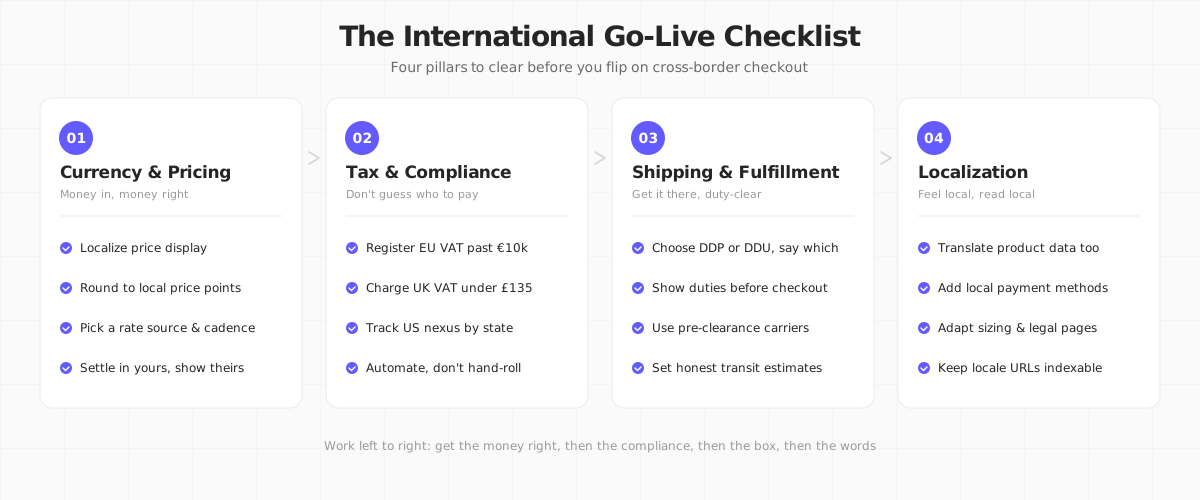
Get currency and pricing right first, because it's what the customer sees before anything else. Get tax right second, because getting it wrong is the one mistake with legal consequences. Fulfillment and localization matter just as much for conversion, but they won't get you an audit letter if you ship late.
Pillar 1: Currency and Pricing
Don't just convert. Localize.
The laziest version of multi-currency is running every price through a live FX rate and displaying "$47.32" as "€43.61." It technically works and it feels foreign in a way that hurts conversion: real stores in that market don't have prices ending in ".61," and the customer's brain registers the mismatch even if they can't name it.
What actually works:
- Display in the local currency, not just the customer's card currency. A shopper in Germany expects EUR, not USD-with-a-euro-sign.
- Round to local price points. If your USD price is $49, don't ship €45.87 to the EU. Round to €49 or €44.99, whatever matches how competitors in that market price.
- Pick a rate source and a refresh cadence (daily is standard) and be consistent, rather than re-quoting on every page load.
- Settle in your own currency, display in theirs. This is the model most payment processors use: you get paid in USD (or whatever your business account holds), the customer pays in their local currency, and the conversion happens behind the scenes.
Stripe is the processor most developer-first stores build on, and it's built for exactly this: it can present a checkout page in the customer's local currency and settle to your account in yours, across 135+ currencies. (If you're still deciding how deep into Stripe's stack to go for the store itself, we've mapped out the five levels of selling with Stripe separately.) Shopify Markets does the same thing at the platform level, with local pricing rules layered on top of a single product catalog. Either approach solves the display problem; the difference is how much control you get over rounding and where the FX margin goes.


What currency conversion actually costs
Card networks and processors both take a cut on cross-border transactions. Using Stripe's US rates as a reference point: a domestic card is 2.9% + $0.30, an international card adds +1.5%, and currency conversion adds another 1% on top of that if you're settling in a different currency than the card was issued in. That's before your processor's own margin. Budget 4-5% total on cross-border card transactions, not the 2.9% you're used to domestically. We break down the exact math for one platform in our Shopify transaction fees analysis, and the pattern (base rate + international surcharge + conversion fee) holds across most processors, not just Shopify Payments.
Pillar 2: Tax and Compliance (Name Your Jurisdiction)
This is the pillar where "figure it out later" turns into a real problem. Tax rules are jurisdiction-specific, they change without much warning, and "I didn't know" isn't a defense. Here's what applies where, as of 2026.
European Union: the VAT OSS scheme
If you sell goods to consumers (B2C) in the EU, the relevant threshold is €10,000 per calendar year, combined across all EU countries, not per country. Below that, you charge your home country's VAT rate. Above it, you owe VAT at the destination country's rate for every sale.
Registering for VAT separately in every EU country you sell into would be its own part-time job, which is why the One Stop Shop (OSS) scheme exists: one registration, one quarterly return, covering cross-border B2C sales into every EU member state. It's optional in the sense that nobody forces you to use it, but once you're above the threshold, doing it any other way means juggling up to 27 separate VAT registrations.
One more 2026 change worth knowing: the EU is removing the €150 customs exemption that let small parcels enter duty-free. Going forward, customs duties can apply to e-commerce parcels regardless of value, which changes the shipping math covered in the next section.
United Kingdom: post-Brexit import VAT
The UK left the EU VAT area, and it runs its own rules now. The relevant number is £135: for consignments valued at or below that, you (the seller) charge UK VAT at checkout and remit it directly to HMRC, the same way you'd handle a domestic sale. Above £135, the parcel is subject to import VAT and potentially customs duty, collected at the border (or by the carrier, who will usually bill the customer or you, depending on your Incoterms). Selling B2C into the UK from outside it means registering for UK VAT once you're making those under-£135 sales, regardless of your total revenue.
United States: economic nexus, state by state
There's no federal sales tax in the US, and no VAT. Instead, each state sets its own economic nexus threshold (we break down how ecommerce sales tax works separately): once your sales into that state cross a dollar (and sometimes transaction-count) threshold, you're required to register and collect sales tax there, even with zero physical presence in the state.
The common baseline is $100,000 in sales in the prior or current calendar year, which is what roughly 41 states use. A handful set the bar higher (California, Texas, and New York sit at $500,000; Alabama and Mississippi at $250,000), and the transaction-count leg of the test (historically 200 orders) is being phased out state by state: Illinois dropped it in 2026, following Utah and Alaska. Avalara's state-by-state guide is the most current reference if you need the number for a specific state.
The practical takeaway across all three jurisdictions: don't hand-roll this. Rate tables and thresholds change more often than most engineering teams want to re-deploy for. Stripe Tax calculates and collects the right amount automatically at checkout for a small per-transaction fee, and dedicated tax-compliance platforms like Avalara cover the same ground plus filing, for teams that outgrow a checkout-level tax add-on. Either way, platforms like Shopify and YNS wire tax calculation in as an option rather than something you build. If you're earlier in the founding process and haven't set up your business entity yet, our guide to starting an online store covers the domestic version of this same registration question.

None of this is legal or tax advice, and thresholds change. Confirm current numbers with a tax professional or your processor's compliance tooling before you flip on a new market, especially the EU's 2026 customs changes and any US state you're approaching the threshold in.
Pillar 3: Shipping and Fulfillment
DDP vs. DDU: pick one and say so
Delivered Duty Paid (DDP) means you collect duties and taxes at checkout and the customer never sees a surprise bill. Delivered Duty Unpaid (DDU) means the customer pays duties when the parcel arrives, often to a confused-looking courier holding a card reader.
DDU is why so many first-time cross-border shoppers get burned: they check out for $60, then get asked for another $18 at the door before they receive their $60 order. That's not just a bad experience, it's the single biggest driver of "will not order internationally again." If you can offer DDP, offer it, and show the all-in landed cost (item + shipping + duties) before the customer confirms payment. Most modern rate-shopping and label APIs, including Shippo, support landed-cost calculation and DDP labels for exactly this reason.
Choosing carriers and setting honest expectations
Not every carrier handles customs pre-clearance well. A courier that pre-clears at origin gets parcels through customs before they land in the destination country; one that doesn't can leave a package sitting for days at a border facility with no visible tracking update, which reads to the customer as "lost." When you're evaluating international carriers, ask specifically about customs pre-clearance and average clearance time for the lanes you sell into, not just the headline transit time.
Set per-region transit estimates instead of one blanket "5-7 business days" for every country. A shopper in Toronto and a shopper in Jakarta should see different, honest numbers, not the same optimistic guess.
Pillar 4: Localization (Beyond Google Translate)
Translate the product, not just the chrome
Machine-translating your nav bar and footer while your product titles and descriptions stay in English is a common half-measure. It looks localized at a glance and falls apart the moment a customer reads the actual product page. If you're serious about a market, translate product data: titles, descriptions, size charts, and materials, not just UI labels. Whether that's done with a professional localization service or an AI-assisted first pass with human review depends on your catalog size and budget, but skipping product content while translating navigation is the fastest way to signal "we didn't really invest in this market."
Local payment methods matter more than currency display
In some markets, cards aren't even the default. iDEAL accounts for the majority of Dutch e-commerce transactions. Klarna and other buy-now-pay-later options are standard across much of Northern Europe. Offering only card payments to a market that prefers bank transfers or BNPL caps your conversion rate no matter how good your product page is. Check which local methods your processor supports before you assume "we take cards" is enough.
Keep locale URLs indexable
If your localized pages live behind client-side language switches with no distinct URL per locale, search engines can't index them separately, and you lose the SEO benefit of localizing in the first place. Each locale needs its own crawlable URL (a subpath like /de/products/... or a subdomain), with hreflang tags pointing search engines to the right version for each region.
The Technical Side: Building Multi-Currency, Multi-Locale Checkout
Everything above is the ops layer. Here's what it looks like in code, using the patterns behind Your Next Store's Next.js App Router storefront template (an RSC-native take on headless commerce, for the architecture-curious), since we build this stuff daily and it's a reasonable reference implementation.
Locale routing with the App Router
The Next.js App Router handles locale routing with a dynamic segment at the root of the route tree, typically app/[locale]/..., paired with middleware that reads the Accept-Language header (or a stored cookie) and redirects to the right locale prefix:
Every page under app/[locale]/ then reads params.locale and passes it down to data fetching and formatting. Because this is a route segment, not client-side state, each locale gets its own indexable URL for free, which solves the SEO problem from the localization section above.
Locale-aware product data
On the YNS backend, product content is stored per locale (a translations table keyed by product and locale, so English and German copy for the same product live side by side rather than overwriting each other). The storefront template fetches it through the Commerce Kit SDK, passing the resolved locale along with the request:
The important part, worth restating from the YNS facts on tech stack: the storefront template never talks to Stripe directly. It talks to the YNS backend through this SDK, and the backend is the thing that owns product data, carts, orders, and translations in PostgreSQL. Stripe's role stays scoped to payment processing, which is also where currency conversion for the actual charge happens.
Formatting currency correctly (don't hand-roll this either)
Once you know the locale and the target currency, formatting is a solved problem in the JavaScript standard library. Intl.NumberFormat handles locale-correct decimal separators, currency symbol placement, and rounding, which is one less thing to get wrong:
Store money as integer cents (or use Decimal types for anything touching totals and taxes), never as floats. Floating-point rounding errors in a cart total are the kind of bug that's invisible in testing and expensive in production.
Where Stripe fits in the checkout flow
At checkout, the storefront creates a Stripe Checkout Session with the currency resolved from the customer's locale or explicit selection. Stripe renders a checkout page in that currency, charges the card in it (with the conversion happening on Stripe's side if the card's home currency differs), and the backend records the order with the currency and amount actually charged, not a converted estimate. That order-level currency field matters: your reporting and refund logic need to work in whatever currency the sale actually happened in, not force everything back to your base currency at write time.
If you want to see this running end to end rather than reading about it, demo.yournextstore.com is a live storefront on the same stack described above.

How YNS Handles the Whole Stack
To be clear about what's built in versus what you'd still assemble yourself: the YNS managed backend handles product translations, carts, orders, customers, and inventory centrally in PostgreSQL, with Stripe scoped to payment processing only. Shipping runs through a Shippo integration, and Stripe Tax is available as an add-on for the compliance math described above. The open-source storefront template is the piece you customize: it's where the locale routing and currency formatting from the previous section live, and you own that code completely.
What it doesn't do: it won't file your VAT OSS return or register you for US economic nexus. Nothing in this article's tax section is automatic anywhere, YNS included. It gets you to "the right amount is calculated and collected at checkout," not "the paperwork is filed." That last step is still yours (or your accountant's).
Selling globally shouldn't mean rebuilding checkout for every market. YNS handles product translations, multi-currency display, and Stripe-native payments so you can focus on which markets to enter, not how to build locale routing from scratch.
Your Next Store is open-source! Star the repo on GitHub:
github.com/yournextstore/yournextstore
Common Mistakes When Selling Internationally
Launching every market at once. Pick one or two adjacent markets (same currency zone, similar tax regime), get the ops right, then expand. Fifteen currencies and eight VAT registrations on day one is how projects die in the planning stage.
Converting prices instead of localizing them. Covered above, worth repeating: a converted price that ends in an odd decimal reads as foreign even when the number is correct.
Treating DDU as a cost-saving move. It isn't. It moves the cost to the customer's doorstep and turns it into a support ticket and a lost repeat customer.
Ignoring the transaction-count leg of US nexus until it's too late. States are dropping it, but not all of them have yet. Check the current rule for any state you're approaching, not the rule you remember from two years ago.
Assuming "translated" means "localized." Sizing, date formats, address formats, and legal pages (returns policy, terms) all need market-specific versions, not just swapped-out words.
The Bottom Line
None of the four pillars is hard on its own. Currency display is a formatting problem. VAT OSS is a registration form. DDP is a checkbox in your shipping API. Translated product data is a spreadsheet and a translator. What's hard is that most stores try to do all four at once, for every market simultaneously, and end up doing all four badly. Pick one adjacent market, get its currency, tax, shipping, and language genuinely right, and expand from there. A store that's fully correct in one new country beats a store that's half-correct in ten.
FAQ
Do I need a local business entity to sell in another country?
Usually not, for straightforward B2C sales. VAT OSS in the EU and UK VAT registration are both designed for foreign sellers without a local entity. Where you typically do need a local entity is for physical fulfillment operations, hiring local staff, or if you cross into B2B territory with local invoicing requirements. Check the specific market before assuming either way.
What's the minimum I need to sell internationally as a small store?
A processor that supports multi-currency settlement (Stripe and most major processors do), a shipping method that at least offers the option of DDP, and clarity on which single threshold applies to you first (usually the EU's €10,000 OSS threshold or your nearest US state's economic nexus). You don't need every pillar solved on day one, just an honest read on which one you're closest to tripping.
Does selling internationally require a multi-currency database, or can I store everything in one currency?
You can store your canonical prices in one base currency and convert for display, which is simpler to build and is what most stores do at first. The place you can't cut corners is the order record: once a sale happens, store the actual currency and amount charged, not a converted-back value, or your refunds and reporting will drift from what actually happened on the customer's card statement.