What Is Headless Commerce? Definition & Examples (2026)
 Michał Miszczyszyn
Updated Sep 18, 202612 min read
Headless commerce (also called headless ecommerce) is an ecommerce architecture where the storefront shoppers see is separated from the commerce backend that runs products, carts, orders and payments. The two talk only through an API, so you can build the storefront in any framework, or add new "heads" like a mobile app or an AI agent, without touching the backend. This guide covers how that architecture works, how it compares with a traditional platform, the real pros and cons, when it is overkill, and examples of headless ecommerce in production.
What Is Headless Commerce?
Headless commerce is an ecommerce setup in which the frontend (the "head": pages, product listings, cart UI) is decoupled from the backend (the "body": catalog, pricing, inventory, checkout, orders, customers). The backend exposes everything through an API, usually REST or GraphQL, and the frontend is a separate application that calls it.
"Headless ecommerce," "headless e-commerce" and "headless commerce" all mean the same thing. Some vendors use "headless commerce" for the broader idea (any channel, not just a website) and "headless ecommerce" for online stores specifically, but in practice the terms are interchangeable.
In a traditional platform like classic Shopify with a Liquid theme, or WooCommerce with a PHP theme, the head is bolted onto the body: the platform renders the pages for you from its own templates. In headless commerce, you can replace the head with anything: a Next.js site, a native iOS app, a kiosk, a voice assistant or an AI shopping agent. The backend does not care what is asking.
The reason it matters in 2026: the tools for building storefronts have moved faster than the tools most commerce platforms ship with. React, Next.js and Tailwind change every few months. Theme systems like Liquid have added sections, blocks and app embeds, but the core developer experience has not changed much in years. Headless is how teams use modern frontend tools without leaving a proven commerce backend behind.
How Headless Commerce Architecture Works
A headless commerce architecture has three layers:
- The frontend (head). A separate app that renders what shoppers see. It can be a website, a mobile app, a smart-TV app, an in-store screen or an agent. It holds no commerce logic of its own.
- The API layer. The contract between the two. Every product, price, cart, order and customer is read and written through it. Many platforms add a typed SDK on top so the frontend gets real types instead of raw JSON.
- The commerce backend (body). The system of record: catalog, inventory, pricing rules, tax, promotions, checkout, orders and the admin your team uses. It talks to payment providers, shipping carriers and other services.
A typical request looks like this: a shopper opens a product page, the frontend asks the API for the product, the backend returns price and stock, the frontend renders the page. When the shopper adds to cart, the frontend calls the cart endpoint; at checkout, the backend creates the order and hands payment to the payment provider.
Headless is not a yes/no switch. It is a spectrum:
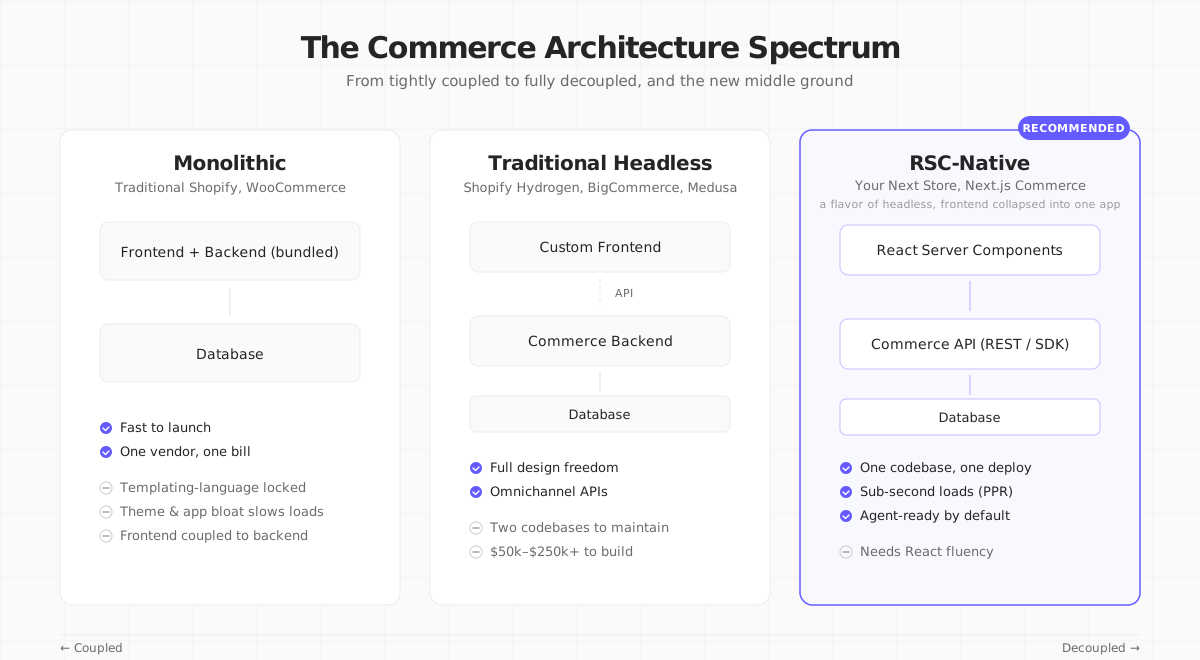
You can be a little headless (Shopify with a Hydrogen storefront and everything else in the Shopify admin) or fully headless (custom frontend on top of a dozen separate services for search, CMS, cart and checkout). Most of the benefit comes from the first step. Most of the complexity comes from the last. The fully split version has its own name, composable commerce: see the FAQ below.
Headless vs Traditional Commerce
| Traditional (monolithic) | Headless | |
|---|---|---|
| Frontend | Platform themes (Liquid, PHP, Twig) | Any framework: Next.js, Remix, SvelteKit, Astro, native apps |
| Backend | Bundled with the frontend | Standalone, reached through an API (REST or GraphQL) |
| Page speed | CDN-optimized but limited by the theme system | As fast as your frontend: SSR, caching and prerendering are yours to tune |
| Channels | Web, plus platform add-ons | Web, mobile, in-store, marketplaces, AI agents, anywhere an API reaches |
| Release velocity | Theme changes and platform updates are coupled | Ship the frontend without touching commerce logic |
| Build cost | Low: a theme and a subscription | Higher: $50k–$150k mid-market, $250k+ enterprise, per BigCommerce |
| Who it suits | First stores, low-code teams | Teams with frontend engineers, brands selling across channels |
Monolithic platforms are cheap to start and expensive to differentiate. Headless flips that: expensive to start, cheaper to keep evolving.
Pros of Headless Commerce
Headless is no longer niche: BigCommerce reports that 64% of enterprise organizations already use a headless approach. Four benefits come up again and again.
1. Page speed you control
40% of shoppers abandon a site that takes more than 3 seconds to load. In headless, you own the rendering pipeline: server-side rendering, partial prerendering, edge caching and streaming. We wrote about the techniques in How Is Your Next Store So Fast?. Brands that switch commonly report 20 to 50% faster page loads.
2. Omnichannel without a rewrite
When commerce logic lives behind an API, every channel gets its own head on the same backend: website, iOS app, in-store tablet and the AI agent placing an order for a customer. 39% of shoppers now use AI in their purchase journey, and agents increasingly hit commerce APIs directly. More in Agentic Commerce: What Store Owners Need to Know.
3. Freedom to pick your stack
Theme-based platforms tie you to their templating language, app ecosystem and release cadence. Headless lets you choose the frontend framework your team knows, the CMS your content team likes, and the search and analytics tools that fit your catalog.
4. Faster releases and testing
With separate deploys, you can redesign the homepage or A/B test a product page without touching commerce logic. Brands report 75 to 90% faster content deployment cycles.
Cons of Headless Commerce
Here is what many guides understate: headless commerce costs more to build than a monolith. BigCommerce's own estimate puts mid-market implementations at $50,000 to $150,000 and enterprise builds above $250,000, before ongoing maintenance.
Where the money goes:
- Two codebases. Someone has to keep the frontend and backend in sync. A new backend field means a frontend change; a new page may need a new endpoint.
- Integration glue. Search, reviews, loyalty, tax, shipping, CMS, subscriptions: each separate tool is another API to integrate, monitor and pay for.
- Hosting and infrastructure. The frontend needs its own hosting (Vercel, Netlify, your own Node servers). A self-hosted backend needs a database and an uptime plan.
- Developers. You cannot go headless without at least one strong frontend engineer. If you have to hire, that is the largest line item.
- Things the theme gave you for free. Theme-store features, app blocks and some platform apps assume the platform renders the storefront. In headless, you rebuild or replace them.
A rough rule of thumb: under $1M a year in revenue, a monolith is usually the right call. Between $1M and $10M, it depends on how custom the experience needs to be. Above $10M, the flexibility usually pays for itself.
When Headless Commerce Is Overkill
Stay on a traditional platform if any of these is you:
- You are launching your first store this week. Use a hosted platform, get to real revenue, then decide. Premature headless is how you ship nothing.
- You have no frontend developers and no budget to hire one. A headless stack without a developer is a car without a driver.
- Your store is "slow" but you haven't measured it. Many slow stores are slow because of dozens of installed apps and scripts, not the platform. Run PageSpeed Insights and remove what you can first.
- Your catalog is simple and your edge is your brand, not your UX. If a theme gets you 95% of the way, the last 5% is rarely worth six figures.
Headless is a powerful tool. It is also a reliable way to burn six months rebuilding a store that was fine. If none of these apply, read on.
Headless Ecommerce Examples
A few real headless builds, each on a different part of the spectrum:
- ATTITUDE Living moved its Canadian and US stores to one Shopify Hydrogen codebase hosted on Oxygen, in English and French. Shopify's case study reports 9% more new customers, 10% higher average order value and 40% faster page loads.
- Kotn used the Shopify Storefront API with a separate CMS to merge two stores and build custom product pages. Their co-founder's summary is the best one-line case for partial headless: Shopify covers 80% of their needs, and "it's that next 20% where headless comes in."
- TASCHEN runs a headless storefront on Shopify Plus with its product information system plugged in, launched in new markets in five months.
- Redmond built a production AI shopping agent on Shopify's Storefront MCP: the "head" is a conversation, not a web page.
- million.yournextstore.com is our own demo: a Next.js storefront serving a one-million-product catalog from the Your Next Store backend over its REST API.
Notice the pattern: most of these kept a proven commerce backend and replaced only the head. That is where most of the value is.
Choosing a Headless Commerce Platform
The platform market splits into three kinds: open-source engines you run yourself (Medusa, Saleor, Vendure), hybrid platforms that ship a storefront and also work headlessly (Shopify with Hydrogen, whose code is open but still needs a Shopify store behind it, BigCommerce, Your Next Store), and composable enterprise suites (commercetools, Commerce Layer, VTEX). For pricing, licenses and a side-by-side table, see our comparison of the best headless commerce platforms.
The Third Option: RSC-Native Commerce
Here is the part most guides have not caught up with: React Server Components remove the most painful cost that headless commerce introduced.
Classic headless added a Backend-for-Frontend (BFF) tier: a Node service in the middle that fetches from the commerce API, reshapes the response and hands it to your React app. That middle layer is the "two codebases" problem, the extra on-call rotation and a big share of the build budget.
With React Server Components, the framework takes over the BFF role. A Server Component imports the commerce SDK, awaits it and returns JSX. There is no second service to deploy. To be precise, RSC-native is a flavor of headless, not a separate architecture: custom frontend, API backend, decoupled deploys. What disappears is the middle tier.
Same product grid, two stacks
First, the loader approach used by Hydrogen (a React Router route fetching from Shopify's Storefront API with GraphQL):
Now the same grid in an RSC-native stack (simplified from the real component in the open-source YNS storefront):
Line count is not the point. What is missing is: no query string, no separate loader, no useLoaderData hook. The component fetches and renders in one place on the server, with one type flowing end to end. The "use cache" line matters too: in classic headless, caching means an HTTP cache in front of the API or a per-route loader cache. In RSC, you mark the component and Next.js handles it.
That is what we mean by "RSC-native commerce." It is what Your Next Store is built on, and what Next.js Commerce pioneered, though the two now pair that idea with very different backends. Paste demo.yournextstore.com into PageSpeed Insights to see the result.
If headless commerce sounds appealing but the six-figure price tag doesn't, an RSC-native stack is the middle path. The BFF tier and the second deploy disappear, and data fetching becomes "import, await, return JSX."
Headless Commerce and the Agentic Web
A reason to care about headless in 2026 that barely existed two years ago: AI agents shop through APIs, not browsers. A store whose catalog, cart and checkout only exist as rendered pages is hard for an agent to use. A headless store already has those as API endpoints.
That is why Google, Shopify, OpenAI, Stripe and others have been standardizing commerce protocols such as UCP and ACP. If you expect agents to become a real share of your traffic (and McKinsey projects $3–5 trillion of agent-mediated commerce by 2030), an API-first backend stops being optional.
How Your Next Store Fits
We built Your Next Store as an RSC-native commerce platform. The storefront template is Next.js 16 with React Server Components, Tailwind and TypeScript. The commerce backend (products, carts, orders, inventory, customers, blog, translations, search) sits behind a REST API you call through the Commerce Kit SDK.
- One storefront codebase. The template is a single Next.js app. No BFF to stitch together.
- A real commerce backend. Products, carts, orders and inventory live in PostgreSQL and are managed in a full admin dashboard. Stripe handles payments only, not product data.
- AI store builder. Describe the change you want in chat; the AI edits the storefront code, shows a live preview and deploys it. This works because the stack is code under the hood.
- Open-source storefront. The storefront template is on GitHub under MIT. Fork it and deploy it anywhere; it connects to the managed backend, which handles the commerce plumbing.
- Flat pricing. Plans start at $30/mo with 0% platform transaction fees; only Stripe's processing fees apply.
Headless without the six-figure build. YNS ships the backend, the Next.js storefront and the typed SDK in one package.
Your Next Store is open source. Star the repo on GitHub: github.com/yournextstore/yournextstore
FAQ
What is headless ecommerce?
Headless ecommerce is the same thing as headless commerce: an online store whose frontend is built and deployed separately from the commerce backend, with the two connected by an API. The backend handles products, carts, orders and payments; the frontend can be any website, app or agent.
What is headless commerce architecture?
It has three layers: a frontend (the "head") that renders the shopping experience, an API layer (REST or GraphQL, often with an SDK) and a commerce backend that owns catalog, inventory, checkout and orders. The frontend never touches the database; everything goes through the API.
What is an example of headless commerce?
A brand running a custom React storefront on Shopify through Hydrogen and the Storefront API, like ATTITUDE Living, is a common example. Others include mobile apps and AI shopping agents built on the same commerce API as the website. See the examples section above.
Is headless commerce the same as composable commerce?
Close, but not identical. Headless decouples the frontend from the backend. Composable commerce goes further and splits the backend itself (cart, catalog, search, checkout, order management) into independent services assembled through APIs. All composable commerce is headless; not all headless commerce is composable.
How much does headless commerce cost?
For a custom build, BigCommerce estimates $50,000 to $150,000 for mid-market businesses and more than $250,000 for enterprise, before maintenance. Starting from a ready storefront template on a managed backend (Next.js Commerce, Your Next Store, or a platform starter kit) can bring that down a lot, because you are not writing the storefront from scratch.
Do I need headless commerce for SEO?
No. A well-built theme on a traditional platform can rank well. Headless gives you more control over speed, markup and structured data, which helps with Core Web Vitals and AI search, but it also makes you responsible for things the platform used to handle, such as redirects and sitemaps.
The Bottom Line
Headless commerce separates the storefront from the commerce backend so each can change on its own schedule. It pays off when you have frontend engineers, several channels or a custom experience to build, and it is overkill for a first store or a simple catalog. If you are somewhere in between, an RSC-native stack gives you most of the benefits with one storefront codebase and a much smaller integration bill. Pick the architecture that matches the store you actually have, not the diagram on a vendor's blog.