Ecommerce Site Speed Optimization: The 2026 Guide
 Michał Miszczyszyn
Apr 13, 202611 min read
Every 100ms of load time costs Amazon 1% in sales. That finding is over a decade old. Since then, the math has only gotten worse: mobile shoppers are less patient, Google uses Core Web Vitals as a ranking signal, and the average ecommerce page still takes over 5 seconds to load on mobile. Most ecommerce site speed optimization guides tell you how to fix a slow store. This one argues you should pick a platform where speed is the default.
Why Ecommerce Speed Is a Revenue Problem
This is not a "nice to have." Speed directly determines how much money your store makes.
- Ecommerce conversion rates drop with every additional second of load time. A site that loads in 1 second converts at 3x the rate of one that loads in 5 seconds
- Google confirmed Core Web Vitals (LCP, INP, CLS) are a ranking signal in 2021. A slow store doesn't just lose customers at checkout: it loses them at search
- Mobile now accounts for over 60% of ecommerce traffic. On a 3G connection, a 3MB product page takes 8+ seconds to render. That's not a speed problem, that's a closed tab
The business case is simple: faster stores rank higher, convert better, and retain more customers. The question is how you get there.
Where Traditional Ecommerce Platforms Lose Speed
If you're running a Shopify, WooCommerce, or Magento store, your speed problems likely come from one of four places.
1. Plugin and App Bloat
Shopify stores commonly accumulate multiple third-party apps, each injecting its own JavaScript, CSS, and tracking pixels. Even Shopify's own blog warns that too many apps slow your store. WooCommerce stores are worse: plugin conflicts, unoptimized database queries, and server-side rendering bottlenecks stack up fast.
Every app adds weight. Remove the ones you don't need, but recognize that the architecture encourages adding them in the first place.
2. Client-Side JavaScript Overload
Traditional platforms often rely on client-side JavaScript for core functionality: product filtering, cart updates, search, and even page transitions. That means the browser has to download, parse, and execute large JavaScript bundles before the page becomes interactive.
The result: pages look loaded (First Contentful Paint is fine) but you can't click anything for another 2-3 seconds (poor Interaction to Next Paint).
3. Full-Page Rebuilds
On monolithic platforms, updating one price means rebuilding the entire page. The architecture can't distinguish static from dynamic content. You're either fully server-rendered (slow but fresh) or fully cached (fast but stale).
4. Checkout Redirects
Many platforms redirect users to a separate checkout domain. That redirect adds 300-800ms of latency, plus the new page has to load its own assets from scratch. On mobile, this is where abandonment spikes.
Architecture-First Speed: The Modern Approach
The traditional speed optimization playbook (compress images, minify CSS, add a CDN) treats symptoms. The modern approach is different: build speed into the architecture so there's nothing to optimize away.
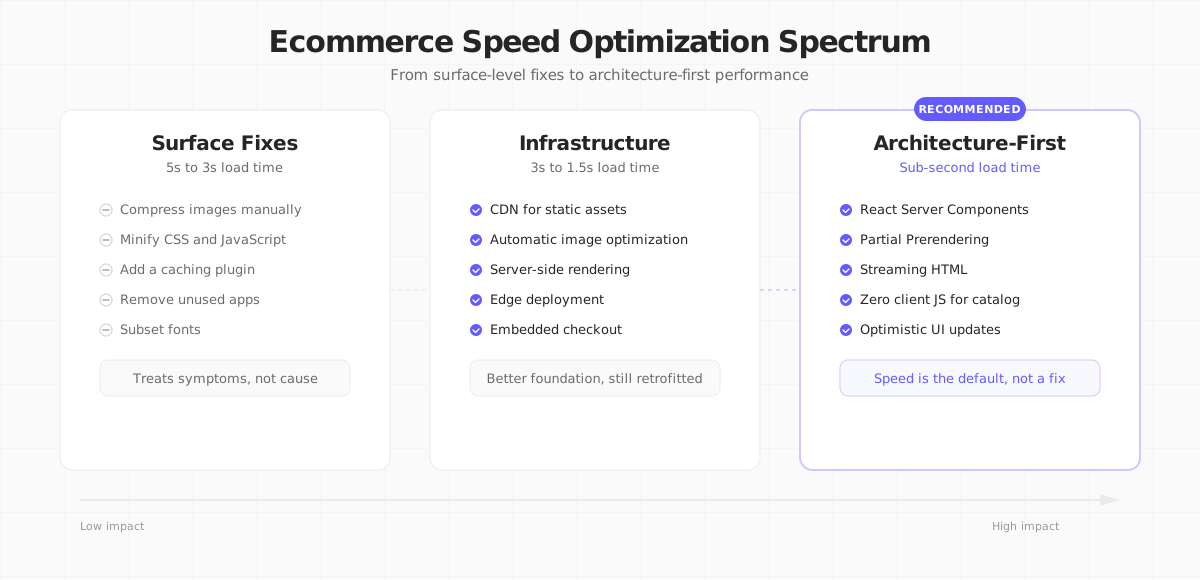
Here's how that works with a Next.js-based stack.
React Server Components: Zero JavaScript for Read-Only Pages
React Server Components (RSC) render on the server and send HTML to the browser. No JavaScript bundle ships for static content. A product listing page with 50 items sends HTML, not a 200KB React bundle that renders client-side.
This is a fundamental shift. Traditional React (client-side) sends a JavaScript app that builds the page in the browser. RSC sends the finished page. The browser just paints it.
The impact: Lighthouse JavaScript execution time drops from seconds to milliseconds on catalog pages. Total Blocking Time approaches zero.
Partial Prerendering: Static Shell, Dynamic Holes
Partial Prerendering (PPR) is a Next.js feature that combines static and dynamic content in a single request. The static parts of the page (header, product details, footer) are prerendered at build time and served instantly from the CDN. Dynamic parts (cart count, personalized recommendations, stock levels) stream in afterward.
The user sees a fully rendered product page in under 200ms. The cart button and recommendations fill in a moment later. No layout shift, no blank screen, no loading spinner.
One gotcha: Suspense boundaries need to be placed deliberately. If you wrap too much in Suspense, you get a loading spinner where static content should be. If you wrap too little, a single dynamic component blocks the entire page. The rule of thumb: wrap the smallest subtree that contains dynamic data.
Edge Caching and Streaming HTML
Deploying on an edge network (like Vercel) means static content is served from the data center closest to the user. Combined with HTTP streaming, the browser starts painting the page before the server has finished generating it.
Traditional server-side rendering waits for the entire page to generate, then sends it all at once. Streaming sends chunks as they're ready. The static shell arrives in 50-100ms. Dynamic sections follow as their data resolves.
The result: Time to First Byte (TTFB) under 100ms for edge-cached content, even for pages with dynamic sections.
Image Optimization at the CDN Layer
Product images are typically the heaviest part of an ecommerce page. Modern image optimization handles this at the infrastructure level:
- Automatic format conversion: WebP for Chrome, AVIF for supporting browsers, JPEG fallback
- Responsive sizing: Serve 400px images on mobile, 1200px on desktop, automatically
- Lazy loading: Images below the fold load only when the user scrolls to them
- CDN caching: Optimized images are cached at the edge, not regenerated per request
No plugins required. No manual compression. The framework and hosting layer handle it.
Checkout Speed Is Conversion Speed
Checkout is where speed has the most direct impact on revenue. Baymard Institute reports that 70% of online shopping carts are abandoned. A "too long/complicated checkout process" accounts for 18% of abandonments, making it one of the top five reasons shoppers leave.
Two architectural choices make checkout fast:
1. Embedded checkout, not redirects. Stripe Checkout can be embedded directly on the page instead of redirecting to a separate domain. That eliminates the redirect latency and keeps the user in your store's UI.
2. Prefetching payment intents. When a user adds an item to their cart, the payment intent can be created in the background. By the time they click "checkout," the Stripe session is already initialized. The checkout form renders instantly.
These aren't optional optimizations. They're the difference between a 5-second checkout flow and a 1-second one. Speed is one layer; we walk through the full set of friction points in the ecommerce checkout optimization playbook.
The Practical Optimization Checklist
Whether you're on a modern stack or a traditional platform, these optimizations help. Ordered by impact.
| Priority | Action | Impact | Effort |
|---|---|---|---|
| 1 | Audit third-party scripts. Remove unused apps, tracking pixels, and chat widgets. Each one adds 50-200ms | High | Low |
| 2 | Optimize images. Use WebP/AVIF, serve responsive sizes, lazy-load below the fold | High | Low |
| 3 | Eliminate render-blocking resources. Defer non-critical CSS and JavaScript | High | Medium |
| 4 | Use a CDN for static assets. Serve from the edge, not your origin server | High | Low |
| 5 | Subset fonts. Load only the character ranges you need. Or use system fonts | Medium | Low |
| 6 | Reduce layout shift. Set explicit width/height on images and embeds | Medium | Low |
| 7 | Preload critical resources. Fonts, hero images, above-the-fold CSS | Medium | Medium |
| 8 | Minimize DOM depth. Flatten nested components, especially in product grids | Medium | Medium |
| 9 | Server-side render critical paths. Product pages, category pages, checkout | High | High |
| 10 | Move to an edge-first architecture. RSC + PPR + streaming HTML | Very High | Very High |
Items 1-8 are band-aids. They help, and you should do them. But items 9-10 are where the step-function improvement comes from. You can compress and cache your way from 5 seconds to 3 seconds. You need a different architecture to get from 3 seconds to under 1 second.
Run your store through PageSpeed Insights and check all three Core Web Vitals. LCP under 2.5s, INP under 200ms, and CLS under 0.1 are Google's thresholds for "good." Most ecommerce stores fail INP because of heavy client-side JavaScript.
How Your Next Store Is Built for Speed by Default
None of this is theoretical. Your Next Store ships with these techniques built in:
- React Server Components for all catalog pages. Product listings, collections, and individual product pages send zero client JavaScript for the main content
- Suspense boundaries that enable Partial Prerendering on pages mixing static and dynamic content. Product details load from the CDN instantly. Cart, stock levels, and recommendations stream in after
- Edge deployment on Vercel's network. Static content is served from the nearest edge node. TTFB under 100ms for cached content
- Automatic image optimization via Vercel Image Optimization. WebP/AVIF conversion, responsive sizing, and CDN caching with zero configuration
- Stripe-native checkout embedded directly in the storefront. No redirect, no separate domain, no extra page load
- Optimistic updates for cart operations. When a user adds an item, the UI updates instantly. The server confirms in the background. Perceived latency: zero
The result: Lighthouse scores consistently above 90 on production stores, including demo.yournextstore.com. Not because we optimize aggressively, but because the architecture doesn't generate the problems that need optimizing.
If you want to understand the technical details behind PPR, we wrote a deep dive on Partial Prerendering in Next.js that walks through the implementation with real code examples.
The fastest ecommerce store is the one that was never slow. Stop optimizing. Start building on the right foundation.
Build on a foundation that was fast from day one. RSC + PPR + typed SDK, ready to ship.
Your Next Store is open-source. See the code behind these performance techniques:
github.com/yournextstore/yournextstore
FAQ
How does page speed affect ecommerce conversion rates?
Significantly. Research from Portent shows that a site loading in 1 second converts at 3x the rate of one loading in 5 seconds. Ecommerce conversion rates decline measurably with each additional second of load time. Beyond conversion, Google uses Core Web Vitals as a ranking signal, so slow pages also rank lower in search results, compounding the loss.
What is a good page load time for an ecommerce site?
Google's Core Web Vitals thresholds define "good" as: Largest Contentful Paint (LCP) under 2.5 seconds, Interaction to Next Paint (INP) under 200 milliseconds, and Cumulative Layout Shift (CLS) under 0.1. For ecommerce specifically, aim for a fully interactive page in under 2 seconds on mobile. The fastest modern stores (using RSC and PPR) achieve sub-second loads for static content.
How do you improve Core Web Vitals for ecommerce?
Start with the highest-impact changes: audit and remove unnecessary third-party scripts (biggest INP killer), optimize and lazy-load images (biggest LCP impact), and set explicit dimensions on all media (fixes CLS). For step-function improvement, move to a server-rendered architecture with React Server Components and Partial Prerendering, which eliminates the client-side JavaScript that causes poor INP scores in the first place.