Set up legal pages
Add a privacy policy, terms of service, and returns policy to build trust and meet what's expected of an online store.
Legal pages tell customers how your store works and how you handle their information. They build trust and are often expected – or required – for an online business.
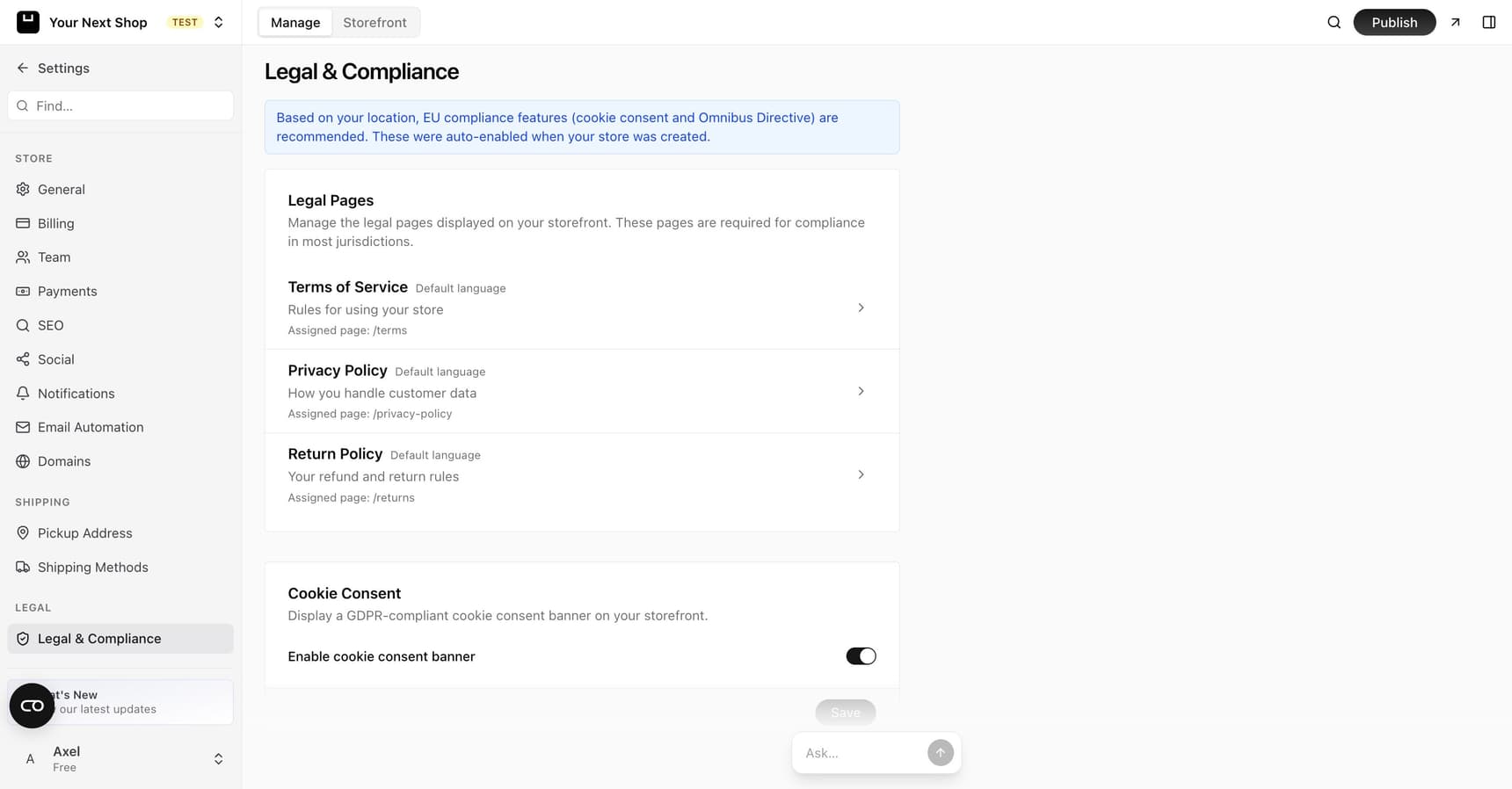
The main legal pages
Most stores have three:
- Privacy policy – explains what customer information you collect and how you use it.
- Terms of service – the rules for using your store and buying from you.
- Returns and refund policy – when and how customers can return items or get their money back.
What each page covers
| Page | What it typically explains |
|---|---|
| Privacy policy | What customer data you collect, why, and how you keep it safe |
| Terms of service | The rules for shopping with you – orders, payment, and your responsibilities and theirs |
| Returns and refund policy | The window for returns, the condition items must be in, and how refunds are handled |
Tip: Your returns policy does double duty – it's both a legal page and a sales tool. A clear, fair policy reassures hesitant buyers right before they decide to order.
Create or edit a page
From your dashboard you can create each legal page and write its content, or edit it later as your business changes. Your store name and contact details from your settings help keep these pages accurate.
Because these pages pull on your business details, it's worth making sure your store details are up to date before you finalise the wording.
Note: Keep these pages accurate for your business. They're a real commitment to your customers, so review the wording and update it whenever your policies change. If you're unsure what to include, consider getting professional advice.
The cookie consent banner
Depending on where you and your customers are based, you may need to show a banner asking visitors about cookies – the small files that help websites remember things. You can turn a cookie consent banner on from your legal settings.
Caution: Whether you need a cookie banner depends on your location and the laws that apply to you. If you're unsure, it's safer to check – and professional advice can help you get it right.
Link them in your footer
Once your legal pages are ready, add them to your store's footer or menu so customers can find them from any page. This is where shoppers expect to look for them.
Tip: Do it with AI – ask the AI Assistant in your dashboard to help draft a starting point for a policy or turn on your cookie banner. Always review the wording yourself, since these pages are a real commitment to your customers.
Tips
- Write in plain language so customers actually understand the terms.
- Make your returns policy easy to find – it reassures hesitant buyers.
- Revisit your pages a couple of times a year to make sure they're still correct.
FAQ
Do I really need legal pages?
For most online stores, yes. A privacy policy and terms are widely expected and often required, and a clear returns policy builds trust with shoppers. The exact requirements depend on where you operate.
Can YNS write my policies for me?
The AI Assistant can help you draft a starting point, but you should review and adjust the wording so it's accurate for your business. These pages are a genuine commitment, so when in doubt, get professional advice.
Where should my legal pages appear?
In your store's footer or menu, so customers can reach them from any page. That's where shoppers expect to find them. See Navigation menus.
Do I need a cookie banner?
It depends on your location and the laws that apply to you and your customers. You can turn one on from your legal settings – and if you're unsure whether you need it, check or seek advice.
What's next
- Add these pages to your navigation – see Navigation menus.
- Keep your contact details current – see Edit your store details.
- Set up refunds and returns handling – see Refunds and returns.