Edit your store details
Update your store name, contact info, and business address – the details that appear in your emails, legal pages, and customer touchpoints.
Your store details are the basic facts about your business – your name, how customers reach you, and where you're based. These appear in places like your emails and legal documents, so it's worth keeping them accurate.
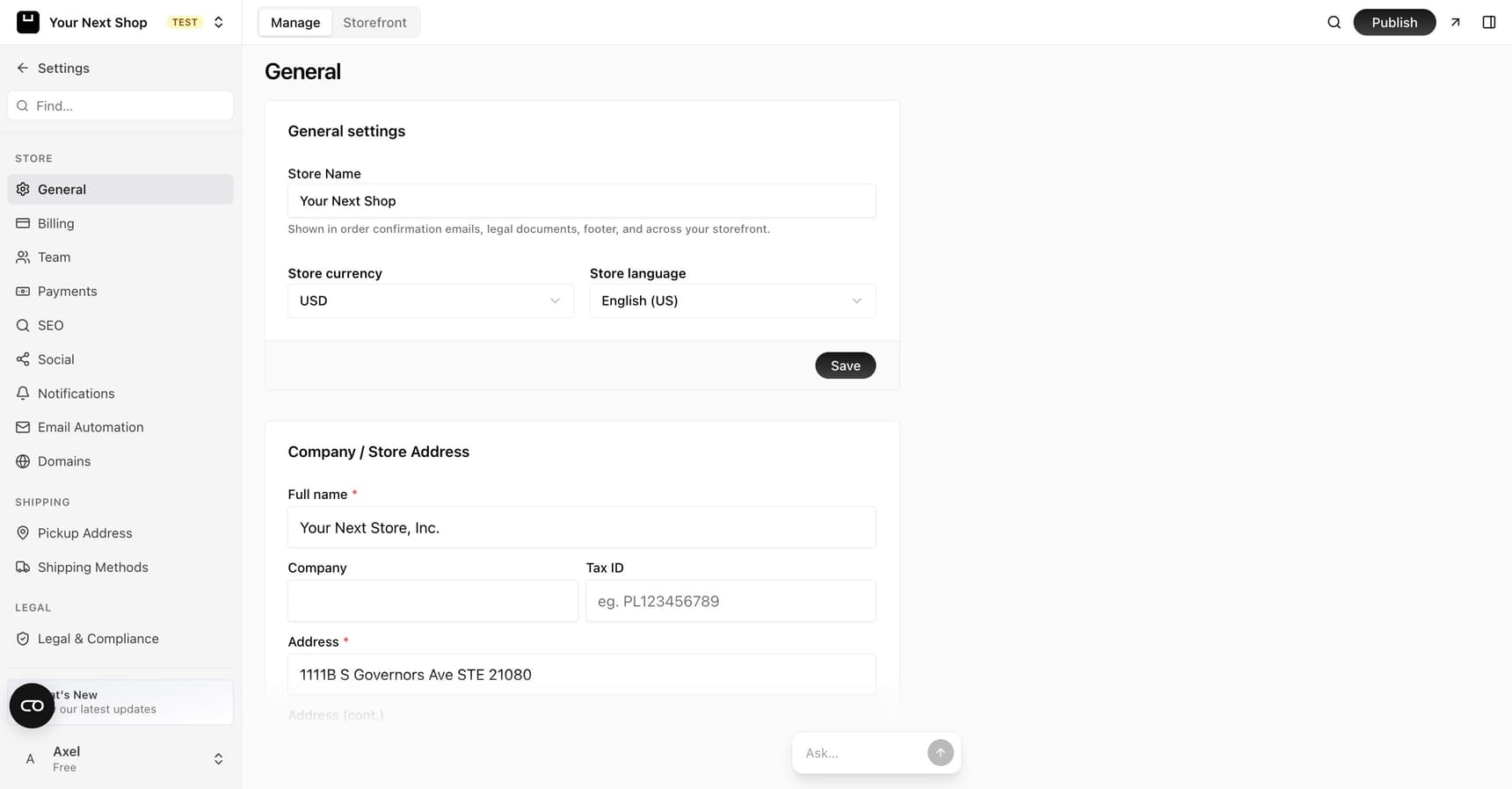
What you can update
In your store settings you can edit:
- Store name – the name customers see across your store.
- Store description – a short summary of what you sell.
- Business address – your company address, including a phone number and Tax ID.
- Currency and language – the money your store sells in and the language it uses.
- Email settings – the address your emails are sent from, and where you receive notifications.
What each field is for
| Field | Where it's used |
|---|---|
| Store name | Across your storefront, in your browser tab, and in emails to customers |
| Store description | A short summary of your business, used in places that introduce your store |
| Business address | On your legal pages and documents, and for your company records – includes a phone number and Tax ID |
| Tax ID / company details | For invoices and legal pages where your business identity needs to appear |
| Currency | The money your store prices and sells in |
| Language | The default language your store uses |
| From email | The address your store's emails are sent from |
| Notification email | Where you receive notifications about your store |
Note: Some of these details, like your business address and tax ID, can appear on documents customers receive. Enter them as they should officially appear for your business.
Why these matter
Your business details and email settings aren't just for show:
- Your address and company details are used on your legal documents, like your terms and privacy policy.
- Your from and notification emails control where your store's emails come from and where you're kept in the loop.
- Accurate, consistent business details build trust with shoppers.
Tip: Use a notification email you check regularly. Missed alerts about your store can mean missed sales.
Keep things consistent
Try to use the same business name and contact details everywhere – your store, your emails, and your social profiles. Consistency helps customers recognize and trust you, and it keeps your legal pages and order emails accurate.
It's worth revisiting these details whenever something changes – a new notification email, a move to a new address, or a new business name – so everything that references them stays correct.
Tip: Do it with AI – ask the AI Assistant in your dashboard to update your store name, notification email, or business address, and it will make the change for you.
Other things on this page
Referral badge. A small "powered by YNS" badge shown on your storefront. You can switch it off depending on your plan – see Manage your plan & billing.
Transfer ownership. Hand your store to someone else. They get an email invitation, and once they accept, ownership moves across and your subscription for that store is cancelled. A pending transfer can be cancelled until it's accepted.
To move ownership between people already on your team instead, use Invite team members – that takes effect immediately and leaves you as an Admin.
Delete store. Permanently deletes the store along with its products and orders. It can't be undone, so export anything you want to keep first.
Caution: Transfer and delete both end your access to the store. Read the confirmation dialog properly – these are not actions you can walk back.
Common mistakes to avoid
- An unmonitored notification email. If alerts land somewhere no one checks, you can miss things that need attention. Use an address you read often.
- An outdated address. Old details on legal pages and documents can confuse customers and cause problems. Update them when you move.
- Inconsistent naming. Different versions of your business name across your store and socials make you harder to recognize and trust.
FAQ
Where do my store details actually appear?
Your name, business address, and company details show up across your storefront, in emails to customers like order confirmations, and on legal pages such as your terms and privacy policy.
What's the difference between the from email and notification email?
The from email is the address your store's emails are sent from – it's what customers see as the sender. The notification email is where you receive alerts about your store. Use addresses you check regularly so nothing slips by.
Do I need to fill in a tax ID or company details?
It depends on your business and where you operate. If your invoices or legal pages need to show your registered business identity, add those details so they appear correctly.
How do I change the currency my store uses?
Currency is set separately from your contact details. See Currencies for how to choose the money your store sells in.
What's next
- Set the money your store uses – see Currencies.
- Add your privacy policy and terms – see Set up legal pages.
- Invite people to help run your store – see Invite team members.