
Best Squarespace Commerce Alternatives in 2026 (Honest Picks)
 Jakub Neander
Apr 17, 202614 min read
Squarespace Commerce ships the best default design taste in the website-builder category. It also ships a site search its own customers have been calling broken for ecommerce since at least 2019, a 250-variant cap, a single-currency display, three payment processors, and real-time shipping gated behind a $99/month plan, all documented in the same long-running forum thread. The merchants leaving Squarespace in 2026 aren't leaving over price. They're leaving over a specific list of limits they hit mid-year, and the cost of staying on the wrong plan once they did. Below: the math, the limits, and the five platforms those merchants actually move to.
Bias disclosure: We build Your Next Store. It's our #1 pick for this audience, every claim is sourced, every YNS weakness is named, and competitors are credited where they actually win.
TL;DR: The Five Squarespace Commerce Alternatives Worth Moving To
- Best for most merchants leaving Squarespace: Your Next Store. Keeps the "describe the brand, get a designed store" shape you liked about Squarespace, drops the 250-variant cap, single-currency display, and broken search. 0% platform transaction fees, modern stack, high-90s Lighthouse mobile scores out of the box. Bias disclosure above.
- If you're hitting specific Squarespace ceilings (variants, currency, search): BigCommerce. More built-in features than anything else on this list, abandoned cart on the $29 entry plan.
- If ecommerce is your whole business and design taste is secondary: Shopify. Largest app ecosystem, best-in-class checkout, most mature POS. Budget for the apps stack.
- If your actual frustration is "I can't place this exactly here": Wix. True free-canvas drag-and-drop where Squarespace, even with Fluid Engine, stays on a section grid.
- If design control is the whole reason you picked Squarespace: Webflow. CSS-level design without writing code.
Honorable mentions (section below): WooCommerce, Framer, Square Online, Ecwid.
The Real Cost of Staying on the Wrong Squarespace Plan
The headline trap on Squarespace Commerce is the $16/month Basic plan. It's the cheapest tier that supports selling, but it adds a 2% Squarespace transaction fee on top of Stripe's processing fee. Core ($23/month) removes that 2%. Most Basic-plan merchants don't realize until they look at a full year of statements that they're paying more total than the "more expensive" plan.
The math is mechanical. Assume annual billing:
| Monthly sales | Basic cost/year ($192 + 2%) | Core cost/year ($276 + 0%) | Better plan | Annual savings |
|---|---|---|---|---|
| $200 | $240 | $276 | Basic | $36 |
| $350 | $276 | $276 | Tie | $0 |
| $500 | $312 | $276 | Core | $36 |
| $1,000 | $432 | $276 | Core | $156 |
| $2,500 | $792 | $276 | Core | $516 |
| $5,000 | $1,392 | $276 | Core | $1,116 |
| $10,000 | $2,592 | $276 | Core | $2,316 |
Figures shown exclude Stripe processing (2.9% + $0.30), which is the same on both plans.
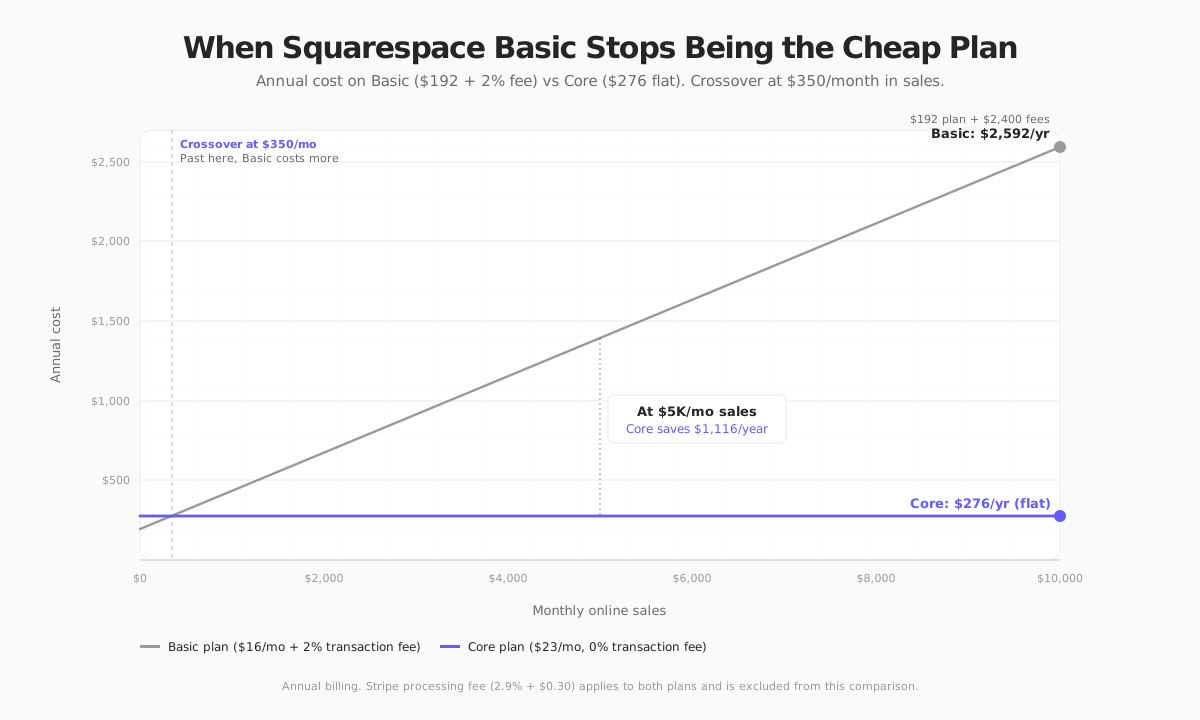
The crossover is at $350/month in sales. Past that point, Basic is more expensive than Core every single month. A store doing $5K/month leaves $1,116/year on the table by staying on Basic, which is more than a year of Core. A store doing $10K/month leaves enough to pay for the Advanced plan instead. If you're reading this post and you're on Basic, the first question isn't "which alternative." It's "why am I still on Basic."
That said, sometimes the answer to "which alternative" is "none of them, upgrade to Core." We'll flag where that applies as we go.
What People Actually Leave Squarespace Over
The forum thread above and the Squarespace Commerce limitations writeup by SF.DIGITAL (a Squarespace development shop) converge on the same list. The ceilings below are ranked by how often they're cited as the trigger for leaving, not by how dramatic they sound on paper. The first three drive most migrations; the rest accumulate.
1. No third-party app marketplace. The biggest structural gap, and the one that turns every other limit into a switching decision instead of an annoyance. Shopify has roughly 13,000 apps, Wix has thousands, Squarespace has a small set of first-party integrations (Printful, ShipStation, AfterShip, Mailchimp, a handful more), Zapier, and code injection. When you need a niche feature the core product doesn't ship, you commission it or you switch. Most merchants switch.
2. The 250-variant ceiling. Squarespace caps products at six options with 250 total variant combinations. If you sell anything configurable (custom furniture, apparel with many sizes × colors × fits, print-on-demand with design variants), you hit this. The only workaround is splitting one product into multiple listings, which breaks SEO and inventory in ways that compound over time.
3. Single-currency display. Squarespace supports 31 display currencies but only one at a time. International shoppers see your home currency on every product page, then discover the exchange rate at checkout. Baymard's cart-abandonment research consistently lists unfamiliar currency among the top reasons shoppers bail. This alone caps how international your store can realistically be.
4. The search that doesn't. Multiple long-running forum threads, the earliest from 2018, describe Squarespace's built-in site search as structurally unsuited for product discovery on a catalog of any size. Results miss exact SKU matches. There is no in-platform fix; the workaround is third-party search (Algolia, Typesense), which loops back to the missing app marketplace.
5. Three payment processors. Squarespace accepts Stripe, PayPal, and Square. That's the list. No Adyen, Braintree, Authorize.net, Klarna-direct, or regional processors. For US-only stores this is usually fine. For anything B2B, regional, or subscription-heavy, it's a constraint worth naming.
6. Real-time shipping is a $99 feature. Carrier-calculated rates (live UPS/USPS/FedEx quotes at checkout) only exist on the Advanced plan. Lower tiers ship flat-rate or by weight. If your margins depend on accurate shipping (anything heavy, bulky, or international), you either eat the loss or pay $99/month.
7. Digital product 300 MB cap. Selling a 2-hour course? A sample pack? A stock photo bundle? Squarespace caps digital downloads at 300 MB per file. Large-file creators build elsewhere.
8. Section-grid layout (with Fluid Engine caveats). Squarespace's Fluid Engine (GA since 2022) added drag flexibility inside sections, which softens the original "locked grid" critique. But sections are still sections: you work in bounded horizontal bands, not a free canvas. For most stores this is fine. For a brand whose visual identity doesn't fit the sectioning model, it stays a fight.
None of this makes Squarespace a bad platform. It makes it a specific one. Switching is a decision about which of these ceilings you've hit and which you're about to.
How We Ranked These
For each alternative:
| Criterion | What we checked |
|---|---|
| Fixes the specific ceiling | Variant counts, multi-currency, search, payments, real-time shipping: does the platform actually solve it? |
| Real cost | Plan fee + transaction fee + realistic apps needed to match Squarespace's defaults |
| Design latitude | Can you ship a site that doesn't look like a template? Can you iterate on the look without rebuilding? |
| Performance | Real-world mobile speed, Core Web Vitals out of the box |
| Migration path from Squarespace | Products, content, customers, SEO: what survives the move? |
Quick Comparison: The Squarespace-Specific Gaps
| Platform | Entry price | Variant cap | Multi-currency display | App marketplace | 0% platform fee on commerce tiers |
|---|---|---|---|---|---|
| Squarespace (today) | $16/mo Basic (2% fee) | 250 | Single only | None | Core+ only |
| Shopify | $29/mo Basic (annual) | 100 per option × 3 options = 2,000 | Yes, on Grow+ | 13,000+ apps | Only with Shopify Payments |
| BigCommerce | $29/mo Standard (annual) | Unlimited | Yes, storefront-level | Smaller than Shopify | Yes, every plan |
| Your Next Store | $30/mo Starter | Unlimited | Yes | Early | Yes, every plan |
| Wix | $29/mo Core (annual) | Unlimited | Yes, on Business+ | Thousands | Yes on commerce plans |
| Webflow | $29/mo Standard Ecom (annual) | Unlimited | Limited | Smaller | Plus+ only (Standard has 2% fee) |
Prices are 2026 annual billing. Monthly billing runs 15–30% higher.
The 5 Best Squarespace Commerce Alternatives
1. Your Next Store
Best for: Most merchants leaving Squarespace Commerce.
Your Next Store was built for the exact gap Squarespace migrants are trying to cross: design-led ecommerce without the commerce ceilings. Open a chat, describe what you sell and the aesthetic ("men's grooming, editorial Scandinavian"), and the AI generates a working store. Iterate by sending another message, or edit by hand. When the brand evolves in six months, you ask, you don't rebuild.
It removes every ceiling on the list above (unlimited variants, proper multi-currency, modern search) without losing the design-led shape Squarespace taught you to want. 0% platform transaction fees on every plan, matching Squarespace Core and beating Shopify Basic.
Three things you can verify without signing up: the live demo is public (open on mobile, run Lighthouse, confirm the high-90s scores yourself), million.yournextstore.com runs 1,000,000 products on the same backend, and the storefront template is open-source if you ever want to own the code. Stack: Next.js 16, Partial Prerendering, RSC. More on the speed in How Is Your Next Store So Fast?.
What it's actually good at:
- AI that ships a working store, not a demo
- 0% platform transaction fees on every plan
- High-90s mobile Lighthouse out of the box, measurably faster than Squarespace
- GEO-ready: structured data, sitemaps, AI discoverability audit baked in
- Open-source storefront escape hatch
Where it falls short, honestly:
- No free plan. Starter is $30/mo, $7 more than Squarespace Core
- Payments are Stripe-only (Klarna, Afterpay, Apple/Google Pay come via Stripe; no native PayPal or Square)
- App ecosystem is young; check first if you need a niche plugin
- Newer platform by a decade than Shopify. That trade buys you stack and AI; if "longest track record" is on your list, pick Shopify
Pricing: Starter $30/mo, Growth $90/mo, Pro $360/mo. 0% platform fees across all plans.
Verify before you commit. Open the live demo on your phone, run Lighthouse, then describe a store to Elliot, the AI Builder.
2. BigCommerce
Best for: Stores leaving Squarespace specifically because they hit variant, currency, or search limits, and don't want an AI in the loop.
BigCommerce quietly bundles the features Squarespace and Shopify either lack or charge for. Unlimited product variants. Real multi-currency at the storefront level (shoppers see their local price from the first product page). Gift cards, B2B price lists, abandoned cart recovery, advanced ratings, all on the $29/month entry plan, no apps required.
For a Squarespace merchant hitting the 250-variant ceiling or losing international shoppers to the one-currency display, this is the most direct structural fix on the list. Nothing else gets you there without stacking apps.
What it's actually good at:
- 0% platform transaction fees on every plan
- More built-in features than any other SaaS here (this is the defining thing)
- Headless-ready if you later want to split admin from storefront
- Geolocation-based currency switching out of the box
Where it falls short vs Squarespace:
- Admin UI is dated. Functional, not delightful
- Revenue-tiered plans force upgrades at $50K/$180K/$400K/year whether or not you want new features
- App store is smaller than Shopify's, though larger than Squarespace's
- Default themes look adequate, not distinctive. You'll want a designer
Pricing (annual billing): Standard $29/mo, Plus $79/mo, Pro from $399/mo (revenue-tiered), Enterprise by quote.
3. Shopify
Best for: Anyone whose main business is ecommerce and who's willing to pay for the ecosystem.

Shopify is the answer when "which platform should I move to?" doesn't need much qualification. It's ecommerce-first from the database up, the checkout converts better than almost anything that isn't Amazon, and the app ecosystem (roughly 13,000 apps) solves every niche Squarespace doesn't.
Compared to Squarespace, the gaps on variants, currencies, search, and shipping all disappear. Shopify's default variant ceiling is 2,000 per product. Multi-currency display works out of the box on Grow and above. Shop Pay handles one-click checkout in a way nothing else on this list matches.
The cost side is where honesty is required. Shopify charges 0.6%–2% platform fees on every sale unless you use Shopify Payments, and most real stores run 3–10 paid apps that add $100–$400/month. For the blow-by-blow breakdown, see our Shopify transaction fees deep dive. If you came to Squarespace partly because it had lower ongoing costs than Shopify, switching here is a real math conversation, not an automatic win.
What it's actually good at:
- Biggest app store in ecommerce, period
- Checkout conversion: Shop Pay is genuinely a conversion uplift
- Multi-channel (Amazon, Walmart, TikTok Shop, Instagram, Google) built in
- POS that competes with Square and Lightspeed for in-person sales
Where it falls short vs Squarespace:
- Default themes look fine, not designed. Theme work usually means Liquid or a paid designer
- Running costs rise fast with apps
- Not a CMS: blog and content are an afterthought compared to Squarespace's
Pricing (annual billing): Basic $29/mo, Grow $79/mo, Advanced $299/mo. Plus and Enterprise by quote.
4. Wix
Best for: Squarespace users whose actual frustration is "I want this thing exactly here."
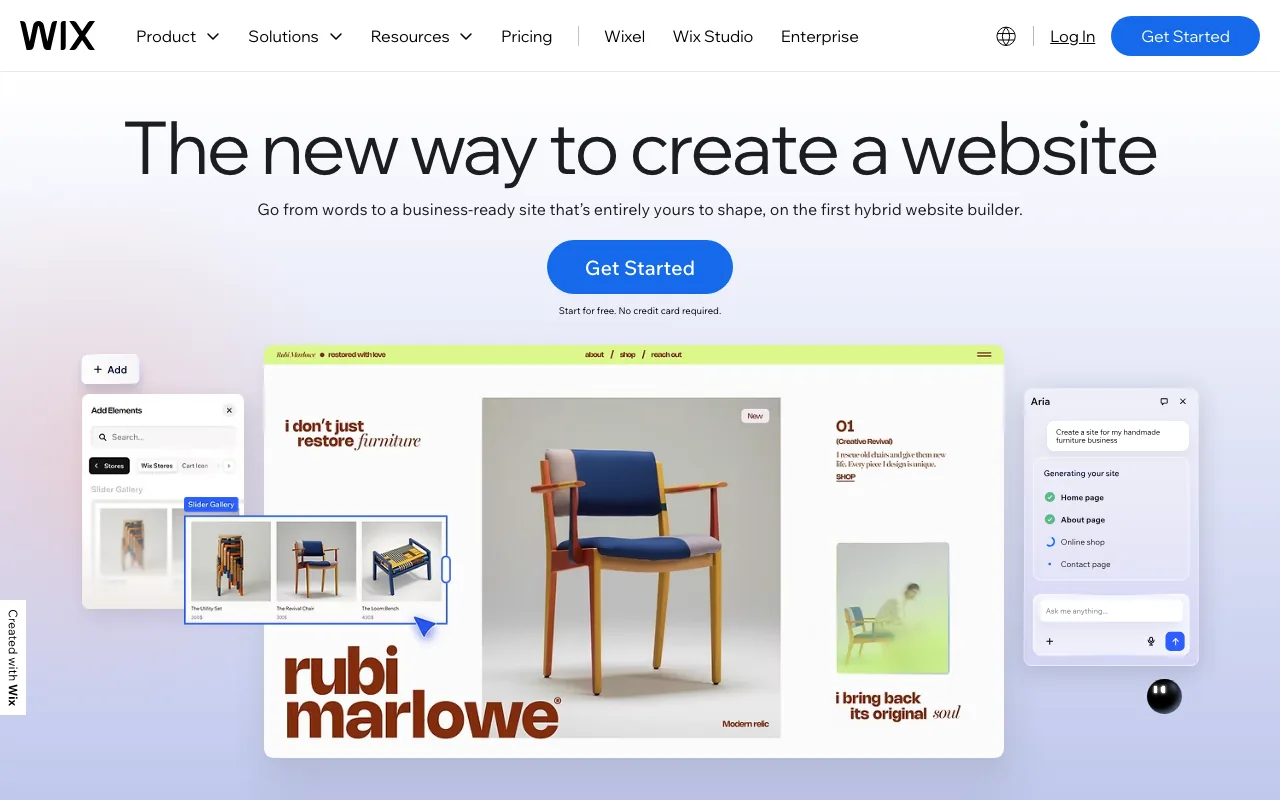
Wix is the closest direct substitute for Squarespace and the platform most merchants cross-shop against it. The substantive difference is the editor. Wix is free-canvas drag-and-drop with pixel placement. Squarespace is section-based with Fluid Engine drag inside sections. If your Squarespace complaint begins with "I can't move this three pixels left," Wix removes the friction.
Wix has also leaned hard into AI. Its site generator (Wix ADI) turns a short brief into a working site in minutes. For a Squarespace user who's curious about AI builders without leaving the drag-and-drop category, Wix is the gentlest move.
What it's actually good at:
- True free-canvas layout, not sectioning
- 900+ templates (Squarespace: ~160)
- Mature AI site generator
- Thousands of third-party apps: the extensibility story Squarespace is missing
- Abandoned cart recovery on the entry Core plan (Squarespace requires Core+, Wix includes it)
Where it falls short vs Squarespace:
- You cannot switch templates after publishing without rebuilding. Squarespace at least lets you migrate templates (with caveats)
- Renewal pricing often jumps after the first year. See our Wix ecommerce alternatives guide for migration specifics and the Wix Payments fee structure for the fee-stack detail
- Mobile Core Web Vitals trail Squarespace and modern headless stacks in third-party tests
Pricing (annual billing): Light $17/mo (no ecommerce), Core $29/mo, Business $39/mo, Business Elite $159/mo.
5. Webflow
Best for: Brands where design is the product.
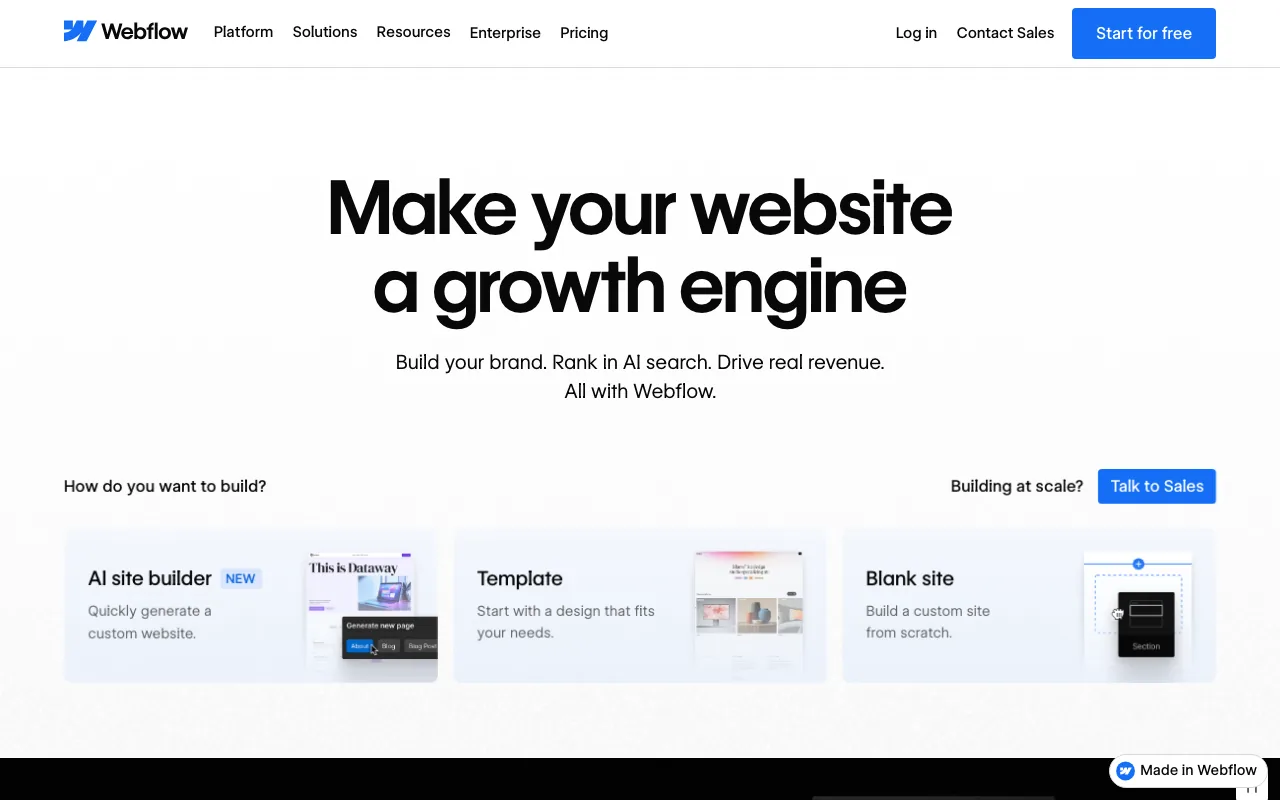
Webflow is what designers move to when Squarespace feels too prescriptive. The visual editor exposes CSS-level control over layout, typography, interactions, and animation. The output is clean HTML/CSS. Pages tend to load fast because Webflow generates the site statically.
Ecommerce is a smaller part of Webflow's story than its CMS and design tooling. It suits boutique catalogs (10–500 SKUs) and design-led brands. It's not a good fit for inventory-heavy operations.
What it's actually good at:
- Real design control, no code required
- Clean output, strong Core Web Vitals by default
- Deep CMS for content-heavy stores
- Animations and interactions that would need a plugin on Squarespace or Wix
Where it falls short vs Squarespace:
- Steeper learning curve. Webflow is not a weekend tool
- Multi-currency at the storefront is limited vs BigCommerce
- 2% transaction fee on the Standard Ecommerce plan (removed on Plus)
- Smaller app ecosystem than Squarespace for commerce-specific tools
Pricing (annual billing): Standard Ecommerce $29/mo (2% fee), Plus $74/mo, Advanced $212/mo.
Honorable Mentions
WooCommerce: Free WordPress plugin, largest ecommerce footprint by install count, infinite plugins, full data ownership. Not a natural off-ramp from Squarespace because it's a different mental model (you run WordPress). More on this in our WooCommerce alternatives for developers post.
Framer: The most design-forward site builder of 2026. Commerce is lighter than dedicated platforms (Stripe, Lemon Squeezy, embeds), so it fits brands selling 1–50 products more than full catalogs. Worth a look if Squarespace's taste was half the reason you picked it and its commerce was the half you're leaving.
Square Online: Free plan with unlimited products, tight POS integration if you also sell in person. Design flexibility is limited compared to Squarespace. Right answer for hybrid retail/food businesses already using Square.
Ecwid by Lightspeed: Embeddable store widget. Drops into any existing site. Useful if you want to keep your Squarespace site for content and bolt real commerce onto it from underneath. From $5/mo. If you're starting from Ecwid rather than Squarespace, see our Ecwid alternatives breakdown.
How to Choose: Three Questions
"Which Squarespace ceiling have you actually hit?"
- All of the above + design still matters: Your Next Store (the shortest migration for the audience this post is aimed at)
- Variants, currency, or search specifically: BigCommerce (direct structural fix, lowest friction)
- Design flexibility above everything: Webflow or Framer
- Performance/stack age: Your Next Store, Webflow, or Framer
- Extensibility (need a specific app): Shopify or Wix
- None of the above, just curious: Stay on Squarespace, upgrade to Core if you're on Basic
"How much is ecommerce your main business?"
- All of it: Shopify, BigCommerce, Your Next Store
- Half of it (content + store): Your Next Store, Webflow, Wix
- A side of it (bolt onto existing site): Ecwid, Square Online
"What's your honest monthly budget?"
- Under $10: Ecwid Starter, Square Online Free. Accept the tradeoffs
- $20–50: Shopify Basic, BigCommerce Standard, Your Next Store Starter, Wix Core, Webflow Standard
- $50–150: Shopify Grow, BigCommerce Plus, Your Next Store Growth, Webflow Plus
- $300+: You're at the scale where headless commerce and custom builds start to make sense
What Staying on Squarespace Quietly Does Well
A full honesty section, because the platforms above each have weaknesses Squarespace doesn't:
- Defaults that look like a designer touched them. Nobody on this list ships prettier out-of-the-box templates. Webflow and Framer give you more design control; Squarespace gives you less work.
- First-party blog, galleries, scheduling, and email campaigns. One admin, one subscription, no app bill.
- 0% transaction fees on Core and up. That's better than Shopify Basic without Shopify Payments.
- A clean editor. Non-technical owners run Squarespace without help.
If your store is small, your catalog is stable, your audience is domestic, and your design taste lines up with the templates, the right answer is often "stay, upgrade to Core, and redirect the migration energy somewhere else." The platforms above only win when one of those four assumptions breaks.
How to Migrate from Squarespace
The destination varies, the shape doesn't:
- Export your products. Squarespace's Inventory panel exports CSV. Clean it before import: Squarespace's category/tag schema doesn't map 1:1 to other platforms, and the CSV strips some metadata.
- Export customers and orders. CSV from the Squarespace dashboard. Shopify and BigCommerce both ship official Squarespace importers that handle this step for you.
- Point your domain carefully. Keep the Squarespace site live until the new one is ready. Set up the CNAME (or full transfer) on the new platform before flipping DNS.
- Set up 301 redirects. Squarespace uses
/shop/p/{handle}URLs. Pull your top pages from Google Search Console, map them to the new platform's URL structure, and test the redirects on staging before cutover. - Reconfigure payments. Squarespace Payments doesn't transfer. Set up Stripe, Shopify Payments, or whichever processor the new platform uses. Run a small live test order before launch.
- Test checkout end-to-end. Real order, real card, real shipping rate, real tax calculation. Then refund it.
Budget one or two weekends for a small catalog. One or two weeks if you're redesigning as you migrate.
FAQ
Is there a Squarespace Commerce alternative that's actually free?
Yes, a few, with caveats. Square Online has a real free plan with unlimited products; you pay processing only. WooCommerce is a free plugin; you pay hosting ($20–50/month realistic). Framer has a free hobby tier for small sites. Full-featured ecommerce platforms with no subscription are rare, and the free tiers that exist usually recoup via higher processing fees.
What's the cheapest Squarespace alternative with no platform transaction fees?
BigCommerce and Your Next Store charge 0% platform fees on every plan. WooCommerce has no platform fee at all (Stripe/PayPal processing only). Squarespace itself only removes transaction fees from Core ($23/mo) and up; Basic still adds 2%. Shopify charges 0.6–2% unless you use Shopify Payments.
Will I lose SEO if I switch from Squarespace?
Not with disciplined redirects. The risk is changing URLs without 301s, which can drop rankings for weeks while Google recrawls. Pull your top 50–100 URLs from Google Search Console, map each to the new platform's URL structure, and test the redirects on staging. Industry case studies on platform migrations with proper redirects typically see organic traffic recover within 4–8 weeks.
Which alternative actually fixes the 250-variant ceiling?
All five main picks allow more variants than Squarespace. BigCommerce and Your Next Store allow unlimited. Shopify allows 2,000 per product by default, with higher limits on Plus. Wix and Webflow both allow unlimited variants.
Can I keep my Squarespace domain when I switch?
Yes. If you bought the domain through Squarespace, transfer it to a registrar (Namecheap, Cloudflare, Porkbun) before cancelling the plan. If you bought it elsewhere, update the DNS to point at the new platform. Either way, there's no technical lock-in on the domain itself.
What about the AI builder category specifically?
Your Next Store, Wix ADI, Hostinger's AI builder, and a handful of newer entrants all generate a working storefront from a short prompt. We compared the field in Best AI Store Builders of 2026. The honest heuristic: pick the AI builder whose underlying ecommerce platform you'd also pick. The AI is the entry, not the product.
Related Blog Posts
- Wix Ecommerce Alternatives: Honest Picks for 2026
- WooCommerce Alternatives (2026)
- Best AI Store Builders of 2026
- Best Ecommerce Platform for Developers
- Shopify Transaction Fees: The Real Math
- Open Source Shopify Alternatives
- Lovable Shopify Integration: How It Works
If you're on Basic and you're selling more than $350 a month, the fastest platform move you can make is not a migration. It's the upgrade button to Core. After that, pick the platform above that removes the limit you're sick of, not the one with the most features, and definitely not the one with the prettiest homepage.
Ready to leave Squarespace? Open the Your Next Store live demo or see every alternative side-by-side.