How to Get Your Products Into ChatGPT Shopping
 Jakub Neander
Oct 6, 202610 min read
To get your products into ChatGPT Shopping, you need three things: a clean product feed in OpenAI's format, Product schema markup on every product page, and a robots.txt that lets OpenAI's search crawler in. There is no checkout to integrate and no buy button to enable: ChatGPT now helps people find products and sends them to your store to buy. That makes your product data the whole game.
If you read launch coverage from late 2025, you may think getting into ChatGPT Shopping means applying for Instant Checkout and wiring up a payment protocol. That chapter has closed, and what replaced it is simpler for small stores. Here is what changed, what ChatGPT actually reads, and a step-by-step plan.
What Happened to Instant Checkout?
OpenAI launched Instant Checkout in September 2025, letting shoppers buy inside a ChatGPT conversation through the Agentic Commerce Protocol (ACP), which was built with Stripe. It did not last. Per reporting on the shutdown, OpenAI wound it down in March 2026, saying the first version "did not offer the level of flexibility that we aspire to provide," and moved purchases back to merchants' own checkouts. The same coverage reports that fewer than 30 Shopify merchants ever enabled it and that Walmart saw in-chat purchases convert at roughly a third of its website rate.
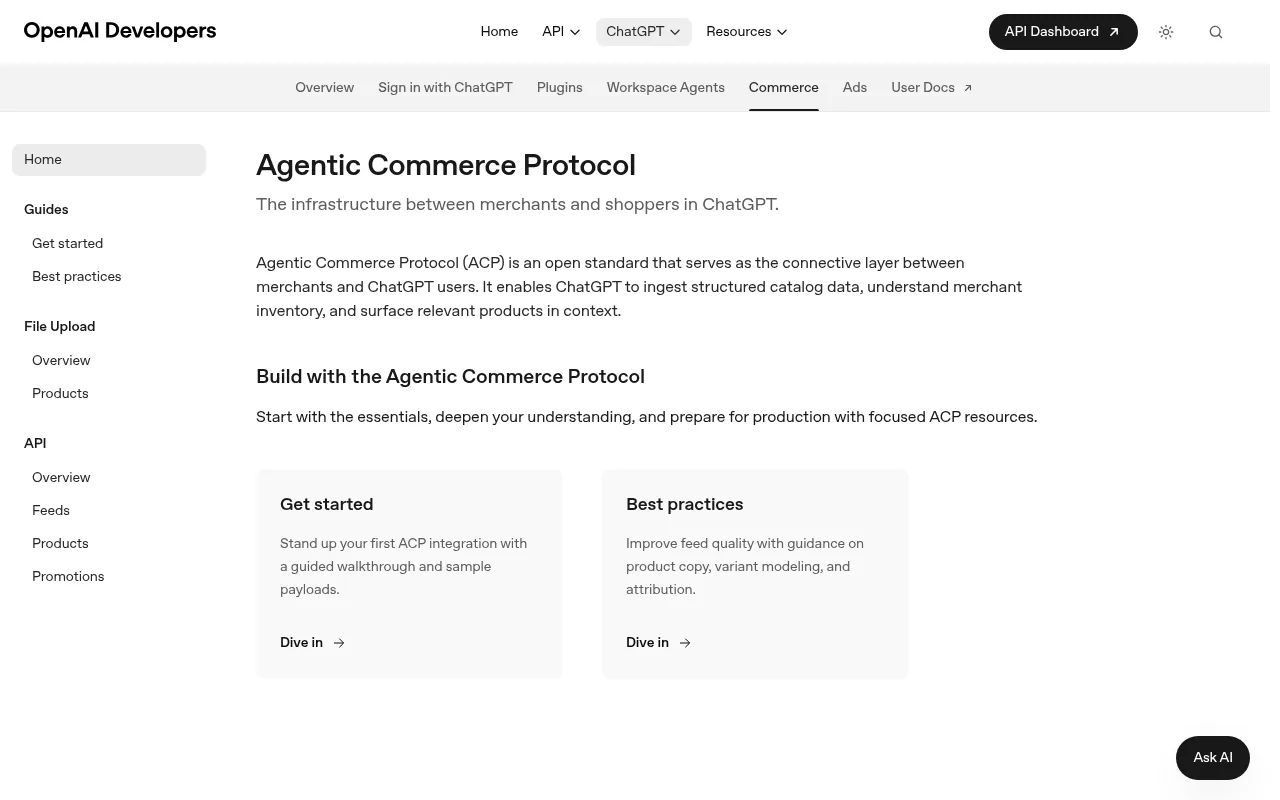
What survived is the discovery layer. Products still appear in ChatGPT answers, ranked by relevance, price and availability. The shopper taps through and finishes the purchase on your site, or in a retailer's own ChatGPT app. ACP itself remains an open standard: OpenAI's commerce docs describe it as the layer that "enables ChatGPT to ingest structured catalog data, understand merchant inventory, and surface relevant products in context."
This area moves fast. Everything here reflects OpenAI's public documentation and press coverage as of October 2026. Check OpenAI's commerce docs for the current requirements before you build.
How a Product Gets Into a ChatGPT Answer
ChatGPT builds its picture of your store from two sources: the feed you submit and the pages it can crawl. Your job is to make both complete and consistent.
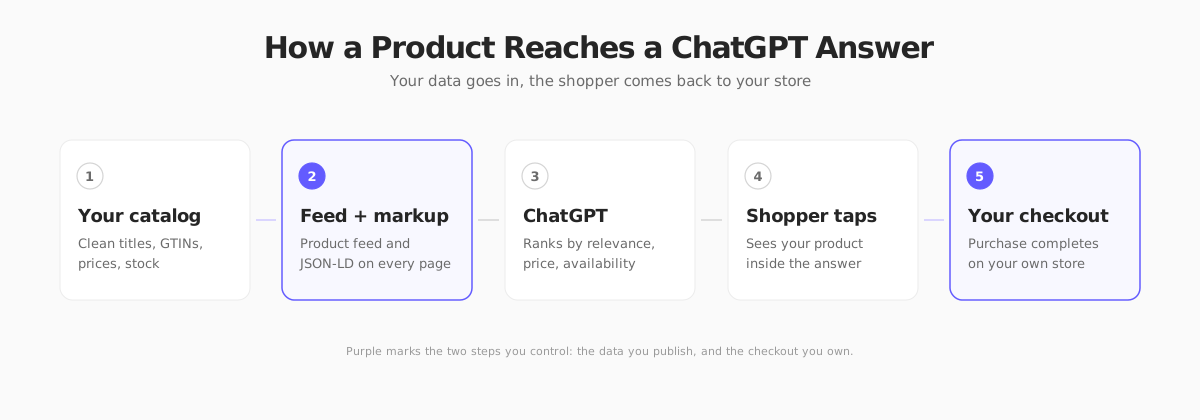
You control two points in that chain: the data you publish and the checkout you own. Everything between is ranking you cannot buy directly, so the way to win is to be the most complete, accurate and fresh listing for the query.
Step 1: Check Whether Your Platform Already Does It
Before building anything, look at your platform.
- Shopify: third-party coverage reports that eligible US stores are syndicated to ChatGPT through Shopify's catalog by default. Confirm in your admin, because availability depends on region and plan.
- Other hosted platforms: many have shipped or announced feed integrations for AI channels. Search your platform's app store for "ChatGPT" or "OpenAI feed."
- Custom or headless stores: you will generate the feed yourself, which is simple once your catalog is clean.
If you are on a platform that handles it, skip to Step 5 and focus on data quality.
Step 2: Build the Product Feed
The feed is a file of one row per purchasable item or variant. OpenAI's product feed reference says to start with discovery data and lists nine required fields:
| Field | What it is |
|---|---|
item_id | Stable, unique ID per variant |
title | Product name, around 150 characters max |
description | Factual details, up to about 5,000 characters |
url | Public product page |
brand | Real brand name |
seller_name | Your actual business name |
image_url | Main product image (JPEG or PNG) |
availability | in_stock, out_of_stock, pre_order, backorder or unknown |
price | Amount plus ISO currency, such as 79.99 USD |
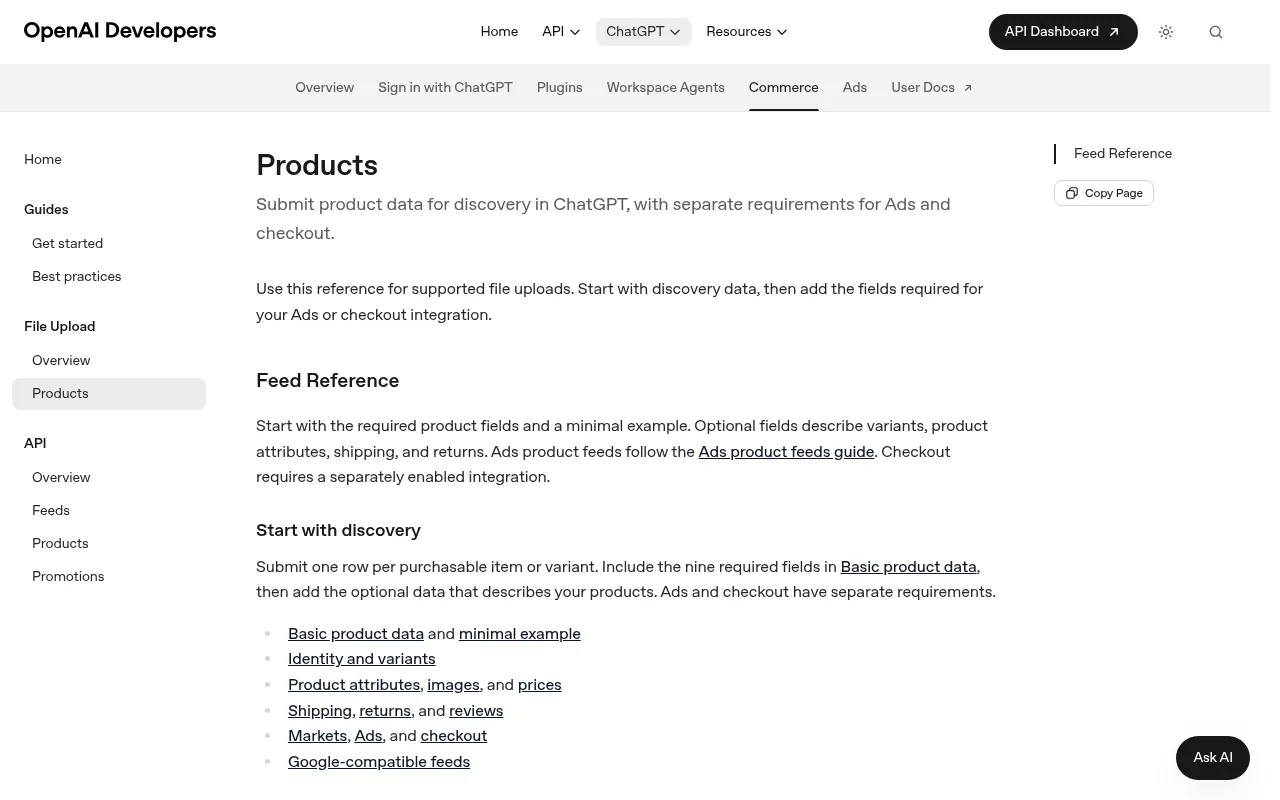
The spec recommends JSONL (one record per line) as the primary format and also accepts Google-compatible text files (.txt, .csv, .tsv, optionally gzipped). Use UTF-8, absolute HTTPS URLs and no placeholder brand or seller names. A minimal record looks like this:
Variants and groups
Give every size or color its own item_id, and tie them together with a shared group_id. If you list a t-shirt as one row, ChatGPT cannot tell a customer which size is in stock.
Keep it fresh
The spec asks you to update availability when an item sells out and to update price when a sale starts or ends. Stale data is the fastest way to waste a click, because a shopper who lands on a sold-out page does not come back. Automate the export instead of uploading by hand.
Step 3: Add Product Schema to Every Product Page
The feed tells ChatGPT what you sell. Your pages prove it. Add Product and Offer markup with schema.org in JSON-LD, and make sure the price and availability in the markup match the page and the feed exactly. Mismatches between feed, markup and page are a common reason a listing is demoted or ignored.
Include the details shoppers actually ask ChatGPT about: material, dimensions, weight, shipping times, return policy, GTIN or MPN where you have them. Conversational queries such as "a dishwasher-safe pour-over dripper under $60" can only match products whose data says "dishwasher safe." We cover the markup patterns in Agentic Commerce: What Store Owners Need to Know and the wider technical checklist in Ecommerce SEO: A Technical Guide for Developers.
Step 4: Let OpenAI's Search Crawler In
This is the cheapest fix and the most commonly missed. OpenAI documents separate crawlers with separate jobs:
- OAI-SearchBot surfaces sites in ChatGPT's search features. Block it and you will not appear in ChatGPT search answers.
- GPTBot is used for training generative AI models. You can disallow it independently without affecting search visibility.
- ChatGPT-User handles individual user requests, and OpenAI says it is not used to decide whether content appears in search.
A robots.txt that keeps you visible in search while opting out of training looks like this:
OpenAI says changes can take about 24 hours to take effect, and also recommends allowing its published IP ranges if you use a firewall or CDN bot protection. Check that your bot-protection rules are not silently blocking the crawler, since that is a frequent cause of "we allowed it in robots.txt but nothing shows up."
Whether to allow training is your call. This is a business decision about your content, not a technical requirement for shopping visibility.
Step 5: Win on Data Quality
Once you are in, ranking comes down to how well your data answers a question. A short audit goes a long way.
Titles. Lead with what the product is, then the attribute a shopper would add. "Ceramic Pour-Over Coffee Dripper, Black" beats "The Morning Ritual by Studio Clay."
Descriptions. Write facts, not slogans. Materials, dimensions, compatibility, care instructions and what is in the box. Skip superlatives you cannot back up.
Identifiers. Add GTIN, MPN and brand where they exist. They are how systems recognize that your listing and a competitor's are the same item.
Images. One clean, well-lit main image on a plain background, plus lifestyle shots on the page.
Reviews and policies. Real reviews, a visible return policy and clear shipping times give a ranking system more to trust.
Price and stock. Accurate, current, and consistent across feed, markup and page.
Treat your feed like a storefront window the shopper cannot walk into. Every missing attribute is a question ChatGPT cannot answer on your behalf, so it answers with someone else's product.
What About Checkout in ChatGPT?
The feed reference still notes that checkout "requires a separately enabled integration," and OpenAI has described a model where some retailers run apps inside ChatGPT. For a small or mid-size store, that is optional and, for now, not where the volume is. The reported conversion numbers on in-chat checkout were poor, and owning the checkout means you keep your upsells, bundles, discount codes and customer data.
Make your own checkout fast and trustworthy instead, because every ChatGPT click lands there. Our guide to ecommerce checkout optimization covers what to fix first.
How to Measure It
AI referrals show up in analytics, usually tagged by source. Look for traffic from chatgpt.com in your referral report, and tag any links you control with UTM parameters. Compare conversion rate and revenue per session for that source against organic search. Volumes are still small for most stores, so look at the trend over months, not days.
If you see visits but no sales, the problem is usually on the product page: a mismatch between what ChatGPT told the shopper and what they see (price, size, availability), or a slow page.
Where Your Next Store Fits
We build Your Next Store (YNS), so here is exactly where it helps and where it does not.
YNS stores output JSON-LD structured data and a dynamic sitemap, and the admin includes an SEO audit with AI-discoverability checks such as llms.txt and content hierarchy. Your catalog lives in one backend with a REST API, which makes it straightforward to export a feed from a script. Every YNS store also exposes an MCP endpoint that shopping agents can query for live product search (see MCP Servers for Ecommerce). What YNS does not have today is a one-click ChatGPT feed export, so you would generate the JSONL file yourself from the API. Checkout stays on your own store, and plans carry 0% transaction fees (Stripe processing fees still apply). See pricing for current plans.
A Quick Launch Checklist
- Confirm whether your platform already syndicates to ChatGPT
- Build a feed with the nine required fields, one row per variant
- Automate the export so price and stock stay current
- Add matching
ProductandOfferJSON-LD to every product page - Allow
OAI-SearchBotin robots.txt and in any firewall rules - Fill in materials, dimensions, GTIN and brand on every product
- Track
chatgpt.comreferrals and compare conversion against organic
FAQ
How do I get my products on ChatGPT Shopping?
Submit a product feed in OpenAI's format, add Product schema markup to your product pages, and allow OAI-SearchBot in your robots.txt. If you use Shopify, check whether your store is already syndicated, since coverage indicates eligible US stores are included by default.
Does ChatGPT Shopping cost anything for merchants?
OpenAI's public documentation describes the feed and discovery path without a listing fee, and it does not list one for organic product results. Ads in ChatGPT have separate requirements. Check OpenAI's current terms, since they change.
Is Instant Checkout still available?
OpenAI retired Instant Checkout in March 2026 and moved purchases back to merchants' own checkouts. The Agentic Commerce Protocol remains an open standard, and checkout integration is described as a separately enabled option.
How long until my products show up?
OpenAI does not publish a guaranteed timeline. Crawler changes in robots.txt can take around 24 hours to take effect, and feed processing varies. Expect days, not minutes, and verify by searching for your product by name and brand in ChatGPT.
Do I need to block or allow GPTBot?
No. GPTBot is OpenAI's training crawler, and OpenAI says it is separate from OAI-SearchBot, which handles search. You can disallow GPTBot and still appear in ChatGPT search.
The Bottom Line
ChatGPT Shopping is a window onto your catalog, not a replacement for your store. Publish a complete feed, mark up your pages, let the right crawler in, and keep the checkout you own as good as the answer that sent the shopper there.