Create coupons & discounts
Offer discount codes with limits, dates, and product targeting to reward shoppers and run campaigns.
A coupon is a code your customers type in at checkout to get money off. They're a great way to reward loyal shoppers, win back visitors, or run a limited-time offer that you can share wherever you like.
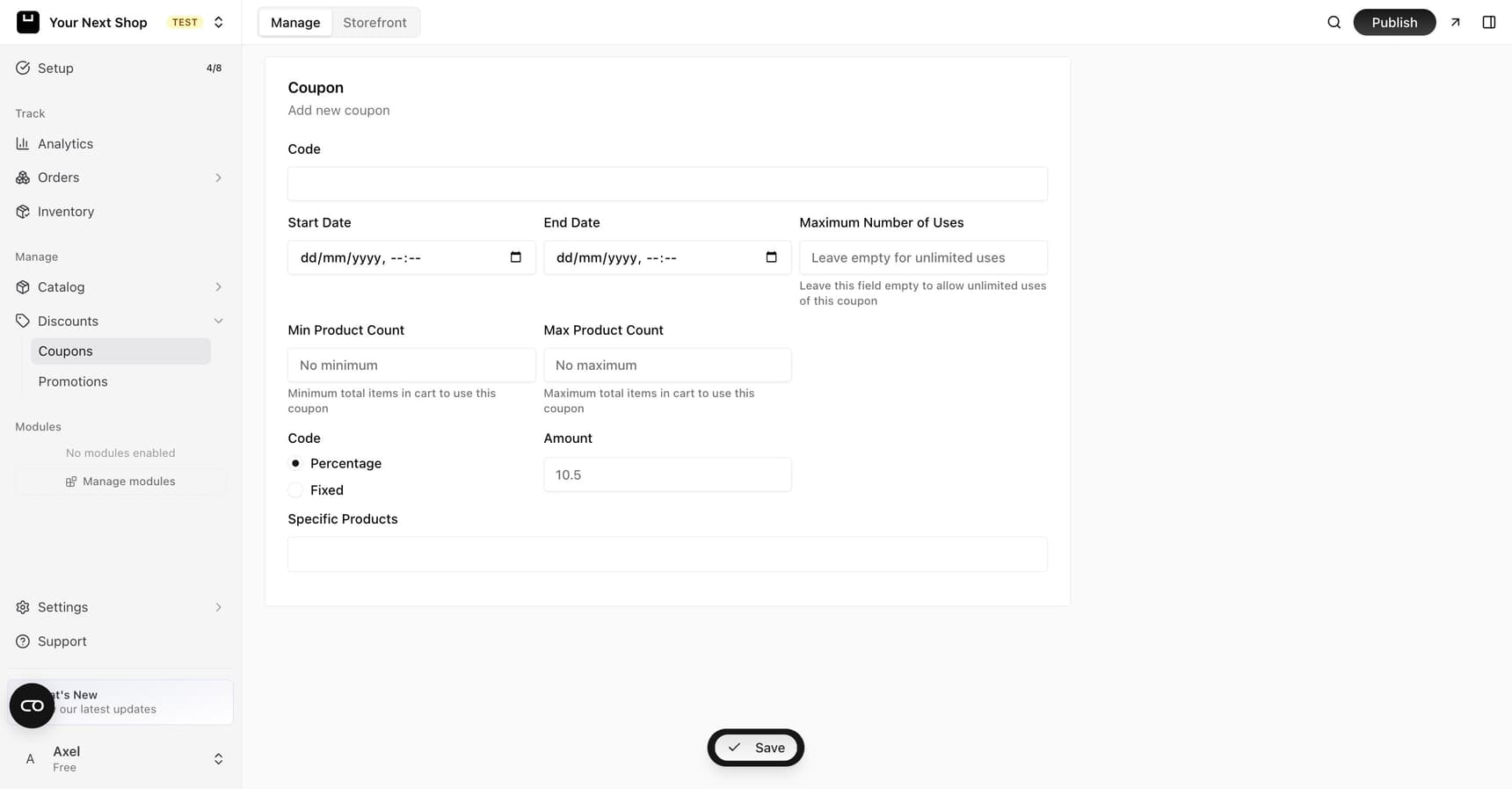
Create a coupon
From the discounts or coupons area of your dashboard, create a new coupon and give it a code – something easy to share, like WELCOME10. Then choose how much it takes off and any rules that should apply.
Tip: Keep codes short, clear, and easy to type. Memorable codes like
SUMMER20get used more than random strings of letters.
Codes can only use letters, numbers, and hyphens – spaces, punctuation, and accented letters aren't accepted.
Codes are matched without regard to case, so a customer typing save10 still finds a coupon you created as SAVE10. The code is stored and displayed the way you typed it – only the lookup at checkout ignores case.
Choose the discount type
You can set your coupon to take off either:
| Discount type | Example | Good for |
|---|---|---|
| A fixed amount | 10 off the order | Clear, predictable savings on bigger baskets |
| A percentage | 15% off the order | Scaling the discount with the order size |
Pick whichever makes the most sense for your offer. A percentage rewards larger orders more; a fixed amount is simple and easy to understand.
Set limits and dates
To keep your offer under control, you can add rules so a coupon only works the way you intend:
| Rule | What it does |
|---|---|
| Usage limit | Caps how many times a coupon can be used in total |
| Active dates | Sets when the coupon starts and stops working, so a sale ends on its own |
| Minimum cart items | Requires a certain number of items before the discount applies |
| Maximum cart items | Limits the discount to smaller orders |
| Scope | Restricts which products the coupon applies to – see below |
These rules let you shape an offer precisely – for example, "15% off, up to 100 uses, this weekend only, on a single collection."
Tip: Set an end date on every promotional code so a generous discount doesn't keep running long after your campaign is over.
Choose where it applies
Pick a scope for the coupon:
| Scope | Applies to |
|---|---|
| Entire store | Every product, with no restrictions |
| Products | Specific products you choose |
| Collections | Products in the collections you choose |
| Categories | Products in the categories you choose |
| Brands | Products from the brands you choose |
You can select more than one dimension at once – say, a few products and a whole collection – and a cart item qualifies if it matches any of them. Choose Entire store to apply the coupon everywhere with no restrictions.
How customers use it
Customers enter your coupon code in the cart or at checkout, and the discount is applied to their order before they pay. Just share the code wherever you like – in an email, on social media, or with a specific customer.
Where to share your coupon
A coupon is only as good as the people who see it. Good places to share:
- In a newsletter to your subscribers.
- On your social links and posts.
- With a single customer as a thank-you or a goodwill gesture – for example, after a refund or return.
Coupons vs promotions
A coupon needs a code; a promotion applies automatically with no code at all. Use a coupon when you want something shareable and targeted, and a promotion when you want everyone to see a lower price right away. See Run promotions for the automatic option.
Common mistakes to avoid
- No end date. A code with no expiry can keep discounting your sales indefinitely.
- No usage limit on a generous offer. If a code spreads further than you expected, a usage cap protects your margins.
- Forgetting product limits. If an offer is meant for one collection, target those products so it doesn't apply storewide by accident.
FAQ
What's the difference between a fixed amount and a percentage discount?
A fixed amount takes off a set sum, like 10 off the order, no matter the basket size. A percentage takes off a share of the total, so the saving grows with larger orders. Choose whichever fits the offer you have in mind.
Does the code have to match exactly, including capitals?
No. Coupon codes are matched case-insensitively, so WELCOME10, welcome10, and Welcome10 all work at checkout. You still can't create two coupons that only differ by case.
Can I limit a coupon to certain products?
Yes. Set its scope to specific products, collections, categories, or brands – or leave it on Entire store to apply everywhere. You can also set minimum or maximum cart items, so the discount only applies in the situations you intend.
How do I stop a coupon after my sale ends?
Set an active end date when you create it, and the coupon stops working on its own. You can also cap total uses with a usage limit so it can't be over-used.
What's the difference between a coupon and a promotion?
A coupon needs a code the customer types in; a promotion applies automatically with no code. Use coupons for shareable, targeted offers and promotions for site-wide sales everyone sees.
What's next
- Want a discount that applies automatically with no code? See Run promotions.
- Share your code with subscribers via Newsletters and subscribers.
- Reward repeat buyers – find them in Manage your customers.