Run promotions
Set up automatic sales and promotional pricing that every shopper sees with no code needed.
A promotion is a discount that applies on its own – no code needed. It's the easiest way to run a sale, because every shopper gets the deal automatically the moment they shop.
How promotions differ from coupons
It helps to know when to use each:
| Promotion | Coupon | |
|---|---|---|
| How it applies | Automatically | Customer enters a code |
| Best for | Site-wide sales and campaigns | Targeted or shareable offers |
| Customer effort | None – the price just drops | They need the code |
| Visibility | Everyone sees the lower price | Only people with the code benefit |
Use a promotion when you want everyone to see the lower price right away, like a weekend sale. Use a coupon when you want a code you can share with specific people. See Create coupons & discounts for the code-based option.
Set up a promotion
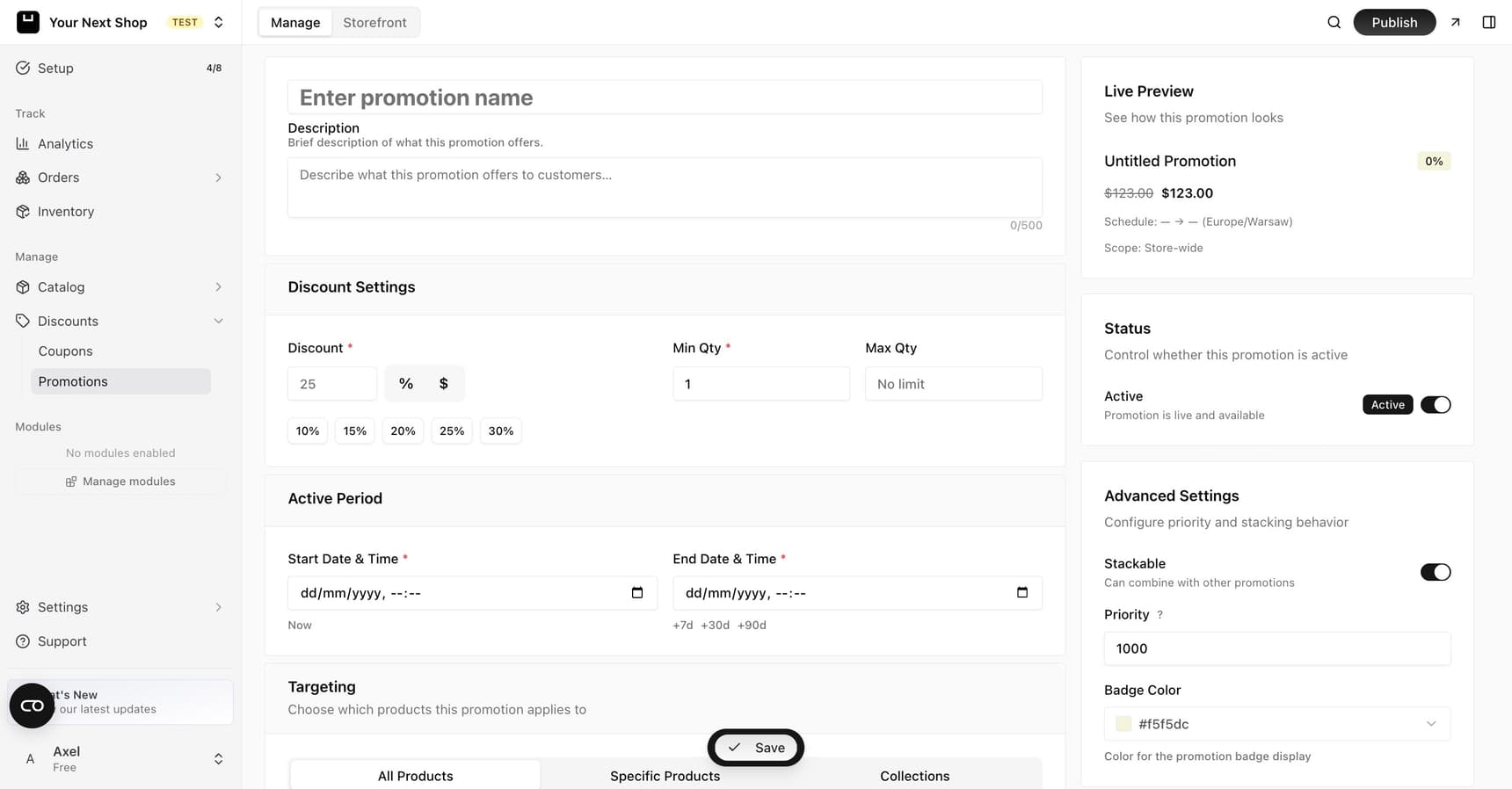
From the promotions area of your dashboard, create a new promotion, set the discount, and choose when it runs. While it's active, eligible customers see the reduced pricing automatically as they shop.
A typical setup involves a few choices:
- The discount – how much comes off, as a fixed amount or a percentage.
- The active period – when the sale starts and stops, so it ends on its own.
- Which products – apply it across your store or target specific products.
- Active status – turn the promotion on when you're ready for it to go live.
Tip: Use the live preview to check the discounted price looks right before you turn the promotion on. It's a quick way to catch a discount that's larger or smaller than you intended.
Choosing what the promotion applies to
You can run a promotion storewide or focus it on certain products:
- Storewide suits big moments like a seasonal sale or a launch, where you want everything to feel like a deal.
- Specific products suits clearing particular stock, spotlighting a new range, or discounting a slow-moving line without touching the rest of your prices.
Timing your promotion
Setting an active period means your sale begins and ends by itself – no need to remember to switch it off. This is ideal for time-boxed events like a weekend sale, a holiday promotion, or a launch week, and it keeps your normal prices from staying discounted longer than you planned.
Tip: Promotions are perfect for seasonal sales and launch campaigns where you want the offer front and center without asking customers to remember a code.
Common mistakes to avoid
- No end date. Without an active period, a sale can quietly run on past when you meant it to stop.
- Overlapping offers. Be mindful of running a storewide promotion and a generous coupon at the same time, so discounts don't stack up more than you intended.
- Skipping the preview. A quick look at the live preview confirms the discounted price is what you expect before shoppers see it.
FAQ
Do customers need a code for a promotion?
No. That's the whole point of a promotion – the discounted price shows automatically to every eligible shopper. If you want a code to share, use a coupon instead.
Can I run a promotion on just some products?
Yes. You can apply a promotion storewide or target specific products, which is handy for clearing particular stock or spotlighting a new range without discounting everything.
How do I make a sale end automatically?
Set an active period when you create the promotion. It starts and stops on its own, so you don't have to remember to switch it off when the sale is over.
Should I use a promotion or a coupon?
Use a promotion for site-wide sales everyone should see right away, and a coupon when you want a shareable code for specific people. They serve different goals, and you can use each when it fits.
What's next
- Prefer a shareable code instead? See Create coupons & discounts.
- Announce your sale to subscribers in Newsletters and subscribers.
- Spread the word on your Social links.