Omnibus Directive Pricing: How to Show Discounts in the EU
 Jakub Neander
Nov 6, 20269 min read
If your store shows a crossed-out "was" price to EU shoppers, that number is regulated. Under the Omnibus Directive, whenever you announce a price reduction you must also show the lowest price you charged in the 30 days before it. Get it wrong and a Black Friday banner becomes a consumer-law problem. This guide explains the rule, its exceptions, the penalties and how to build it into your store.
What the Omnibus Directive Is
The Omnibus Directive is Directive (EU) 2019/2161, a package of changes to EU consumer law. Member states had to apply its rules from 28 May 2022. It updated several older laws at once, including the Price Indication Directive (98/6/EC), the Unfair Commercial Practices Directive and the Consumer Rights Directive.
For online sellers, it changed more than pricing. The main points are:
- Price reductions: the 30-day reference price rule (the focus of this guide).
- Personalized pricing: if you set a price using automated decision-making based on the individual shopper, you must tell them.
- Search rankings: if you run a marketplace or comparison tool, you must disclose the main parameters that decide ranking, and when results are paid for.
- Reviews: if you say reviews come from real customers, you must take reasonable steps to check that they do. Publishing fake reviews is banned.
- Penalties: member states must be able to impose fines of up to at least 4% of annual turnover for widespread infringements.
The 30-Day Lowest Price Rule
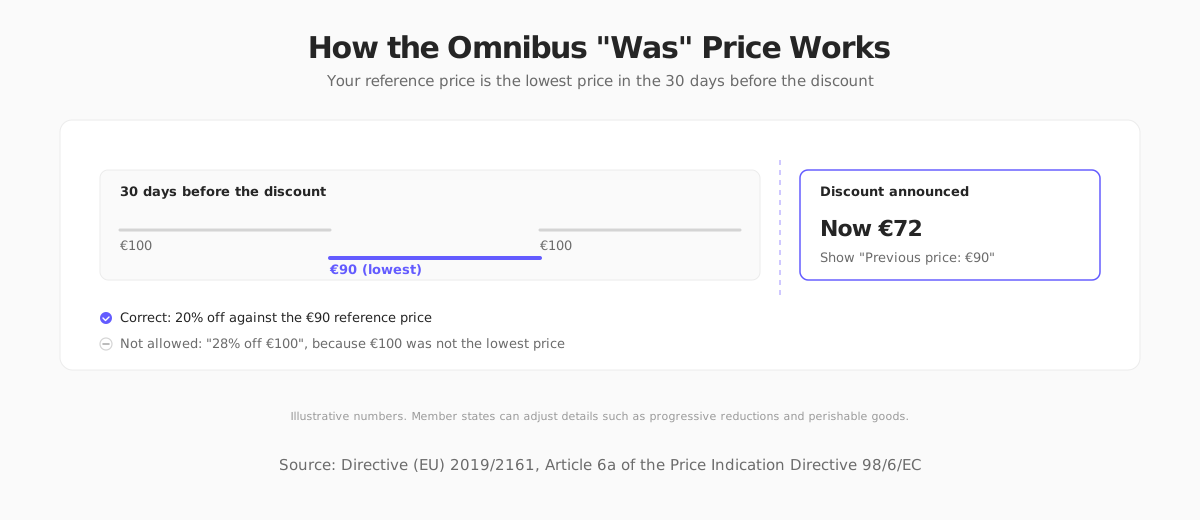
The core rule sits in Article 6a of the Price Indication Directive. When you announce a price reduction, the prior price is the lowest price you applied to that product during a period of at least 30 days before the reduction.
Two details trip people up:
- The reference is the lowest price, not the usual price. Your normal price is irrelevant if you sold the item cheaper at any point in the window.
- The 30 days end the moment the discount starts. The lookback is a rolling window, not a calendar month.
A worked example
Say a jacket normally sells for €100. Ten days ago you cut it to €90 for a flash sale, then returned it to €100. Today you want to run a sale at €72.
- The lowest price in the last 30 days was €90.
- You must show "Previous price: €90" and a reduction of 20%.
- You may not advertise "28% off €100", because €100 was not the lowest price you charged.
When it applies
The rule applies when you announce a price reduction: a crossed-out price, a "was/now" label, a percentage-off badge, or a banner saying "30% off". If you simply lower the price and say nothing about the reduction, Article 6a does not apply, though the general ban on misleading pricing still does.
Exceptions and National Differences
An EU directive sets a floor, and each country writes its own law. The Directive leaves some options open to member states, so details differ. The main ones:
| Situation | What the Directive allows |
|---|---|
| Progressive reductions | A member state may let you use the price before the first reduction as the reference if you keep reducing the price in steps during one campaign |
| Fast-perishable goods | A member state may set a shorter period for goods that can deteriorate or expire quickly |
| New products | A member state may set a shorter period for products on the market for less than 30 days |
| Personalized discounts | Reductions tailored to an individual, such as a loyalty or one-off coupon, are generally outside the rule, but check how your country treats them |
The European Commission's guidance on the Price Indication Directive explains how the rule applies in practice. It also clarifies that comparisons with something other than your own previous price, such as a manufacturer's recommended retail price, are not covered by Article 6a, but remain subject to the general ban on misleading practices.
Selling to several EU countries? Treat the strictest country you sell into as your baseline. Maintaining one price-history rule is much easier than one per country.
Penalties for Getting It Wrong
Enforcement is national. Consumer authorities and, in many countries, competitors and consumer associations can act. Possible consequences include:
- Fines. The Omnibus Directive requires member states to be able to fine up to at least 4% of annual turnover in the countries affected for large, coordinated infringements.
- Injunctions. An order to stop the promotion.
- Cease-and-desist letters and lawsuits. In several countries competitors can bring unfair-competition claims, which makes a sloppy "was" price a business risk beyond regulators.
Omnibus Compliance Checklist for Your Store
Use this list to audit your store before the next sale.
- Record every price change. Keep a price history per product and per currency, with timestamps. You cannot prove compliance without it.
- Compute the reference price automatically. Do not hand-type "was" prices into banners.
- Show the previous price clearly. Label it, for example "Lowest price in the last 30 days: €90".
- Base percentages on the reference price. "20% off" must be calculated from the €90, not the €100.
- Handle variants. If sizes or colors have different prices, track history per variant.
- Do not reset the clock. Raising the price for a few days to inflate the reference, then discounting, is exactly the behavior the rule targets.
- Cover every channel. Email, ads, banners and marketplace listings all count as announcements.
- Keep records. Store price history long enough to answer a regulator, ideally for the period of any active campaign plus the limitation period in your country.
Computing the reference price in code
Here is a minimal TypeScript example of the calculation. It assumes you store a list of timestamped prices per product (illustrative, not a YNS API):
Note that this ignores the national options in the table above (progressive reductions, perishables, new products). If you rely on one, encode your country's rule explicitly and have a lawyer confirm it.
Omnibus Pricing Outside the EU: UK and US
United Kingdom
The UK did not adopt the Omnibus Directive after Brexit, so there is no fixed 30-day rule. Reference pricing is governed by the Consumer Protection from Unfair Trading Regulations and now the Digital Markets, Competition and Consumers Act 2024, which gives the CMA direct fining powers. The CMA's guidance on pricing practices expects "was" prices to be genuine and recent. Adopting the EU approach is a safe policy if you sell on both sides of the Channel.
United States
There is no federal 30-day rule. The FTC's Guides Against Deceptive Pricing say a former price must be a genuine price you offered for a reasonable period. Some states are stricter, so check the rules where you sell.
Always check the current rules where you sell. This guide summarizes EU, UK and US pricing rules as of November 2026. National implementations differ and change, so confirm the details with a local consumer-law specialist before you run promotions. This is general information, not legal advice.
Where Your Next Store Fits
Your Next Store gives you discount codes, Stripe Tax for EU VAT, and a managed backend that stores your products and orders. Be aware that reference-price rules are a business and legal decision, so confirm how any platform records price history before you rely on it for compliance.
What YNS does give you as a developer is control. The storefront is an open-source Next.js template, so you can add the "lowest price in the last 30 days" label to your product pages in the same codebase as the rest of your store, rather than waiting for a plugin. It pairs well with a clean checkout and good VAT handling.

FAQ
What is the Omnibus Directive 30-day rule?
When you announce a price reduction in the EU, you must show the lowest price you charged during the 30 days before the reduction, and calculate any percentage discount from that price. It has applied since 28 May 2022.
Does the Omnibus Directive apply to Black Friday sales?
Yes. Black Friday promotions that show a crossed-out price or a percentage off are price reduction announcements, so the 30-day reference price applies. See our Black Friday ecommerce checklist for the wider preparation.
Does it apply if I am not based in the EU?
It applies to sellers who target consumers in EU member states, wherever you are based. If your store ships to or markets to EU shoppers, assume the rules apply.
Can I show a recommended retail price instead of my previous price?
Comparing with a manufacturer's recommended price is not covered by the 30-day rule, but it must still be genuine and not misleading under general consumer law. Many sellers avoid it because it is harder to defend.
The Bottom Line
A "was" price is a promise about your own history. Keep the history, calculate the reference price in code, and the rule stops being a risk and becomes one more thing your store does correctly.
Related Blog Posts

Before you spend more on ads,
check your store.
Get a free 25-point checklist to find what could be holding back your sales, from product pages to checkout.