How to Start a Digital Products Business in 2026: Ideas, Fees and Taxes
 Jakub Neander
Oct 13, 202613 min read
A digital products business is the cheapest way to start selling online: you make a file once and sell it forever, with no inventory, no shipping and no returns shelf. The catch is that "no inventory" does not mean "no work". You still need a product people will pay for, a place to sell it, and a plan for tax. This guide covers how to start a digital products business step by step: choose what to sell, validate it, pick the right platform, price it, and handle the rules most guides skip.
The 7 Steps, in Order
- Choose a product type that fits a skill you already have.
- Validate demand before you build the full thing.
- Create the product and make it easy to use.
- Price it and plan the fees.
- Pick where to sell: marketplace, creator platform or your own store.
- Sort out tax and legal basics.
- Get your first 100 buyers with one channel.
Step 1: Choose a Product Type
"Digital products" covers a lot of ground. Some types are quick to make but crowded, others take work but earn trust and repeat sales.
| Product type | Examples | Effort to make | Competition |
|---|---|---|---|
| Templates and printables | Planners, spreadsheets, Notion templates, resumes | Low | High |
| Design assets | Fonts, icon packs, presets, mockups, stock photos | Medium | High |
| Courses and guides | Video courses, ebooks, workbooks | High | Medium |
| Software and code | Plugins, UI kits, scripts, starter templates | High | Medium |
| Audio and video | Sample packs, music, stock footage | Medium | High |
| Memberships | Paid community, premium library | High, ongoing | Medium |
The best starting point is the intersection of three things: a problem you understand well, a format you can produce yourself, and a buyer who already pays for something similar. A nurse who builds a shift-planning spreadsheet, a developer who sells a UI kit, or a teacher who writes a lesson bundle all have a head start that a generic "planner" seller does not.
A good test: can you describe the buyer in one sentence? "Freelance designers who need client contract templates" is a business. "Everyone who wants to be organized" is not.
If your product is a printable or a coloring page, our guide to starting a coloring book business shows how that niche works in practice.
Step 2: Validate Demand Before You Build
Digital products are cheap to make, which tempts people to skip research. Do not. Hours spent on a product nobody wants are still hours lost.
Quick ways to check demand:
- Browse the marketplaces. Search your idea on Etsy and Gumroad Discover. Many listings with reviews means people pay for it. Zero competition is usually a warning, not an opportunity.
- Read the reviews of competing products. Complaints such as "no instructions" or "wrong size for my printer" tell you exactly what to do better.
- Ask in the places your buyer hangs out. Subreddits, Facebook groups, Discord servers and forums show which problems people repeat.
- Pre-sell a small version. A $9 starter pack or a waitlist with a price tells you more than a poll. If ten strangers pay, build the rest.
- Check search interest. Free keyword tools show whether people type your product name into Google at all.
Aim for a niche you can lead in. Ten buyers who need your exact template beat a thousand browsers.
Step 3: Create the Product and Make It Easy to Use
A digital product succeeds or fails on usability. Buyers cannot pick it up and inspect it, so clarity does the job of packaging.
- Deliver in a format people can open. PDF for guides, PNG or SVG for graphics, a shared link plus a download for spreadsheets and Notion templates, and a ZIP for bundles.
- Add a "start here" file. A one-page guide on how to open and use the product cuts support emails dramatically.
- Show the product in context. Mockups of a planner on a desk or a template in a real app sell better than a flat file preview.
- Test on different devices. Open the file on a phone, a Windows laptop and a Mac. Fonts and links break more often than you expect.
- Plan updates. Digital products can be improved after launch. Tell buyers they get free updates, then actually ship them.
Licensing matters too. Say clearly what buyers may do: personal use only, commercial use allowed, or resale forbidden. If your product includes other people's fonts, images or code, check their licenses first. A "commercial use" template built on a font that only allows personal use is a problem you created for your customers.
Step 4: Price It and Plan the Fees
Digital products have almost no cost per sale, so price is mostly about perceived value, not cost. Think about the result the buyer gets.
- Templates and printables: often $5 to $30.
- Design assets and code kits: often $20 to $150.
- Courses and in-depth guides: often $50 to $500 or more.
Treat these as typical ranges, not rules. A $15 spreadsheet that saves a freelancer five hours a week is cheap. A $15 generic planner is a race to the bottom.
Pricing tactics that work for digital sellers:
- Tier it. A basic version, a "plus" version with extras, and a bundle give buyers a clear step up.
- Bundle related products. Three templates for $39 beat three separate $19 products.
- Offer a free sample. A free small version builds your email list and shows quality.
- Use pay-what-you-want sparingly. It can work for creators with an audience, less so for a cold start.
What the platform takes
Fees are where margins quietly disappear. Here is how four common routes compare, based on each company's own pricing page at the time of writing. Check before you commit, because plans change.
| Route | What you pay | Handles tax for you? |
|---|---|---|
| Gumroad | 10% + $0.50 per direct sale, 30% on sales found through Discover | Yes, Gumroad is the merchant of record |
| Lemon Squeezy | 5% + $0.50 per transaction | Yes, it is your merchant of record |
| Payhip | Free plan 5%, Plus ($29/mo) 2%, Pro ($99/mo) 0%, plus payment processor fees | EU VAT and UK VAT collected and remitted |
| Your own store with Stripe | Stripe's processing fee, plus your store's monthly cost | No, you (or an add-on) handle it |
A worked example: you sell a $20 template. On Gumroad's direct rate, the 10% + $0.50 fee is $2.50, leaving $17.50 before taxes and other costs. At 500 sales a month ($10,000), the percentage fees alone are roughly $1,250 a month. That is the point where a flat monthly cost can start to look attractive.
Step 5: Pick Where to Sell
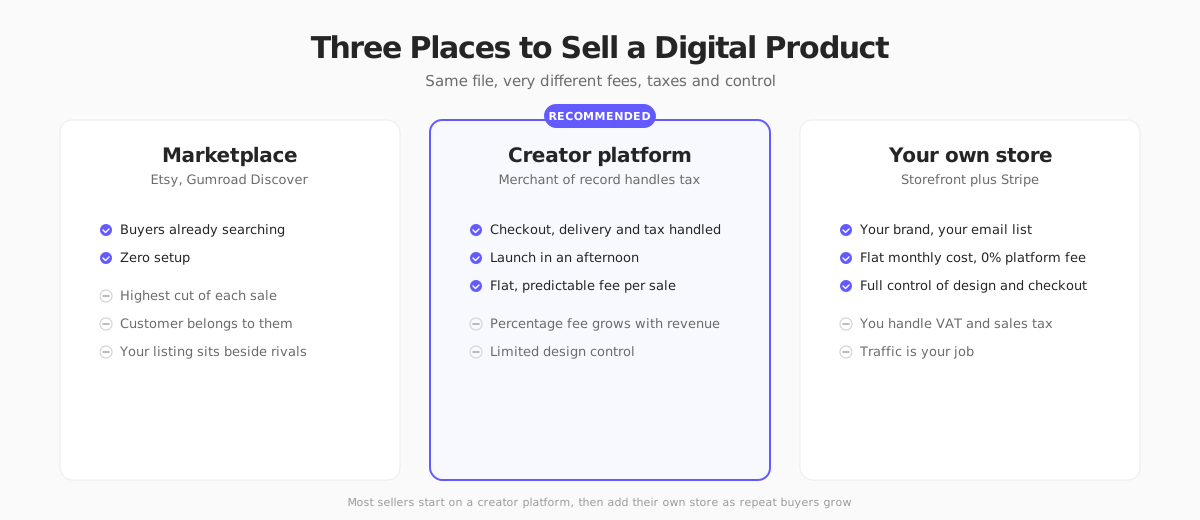
Marketplaces: borrowed traffic
On Etsy and Gumroad Discover, buyers are already searching. You get traffic on day one, which is rare. The price is higher fees, competition on the same results page and a customer relationship that belongs to the marketplace first. Good for testing an idea.
Creator platforms: the best default for most
Tools like Gumroad, Lemon Squeezy, Payhip and Podia give you a checkout page, file delivery, discount codes and email in one tool. Several act as merchant of record, which means they calculate, collect and file sales tax and VAT on your behalf. For a solo creator who hates tax paperwork, that is worth a lot.
The trade-offs are a percentage fee on every sale and less control over design and customer data. Compare the numbers in the table above against your expected volume.
Your own store: brand and control
A store on your own domain gives you your brand, your email list and no percentage fee from a middleman. You pay with setup time and responsibility: you choose how to collect tax, how to deliver files and how to bring in traffic.
Here is where Your Next Store fits, to be upfront about it. YNS is an online store platform built around a Next.js storefront and a commerce backend, with an AI builder, plans from $25/month on yearly billing and 0% platform transaction fees (Stripe's processing fees still apply). It is a good fit if you sell physical goods or want a modern branded storefront, and it fits a mixed shop where merch sits next to your digital line. It is not a dedicated file-delivery or license-key tool, so if your whole business is downloads, a creator platform is the simpler path. Check how file delivery works for your setup before you choose.
0% platform fees on every sale. Building a brand with merch next to your digital products? Start a store in minutes.
A common path: start on a creator platform, learn what sells, then add your own store when repeat buyers justify it. See how to start an online store for that second step.
Step 6: Sort Out Tax and Legal Basics
Digital products are taxed differently from physical goods, and the rules depend on where your buyer lives, not just where you do. This is where most new sellers get surprised.
In the EU and UK
- In the EU, digital products sold to consumers are generally taxed at the VAT rate of the buyer's country. The One Stop Shop (OSS) lets you report and pay across member states in one place. Rules for non-EU sellers and thresholds differ, so check the official guidance.
- In the UK, digital services sold to UK consumers fall under UK VAT. Non-UK sellers generally have to register from their first taxable sale. See HMRC's VAT Notice 741A on place of supply of services and check the current registration rules for overseas sellers.
In the US
There is no national VAT. Sales tax is set by each state, and whether digital goods are taxable varies by state and by product. Since the Supreme Court's 2018 South Dakota v. Wayfair decision, you can owe tax in a state where you have no physical presence once you pass its economic threshold, often $100,000 in sales or 200 transactions, though it differs by state. Our ecommerce sales tax guide explains how nexus works.
Merchant of record: the shortcut
A merchant of record (MoR) is the company that legally sells the product to your customer. When Gumroad or Lemon Squeezy is the MoR, they register, collect and remit tax, and you receive a payout. You pay for that convenience in the fee. If you sell through your own store with Stripe, you are the seller, and you need to register where required and collect tax, with tools such as Stripe Tax helping to calculate it. Our guides on selling online with Stripe and selling internationally cover the setup.
Other basics
- Refund policy. Digital goods are often non-refundable once downloaded, but consumer rules in the EU and UK give buyers withdrawal rights that you can only waive properly, with explicit consent at checkout. Write a clear policy.
- Terms and license. State what buyers can and cannot do with the file.
- Privacy. If you collect emails, follow GDPR in the EU and UK and state privacy laws in the US.
- Business registration. Register as a sole trader, LLC or equivalent where you live, and keep business and personal money separate.
Always check the current rules where you sell. This guide summarizes US, EU and UK tax and consumer rules for digital products as of October 2026. Regulations change and vary by country and state, so confirm the details with your local tax authority or an accountant before you register, charge tax or write your policies. This is general information, not legal or tax advice.
Step 7: Get Your First 100 Buyers
You do not need a big audience, but you do need one channel you commit to. Pick one and give it two months.
- Search and content. A free guide or a how-to post that solves a small part of the problem draws the exact buyer. Our ecommerce SEO guide covers the basics.
- Social platforms. Short videos that show the product in use work well. Pinterest suits printables and templates because boards keep sending traffic for months.
- Email list. Offer a free sample in exchange for an address. Subscribers buy at much higher rates than strangers.
- Marketplaces. List on Etsy or Gumroad Discover to borrow their traffic while you build your own.
- Partnerships. Affiliate links with creators your buyers already follow can open a new audience. Most creator platforms support them.
- Communities. Answer questions honestly in forums and groups. Mention your product when it is truly the answer.
Then do the unglamorous part: ask buyers for reviews, fix what they complain about, and release updates. A product that improves keeps selling.
What Does It Cost to Start?
Digital products are cheap to launch, but not free. Rough planning ranges:
| Approach | Upfront | What you get |
|---|---|---|
| Test with one product | $0 to $100 | Free tools, a creator platform, mockups you make yourself |
| Small catalog | $200 to $1,000 | Design help, a domain, email tool, a few paid ads |
| Brand with its own store | $1,000 to $5,000 | Custom storefront, branding, email flows, content |
The largest cost is your time. Plan for the first product to take weeks, not days, and for the second to sell better because you learned from the first.
The digital sellers who last do not chase every trend. They pick a buyer, solve one problem very well and keep the product current.
FAQ
How do I start a digital products business with no money?
Pick a product you can make with free tools, such as a spreadsheet, a guide or a template. Sell it on a creator platform that charges only when you make a sale, so your upfront cost can be close to zero. Spend your time on research, a clear listing and one marketing channel.
What digital products sell best?
Templates, planners, design assets, courses, software kits and guides all sell, but the winners solve a specific problem for a specific buyer. Check marketplaces for products with many reviews, then look for a narrower or better version.
Do I need to charge VAT or sales tax on digital products?
Often yes. In the EU and UK, VAT usually depends on where the buyer lives. In the US, taxability and thresholds vary by state. A merchant of record such as Gumroad or Lemon Squeezy handles this for you in exchange for a fee, while selling through your own store means you handle it yourself.
Is a digital products business passive income?
Not entirely. The product can sell without you, but you still handle support, updates, marketing and tax. It becomes mostly hands-off once your product has steady traffic and a clear support page.
Should I sell on my own website or a marketplace?
Start where buyers already are, then add your own store once you have repeat customers. A marketplace gives traffic with higher fees and less control. Your own site gives you your brand and email list, but you bring the traffic.
How much can I earn?
It varies widely. Many sellers earn little or nothing in the first months, and a few build full-time incomes. Treat any figure you see online as a best case, and judge your own numbers after a few months of real sales.