How to Open a Retail Store in 2026: A Step-by-Step Guide
 Michał Miszczyszyn
Sep 3, 202610 min read
Opening a retail store used to mean picking a location, signing a lease, and hoping the neighborhood showed up. In 2026, the retailers who survive their first year usually do it in a different order: validate demand online, then use a physical location to serve customers who already exist. This guide walks through both paths, the real costs involved, and the operational basics (licenses, POS, inventory) that trip up first-time retailers regardless of which order they choose.
Physical First, Online First, or Both?
The traditional playbook (find a location, build it out, open the doors) still works, but it front-loads your biggest risk before you have a single customer. The alternative that's become standard for new retail brands: open an online store first, spend a modest budget proving people actually want what you're selling, then use that data to justify a physical lease, a specific location, and a realistic inventory buy.
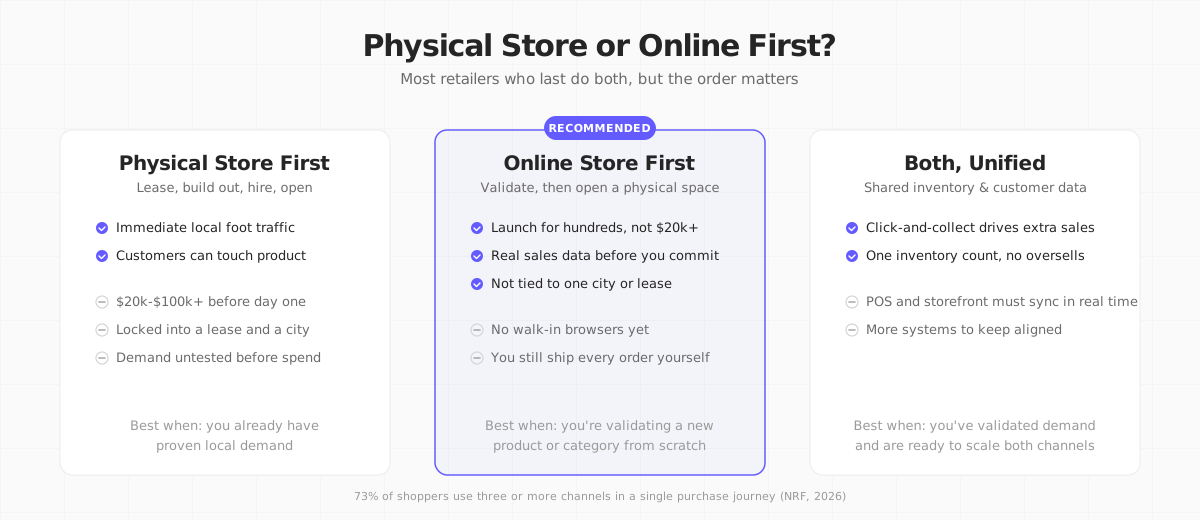
Neither path is universally correct. If you're opening in a category where discovery already happens locally, foot traffic, a farmers market stall, a neighborhood with proven demand, physical-first can make sense. If you're testing a new product or a niche category with no guaranteed local audience, validating online first is the lower-risk sequence, and it's the one this guide leans toward.
Step 1: Estimate Your Real Startup Costs
Retail startup cost estimates vary widely depending on who you ask, mostly because "retail store" spans everything from a 200-square-foot kiosk to a full-size boutique. A reasonable range for a small independent store: $20,000 to $100,000 before you open the doors, broken down roughly as:
| Cost category | Typical range |
|---|---|
| Lease deposit (first + last + security) | $5,000-$20,000 |
| Store buildout, fixtures, signage | $3,000-$30,000+ |
| Initial inventory | $10,000-$50,000 |
| POS hardware and software | $79-$300/month, plus one-time hardware |
| Working capital reserve (3-6 months) | Varies, but budget for it |
Average asking rent for US retail space in early 2026 runs around $23-$26 per square foot annually, though malls and prime urban corridors run considerably higher. If those numbers feel steep relative to your available capital, that's the strongest argument for validating demand online before you sign anything.
Step 2: Cover the Legal Foundations
Before you sell anything, in-person or online, get these in order:
- Register a business entity. A sole proprietorship works to start in many places, but an LLC (US) or equivalent limited-liability structure is worth it once you're signing a commercial lease, since a lease is a multi-year personal liability if your business is unincorporated.
- Get a sales tax permit in every state or region where you'll collect tax, and register for VAT if you're selling in the EU or UK above the local threshold.
- Check zoning and permits for your specific location. Retail zoning, a certificate of occupancy, and a sign permit are all separate approvals in most US cities, and each can take weeks.
- Get general liability and commercial property insurance before you take possession of a lease, not after your first customer walks in.
- Confirm what licenses your category needs. Food, cosmetics, and secondhand goods often carry category-specific permits beyond the standard business license.
Requirements differ meaningfully by state and country, so treat this as a checklist to verify locally, not a substitute for confirming your specific jurisdiction's rules.
In the EU and UK, VAT registration typically kicks in once you cross a local turnover threshold (this varies by country, so confirm your specific one), and it applies regardless of whether the sale happens in-store or online. If you're opening both a physical location and an online store, you'll usually need to account for VAT across both channels under the same registration, not as two separate businesses. Commercial leases in the EU also commonly carry longer minimum-term expectations than US retail leases, so get a local commercial lawyer to review terms before signing, not after.
Step 3: Choose a Location With Data, Not a Gut Feeling
If you're going physical-first, or you've validated online and are ready to open a location, resist picking a spot purely because it "felt right" on a walkthrough. A few checks that catch expensive mistakes before you sign:
- Pull actual foot traffic data for the block, not just the neighborhood. Foot traffic can vary enormously between one storefront and the one next door, depending on parking, transit stops, and what anchor tenant is nearby.
- Map your existing online customers' zip codes, if you have any sales history at all. A cluster of existing demand is a far stronger location signal than demographic averages for a city as a whole.
- Visit at the times you'll actually be open, including a weekday evening and a weekend afternoon, not just once during a leasing agent's showing.
- Ask about co-tenancy and anchor turnover. A location next to a strong anchor store can lose most of its value if that anchor leaves during your lease term; ask what protections (if any) your lease has for that.
Step 4: Find Products and Set Up Point of Sale
Whether you're sourcing wholesale, manufacturing, or reselling, the same POS system needs to handle both a physical register and, if you're running both channels, your online orders, without you re-entering inventory counts twice.

Square is a common starting point for new independent retailers: no monthly minimum, hardware that works out of the box, and payment processing bundled in.

Lightspeed targets retailers who need deeper inventory management, multi-location support, or industry-specific features (apparel matrices, serialized inventory for electronics or bikes), at a higher price point than Square's entry tier.
Whichever you choose, confirm it can sync inventory with your online store in real time. A sale on the floor that doesn't decrement your website's stock count is how you end up selling the same item twice, which is one of the fastest ways to generate a refund and a bad review in the same afternoon.
Step 5: Build (or Validate With) an Online Store
If you're following the validate-first sequence, this is where you start, and it's also the step every physical retailer needs eventually: 73% of shoppers now use three or more channels during a single purchase journey, according to NRF's State of Retail 2026 research, and retailers offering an "endless aisle" (online catalog beyond what fits in-store) see average ticket sizes rise 15-20% by removing the physical shelf-space limit entirely.
This is where our product, Your Next Store, is directly relevant: it's an AI-powered store builder where you describe what you're selling and get a working storefront, which is a fast way to get a real online presence live before you've committed to a lease. It's built on Next.js with Partial Prerendering, so product pages load quickly even under the traffic spikes a local press mention or a viral social post can cause. If you already have a developer team and want full control instead, the open-source storefront template is free to self-host, though it's the frontend only and still needs a commerce backend to actually run your catalog and orders.
Whichever platform you pick, get real transactions flowing through it (even ten sales) before you finalize a location. Actual conversion data tells you more about demand than any survey.
Step 6: Hire, Train, and Open
Staffing is where a lot of retail budgets get surprised. Beyond wages, budget for POS training (most systems, including Square and Lightspeed, can train a new hire in under a day), a written cash-handling and return policy so staff aren't improvising rules on the spot, and a clear opening/closing checklist. A soft-open week, invite friends, local press, and email subscribers before your official grand opening, catches operational problems (a POS glitch, a checkout bottleneck, a signage issue) while the stakes are still low.
Common Mistakes That Sink New Retail Stores
- Signing a lease before validating demand. A five-year commercial lease is the single hardest cost to undo if the category doesn't sell.
- Underestimating working capital needs. Most new stores need 3-6 months of operating cash beyond the opening budget; running out of cash in month four, after the store is already open, is one of the most common failure modes.
- Treating online and in-store inventory as separate systems. Split inventory leads to overselling, understocking, and a staff that doesn't trust either number.
- Skipping a soft-open. Full-volume day one with an untested POS or an untrained cashier turns a good first impression into a bad review.
- No plan for slow months. Retail is seasonal in almost every category; budget for the slow months before they arrive, not during them.
FAQ
How much money do I need to open a retail store?
Plan for $20,000-$100,000 for a small independent store, covering lease deposit, buildout, initial inventory, and a working capital reserve, though costs vary widely by city, category, and store size. If that range is out of reach right now, validating demand with a lower-cost online store first is a common way to build toward it with real sales data instead of a guess.
Do I need a business license to sell online only, with no physical location?
Usually yes. Even an online-only store typically needs a business registration and a sales tax permit in the states or countries where you have tax obligations. Requirements vary significantly, so check your specific state, province, or country rather than assuming an online store is exempt from local business licensing.
Is it cheaper to open online first or a physical store first?
Online first is almost always cheaper to start: a storefront platform and initial marketing budget can run a few hundred to a few thousand dollars, versus $20,000+ for a physical space. The tradeoff is that a physical store captures walk-in demand an online store never sees, which is why many successful retailers eventually run both.