How Much Does an Ecommerce Website Cost in 2026? A Beginner's Guide
 Jakub Neander
Apr 24, 202611 min read
Every article that ranks for this question tells you an ecommerce website costs "anywhere from $500 to $250,000." That range spans three orders of magnitude and helps nobody, especially if you've never built a store before. This post is for first-time, non-technical store owners. We skip the jargon, show you the five paths you can actually take, and give you a real dollar total for each, including the fees and extras most guides quietly leave out.
I'm Jakub. I run Your Next Store, which is one of the options mentioned below, so take my numbers with that in mind. If something here is wrong, tell me and I'll fix it.
If you're brand new to this: there isn't one "website cost." There are five paths. The right one depends on whether you have any coding help, how much time you have, and how much your store will sell. We'll walk through each with real dollar amounts below.
The Short Answer
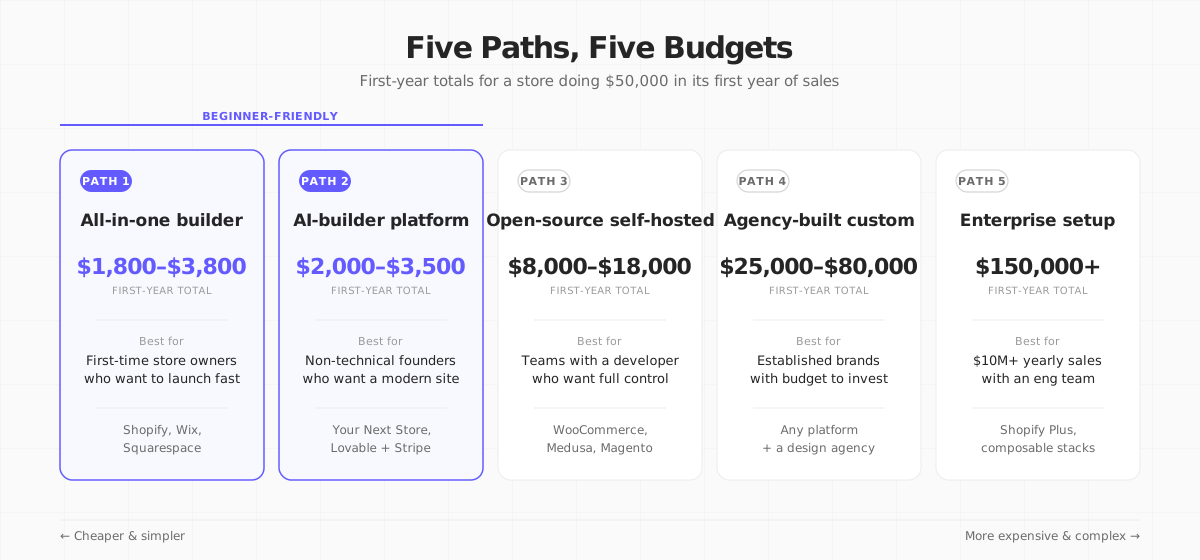
For a typical beginner store doing $50,000 in its first year (about $4,000/month, or roughly 500 orders at an average price of $100):
| Path | Best for | First-year total | Year 2 onwards |
|---|---|---|---|
| 1. All-in-one website builder (Shopify, Wix, Squarespace) | Beginners who want to launch this week | $1,800–$3,800 | $2,000–$4,500 |
| 2. AI-builder platform (Your Next Store, Lovable + Stripe) | Beginners who want a modern, faster store without hiring a developer | $2,000–$3,500 | $2,000–$3,500 |
| 3. Open-source, self-hosted (WooCommerce, Medusa) | People with a developer friend or a small technical team | $8,000–$18,000 | $6,000–$14,000 |
| 4. Agency-built custom site | Established brands with budget for a bespoke design | $25,000–$80,000 | $15,000–$35,000 |
| 5. Enterprise setup (Shopify Plus, headless, composable) | $10M+ sales with an engineering team | $150,000+ | $100,000+ |
The numbers above include the monthly subscription, a theme or design, a few essential add-ons, payment processing fees, and basic email marketing. They don't include your own time, your marketing budget, or the cost of making the product itself.
Source ranges cross-checked against Shopify's own guide, BigCommerce's breakdown, and Statrys's 2026 guide.
If you're a complete beginner, the only paths you should seriously consider are 1 and 2. The rest of this post still explains all five, so you understand what you're not doing and why.
One Fee Every Path Charges: Payment Processing
Before we dig in, one thing to understand, because it surprises almost every new store owner:
Every time a customer pays you by credit card, roughly 3% of the sale goes to the card networks (Visa, Mastercard) and the payment processor (usually Stripe or PayPal). The exact number is typically 2.9% + $0.30 per order. On a $100 sale, you keep about $96.80.
This isn't a fee your website charges. It's a fee the banks and card networks charge. Every online store pays it, no matter which path you pick. For a store doing $50,000 in yearly sales, that's roughly $1,600/year in card fees. For $250,000 in sales, about $8,000/year.
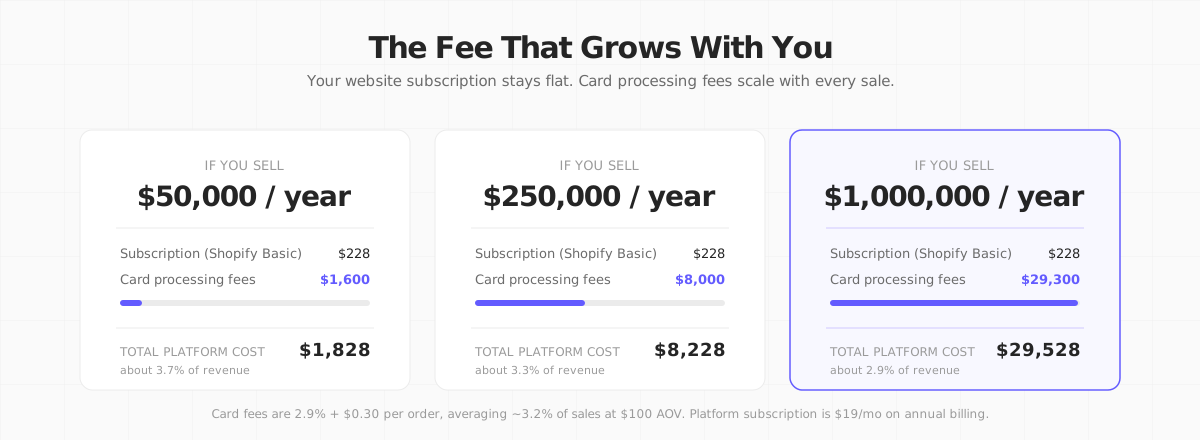
Keep that number in mind as you read the tables below. The subscription for your website is usually the small number. Card fees are the big one, and they scale with your sales.
Path 1: All-in-One Website Builder (Shopify, Wix, Squarespace)
This is how most first-time store owners start, and for good reason. You pick a platform (Shopify, Wix, Squarespace), pay a monthly fee, click through a setup wizard, pick a theme that looks close enough, add your products, and you're live. The platform handles hosting, security, and most of the technical work.
What it actually costs in year one
| What you're paying for | First year |
|---|---|
| Monthly subscription (Shopify Basic on yearly billing, $19/mo) | $228 |
| Custom domain (yourstore.com) | $15 |
| A premium theme (one-time) | $300 |
| 2–3 essential add-ons (reviews, email capture, etc.) | $400 |
| Some basic product photos from a freelancer | $300 |
| Email marketing tool (starts free, grows with you) | $0 |
| Payment processing on $50,000 in sales | $1,600 |
| Realistic first-year total | ~$2,843 |
Shopify updated its plans in April 2026. Basic is now $19/mo on annual billing, not the $29 you'll still see in older articles. See current pricing.
Where it starts to hurt later
The subscription is the cheap part. Two things tend to surprise people after the first few months:
- Card processing fees scale with sales. If your store grows from $50K to $250K in yearly sales, your card fees grow from about $1,600 to about $8,000. That's fine. But if you use a different payment provider than Shopify's own (for example, direct Stripe or PayPal), Shopify charges an extra 0.5%–2% on top. We broke down exactly what happens to a single sale in How Much Does Shopify Take From a $100 Sale?.
- Add-on apps pile up. Each one is small ($15–$50/month), but a mature store often runs 8–15 of them. That's easily $200–$500/month on top of your subscription. None of this appears on the pricing page. For a closer look at what those fees actually look like, see Shopify Transaction Fees: Every Fee They Don't Show You.
This path is right if…
- You've never built a store before.
- You want to launch in days, not weeks.
- You're okay with your store looking like a template (a nice one, but still a template).
- You won't outgrow 500 products or need unusual features.
This path is wrong if…
- You want a store that looks obviously different from every other Shopify store.
- You expect to cross $500K in yearly sales within 12 months (card-plus-app fees start eating real margin).
- You care a lot about site speed and have the skills to do something about it.
Path 2: AI-Builder Platform (the newer beginner option)
This is the path that barely existed in 2023 and is now growing fastest. You describe what you want in plain English, an AI assistant builds the storefront for you, and a hosted platform handles the rest (products, orders, payments, inventory). You end up with a modern, fast site, usually built on Next.js or similar, without having to code anything yourself.
Examples: Your Next Store (the Elliot AI builder plus an open-source storefront template plus the managed platform behind it), and Lovable paired with Stripe for payments.
What it actually costs in year one
| What you're paying for | First year |
|---|---|
| Platform subscription (YNS Starter on yearly billing, $25/mo) | $300 |
| Custom domain | $15 |
| AI credits (included in the plan) | $0 |
| Some product photos / content | $300 |
| Email marketing (starts free) | $0 |
| Payment processing on $50,000 in sales | $1,600 |
| Extra platform fees beyond Stripe's? | $0 |
| Realistic first-year total | ~$2,215 |
Numbers here are for a YNS Starter plan. If you need more AI credits or more team members, the Growth plan is $75/mo on yearly billing, which adds $600 to the first-year total.
The card fees on the line above are the same ones any store pays, no matter the platform. The important difference is that this path doesn't add extra fees on top of Stripe's, the way Shopify does if you pick a non-Shopify payment provider.
That $300 photo line item can often shrink further, too. AI background-removal and product-photography tools now handle a lot of that work for a few dollars a month instead of a photographer's day rate; see our roundup of AI tools for ecommerce for the current options, or shoot your own with a budget product photography setup.
Where it starts to hurt later
- AI builders are still new. If you need something unusual (complex subscriptions, country-specific pricing, multi-warehouse inventory), you may hit a "the AI can't do this yet" wall and need to wait for a feature, work around it, or get occasional help from a developer.
- Platform risk. If the AI-builder company shuts down or changes its prices a lot, your store might need to move. Mitigate this by picking a platform that's open-source or lets you export your store's code, so you're never locked in. YNS is open-source; not every competitor is.
This path is right if…
- You don't code and don't want to hire a developer.
- You want a modern, fast site that doesn't look like a default Shopify template.
- You like the idea of "I describe what I want, the site updates."
- You want the option to own the code later if you outgrow the managed version.
This path is wrong if…
- You need obscure features that only exist in a mature app ecosystem today (very niche dropshipping setups, for example).
- You're already comfortable with Shopify and have no reason to change.
For the tutorial-style version of this path, see How to Build an Ecommerce Website with Next.js. For how AI is changing store-building in general, see AI Ecommerce: A Practical Guide.
Path 3: Open-Source, Self-Hosted (for people with a developer)
This is what you'd hear about if you asked a developer friend. You (or they) install free ecommerce software like WooCommerce (for WordPress) or Medusa on a server you rent. The software is free. Everything else isn't.
If you're a total beginner, you can stop reading this section. It isn't for you. It's here so you know what people mean when they say "go open source" (and why they usually say it without mentioning the hidden costs).
What it actually costs in year one
| What you're paying for | First year |
|---|---|
| Domain, hosting, and security service | $500 |
| Paid plugins / extensions | $500 |
| Initial setup by a freelance developer (20–40 hours) | $1,500–$3,000 |
| Ongoing developer help (a few hours a month) | $4,500 |
| Payment processing on $50,000 in sales | $1,600 |
| Email marketing | $240 |
| Realistic first-year total | ~$8,840–$10,340 |
Ranges here lean on industry freelancer rates from Statrys's 2026 guide ($3K–$10K for freelance dev work) and hosting numbers from BigCommerce's cost table.
Why it's not actually "free"
Open-source software costs $0 to download. But:
- Someone has to keep it running. Security patches, plugin conflicts, software updates, backups. That's a few hours a month, forever.
- Plugins cost real money. Free software + 10 paid plugins = more than a simple Shopify subscription.
- When something breaks, there's no support line. You or your developer have to fix it.
If you have a developer friend who's genuinely happy to help for the long term, this path can make sense. If your "developer" is someone you'll lose contact with after month three, this path turns into a very expensive lesson. For a deeper comparison against modern alternatives, see WooCommerce vs Next.js: An Honest Take.
Path 4: Agency-Built Custom Site
You hire a design-and-build agency. They design a site that looks distinctively yours, build it on top of an existing platform (Shopify, WooCommerce, or a custom stack), and hand it over. You usually keep paying them a monthly amount to make changes.
What it actually costs in year one
| What you're paying for | First year |
|---|---|
| Design and discovery | $6,000–$12,000 |
| Build (actual coding) | $18,750–$50,000 |
| Platform subscription | $228 |
| Ongoing monthly help from the agency | $0 in year one (covered in build) |
| Payment processing on $500K yearly sales | $15,150 |
| Apps, integrations, and extras | $1,200 |
| Realistic first-year total | $41,000–$78,000 |
Agency ranges here match BigCommerce's tier estimates ($25K–$80K for a custom build) and Statrys's figures ($20K–$100K+ for development agencies).
When it makes sense
You have a real brand that people come to because of how it looks and feels. You've been selling on Shopify or Wix for a year or two, and now you want a site that's as distinctive as your product. You have $30K+ to invest and it won't put you out of business if the project takes three extra months.
If you're still figuring out whether people want to buy your product at all, this is not the right path. Start with Path 1 or Path 2 and come back here in a year.
Path 5: Enterprise Setup
This is the "Formula 1 of ecommerce" tier. Licensed enterprise platforms (Shopify Plus at $2,300/month minimum, BigCommerce Enterprise, or more custom setups) with a specialist team to build and maintain everything. First-year totals of $150,000 to $900,000+.
If you're reading this guide, this isn't for you. It makes sense for businesses doing $10 million or more in yearly sales with a large engineering team. Every other time, it's overbuilding. We include it so you know it exists and, more importantly, so you don't get talked into it too early.
The Extras Most Guides Leave Out
Five costs that matter and that you'll almost certainly meet in year one, no matter which path you pick.
1. Card processing fees grow with your sales
We covered this above. On $50K in yearly sales, plan for about $1,600/year in card fees. On $250K, about $8,000. This is usually your biggest recurring cost after the product itself.
2. Add-on apps pile up
A mature store on Shopify, Wix, or Squarespace often runs 8–15 small paid apps at $15–$50/month each. That's $2,000–$5,000/year. It's not in the sticker price on the pricing page. Budget for it.
3. Your own time isn't free
If you're the founder and you DIY the whole store, that's 80–120 hours of your life for a typical first-year launch. If you'd otherwise be making money doing something else, count that as a cost. Most beginners don't, which is fine, but be honest with yourself when you compare "Path 1 at $2,800" to "Path 4 at $45,000." Some of that gap is just your time.
4. Product photos and copy
Good photos sell. Bad photos kill conversion. A freelance product photographer runs $50–$200 per product for studio shots. Even a small 30-product catalog is $1,500–$6,000 on the low end. Most cost guides forget to mention this.
5. Marketing is usually bigger than the site itself
Building the store is about 10% of the work. Getting customers to it is the other 90%. For most beginner stores, marketing spend ends up at 15%–30% of your revenue. On a $50K store, that's $7,500–$15,000 in ads, email tools, influencer collabs, or SEO. It's not part of "ecommerce website cost," but it's the cost that decides whether your store actually makes money.
A Simple Decision Guide
Working from most-beginner-friendly to least:
| If you… | Start with |
|---|---|
| Have never built a store before and want to launch this week | Path 1: all-in-one builder |
| Want a modern, fast store without hiring a developer | Path 2: AI-builder platform |
| Have a developer friend and want full control | Path 3: open-source, self-hosted |
| Have a real brand and $30K+ to invest in a custom design | Path 4: agency-built |
| Do $10M+ in yearly sales with an engineering team | Path 5: enterprise |
The two most common beginner mistakes:
- Paying for a path one tier too expensive. Hiring a $40K agency before you know whether people want to buy your product is the classic first-time overspend.
- Paying for a path one tier too cheap for where you'll be in 18 months. A free-tier builder with no custom domain looks scrappy, and scrappy converts worse. The $25–$40/month paid tier almost always pays for itself.
An ecommerce website doesn't cost "$500 to $250,000." It costs whatever the path you picked costs, plus the card fees, plus the time you forgot to charge yourself for. Pick the path first, do the math second, and ignore any guide that skips either step.
Where Your Next Store Fits
Quick disclosure: I run YNS, so treat this as a vendor pitch. Skim it if you've already picked a path.
YNS is one of the Path 2 options (AI-builder platform). The short version:
- Built for beginners. You describe what you want in plain English and the AI builds the store with you.
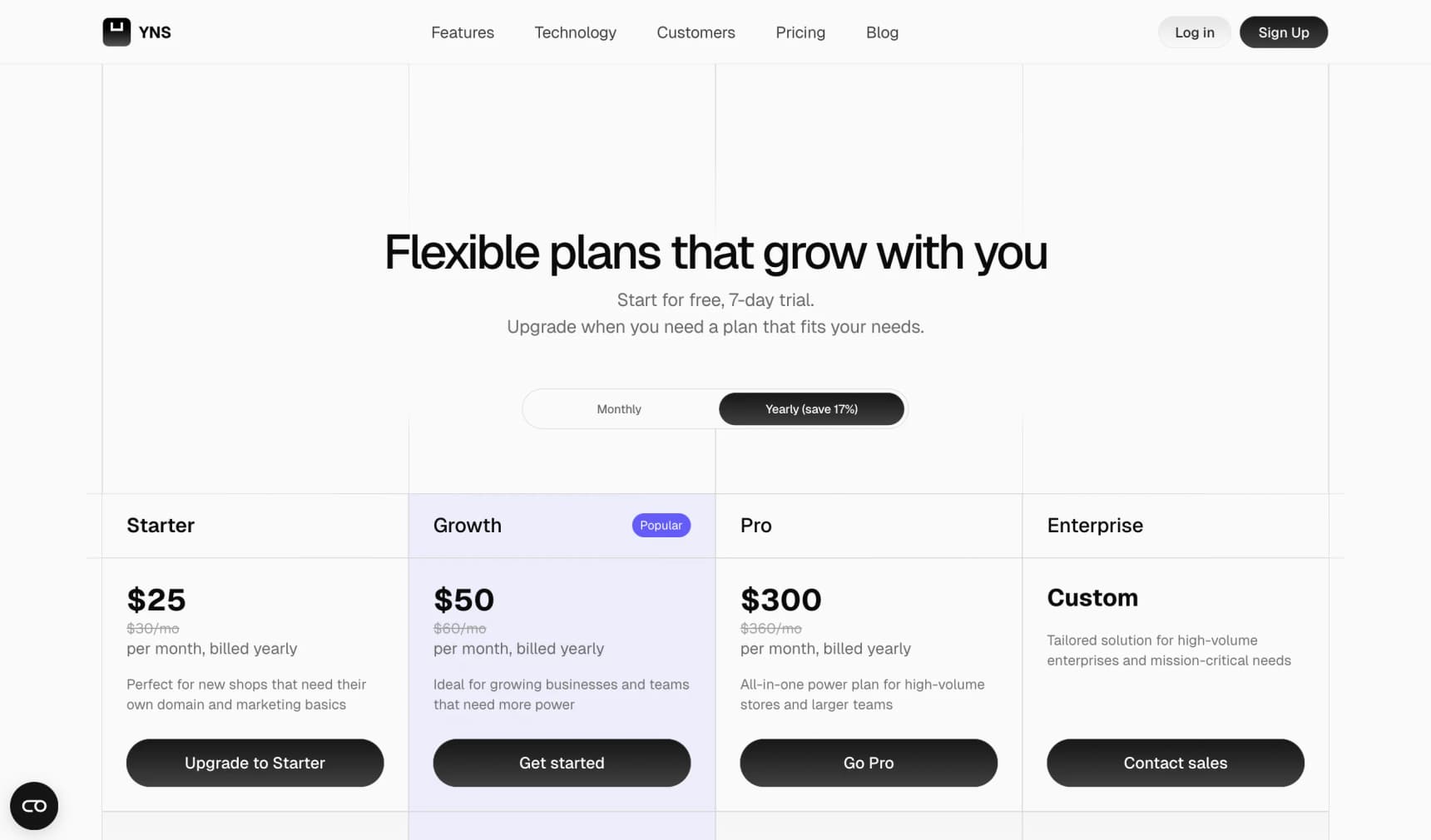
- $25/mo on yearly billing (Starter plan). See current pricing.
- No extra platform fees on top of card fees. You pay Stripe's standard processing (same as everywhere else); YNS charges 0% platform fee on your sales.
- The storefront code is open-source. If you ever outgrow the platform, you can take the code with you. Most AI builders don't let you.
If you're comparing YNS to Shopify specifically, see Next.js vs Shopify. For the step-by-step version of what "build a store with AI" actually looks like, see How to Build an Ecommerce Website with Next.js.
YNS is open-source. Star the repo on GitHub:
github.com/yournextstore/yournextstore
FAQ
Do I need to know how to code to build an ecommerce website?
No. Paths 1 and 2 don't require any coding. Path 1 (Shopify, Wix, Squarespace) is the most traditional no-code option. Path 2 (AI-builder platforms) is newer and gives you a more modern, faster site, also with no coding. Paths 3, 4, and 5 either require a developer or require paying someone to be that developer for you.
Can you really build an ecommerce website for under $500?
Technically yes. A free-tier platform plus a $15 domain gets you to around $50–$100 for the first year, before payment processing fees on your actual sales. But "under $500" usually means a free theme, no custom domain, and a site that looks like every other free-tier store. Budgeting $2,000–$3,000 for the first year gets you a site customers actually trust.
How much does a Shopify store really cost per year?
For a beginner store doing $50K in yearly sales on Shopify Basic with Shopify's own payment provider: roughly $2,800–$3,800 all-in. Card fees are about $1,600, add-on apps another $500–$1,000, and the subscription itself only $228 on yearly billing. For stores doing $250K in sales, plan for $9,500–$12,000. We walked through the per-sale math in How Much Does Shopify Take From a $100 Sale?.
What's the cheapest way to build a store in 2026 if I want it to look professional?
Path 2 (AI-builder platforms) currently has the lowest total first-year cost for non-technical founders while still producing a fast, modern-looking site. You're usually in the $2,000–$3,500 range including card fees. Path 1 (Shopify, Wix) is close, but the generic-template look is harder to avoid.
Is an agency-built custom website worth the cost?
Only if your brand is the reason people buy. If customers come to you because of your product's look, feel, or a unique experience, the $30K–$80K agency investment can pay for itself. If you're selling on price, features, or assortment, spend that money on marketing instead and use a Path 1 or Path 2 store.
How much should I budget for ongoing maintenance?
On Paths 1 and 2, zero. The platform handles it, included in your subscription. On Paths 3, 4, and 5, plan for 10%–20% of your first-year cost per year on maintenance and small updates.
What about the cost of making the product itself?
Not covered here. This guide is about the website cost. Making the product, whether it's inventory you buy from a factory, materials for something you make yourself, or a digital file, is a separate budget. For a beginner's guide to that side of the business, see How to Start an Online Store in 2026.