Set up shipping methods
Create the delivery options and rates your customers choose from at checkout, from a simple flat rate to country-specific options.
Shipping methods are the delivery options your customers choose from at checkout. You decide what each option is called and how much it costs, and your customers pick the one they want.
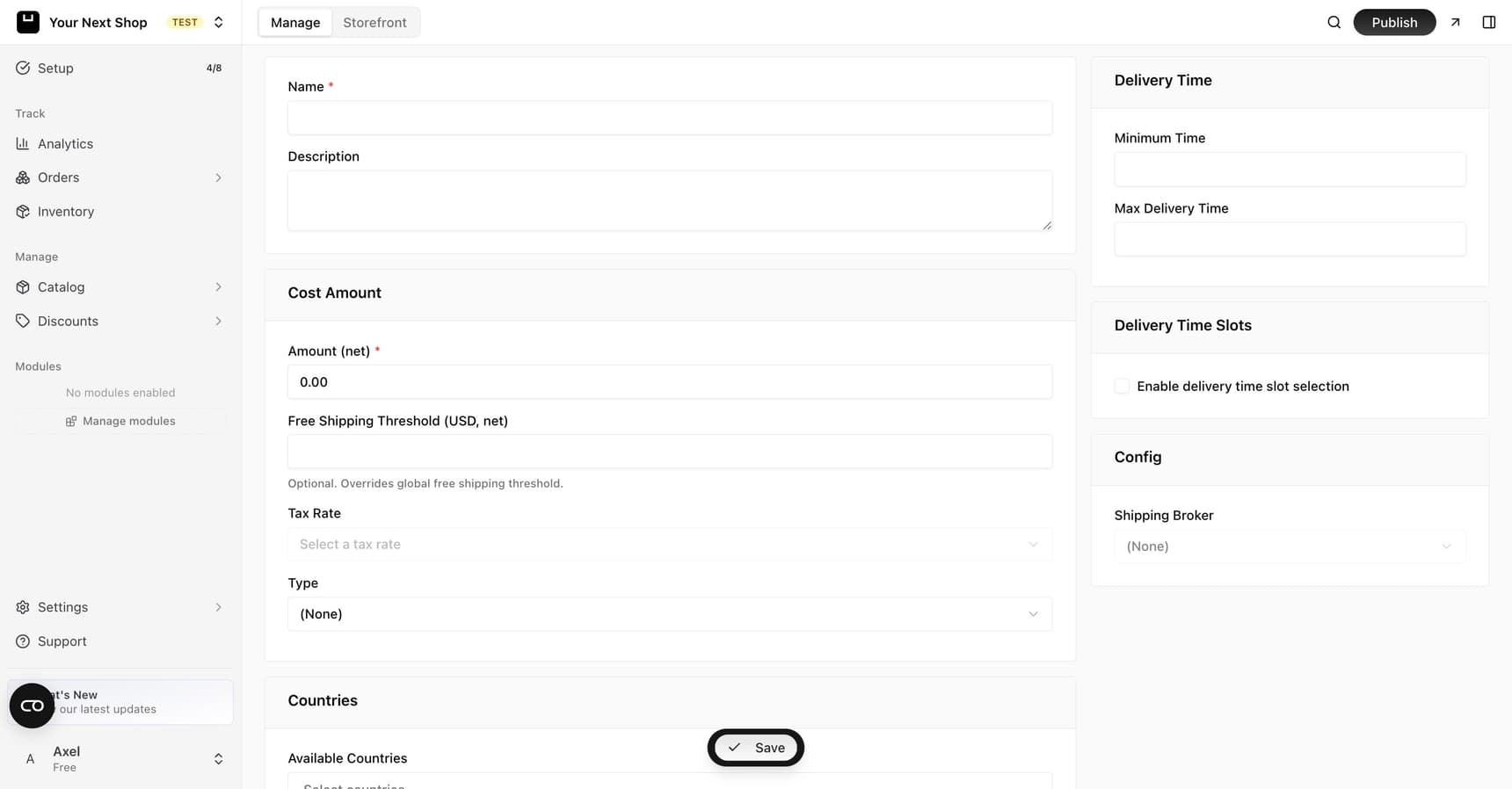
How shipping methods work
Each shipping method has a name and a cost. When a customer reaches checkout, they see your shipping options and select one – the cost is added to their order total.
You can offer just one option or several, so customers can trade off speed and price. There's no limit to how simple you keep it: a single flat rate works perfectly well, and you can always add more options as you learn what your customers want.
Note: If you sell only digital products – downloads, tickets, subscriptions – you can skip this step entirely during setup. It comes back on its own the moment you add a product that needs to be shipped.
Before you start
A few minutes of planning makes setup quicker:
- Know roughly what delivery costs you. Weigh a typical parcel and check your courier's prices so your rates cover what you actually pay to send orders.
- Decide where you ship. Just your own country, a handful of nearby countries, or worldwide? You can set which countries each method is available in.
- Pick names customers will recognize. "Standard delivery" and "Express delivery" are clearer than internal codes or courier names.
Step 1: Add a shipping method
- Go to the shipping settings in your dashboard.
- Choose to add a new shipping method.
- Give it a clear name customers will understand, such as "Standard delivery" or "Express delivery".
- Set the cost (for example, a flat rate of $5).
- Save.
Tip: A simple flat rate is the easiest way to start. You can always add more options later.
Understanding the fields
When you create a method, you'll see a few settings. Here's what each one does:
| Field | What it does |
|---|---|
| Name | The label customers see at checkout, such as "Standard delivery". Make it clear and friendly. |
| Cost | The amount added to the order when this method is chosen, entered net (before tax) – the field is labeled "Amount (net)". Enter 0 for free shipping. |
| Free shipping threshold | An optional order amount above which this method becomes free – for example, free over $50. |
| Tax rate | The tax applied to the shipping charge, where shipping is taxable in your area. Leave it as is if you're unsure. |
| Available countries | The places this method can be chosen. Use it to offer different rates for home and abroad. |
| Delivery time | An estimate like "2–4 business days" that helps customers set their expectations. |
Tip: Filling in a delivery time estimate reassures shoppers and cuts down on "where's my order?" messages later.
Step 2: Add more options (optional)
Many stores offer a few choices. For example:
| Method | Cost |
|---|---|
| Standard delivery | $5 |
| Express delivery | $12 |
| Free shipping | $0 |
Customers see all of these at checkout and pick the one that suits them.
When to use one rate vs several
- One flat rate keeps things simple and is great when you're starting out or sell similar-sized items.
- Several options let customers choose between paying less and getting it faster – useful if some shoppers are happy to wait and others want it quickly.
- Country-specific rates make sense once you ship abroad, since sending a parcel overseas usually costs more than sending it locally.
Step 3: Review at checkout
After saving, place a test order or preview your checkout to make sure your shipping options appear and the costs look right. Check from a customer's point of view: do the names make sense, are the prices correct, and do the right options show for the country you're testing?
Tip: Do it with AI – ask the AI Assistant in your dashboard to set up a flat-rate shipping method, add an express option, or check which methods are live, and it will handle the setup for you.
Common mistakes to avoid
- Pricing too low to cover real costs. If you charge $3 but pay $6 to ship, every order eats into your margin. Match your rates to what delivery actually costs.
- Forgetting countries you can't ship to. Only list countries you're genuinely able and willing to ship to, or you'll get orders you can't fulfill.
- No free option when you advertise one. If you promote free shipping anywhere, make sure a matching method actually exists.
FAQ
Can I charge different prices for different countries?
Yes. Create a separate shipping method for each region and set the available countries on each one. Customers only see the methods available for their delivery address.
What happens if I don't add any shipping methods?
If you sell anything physical, customers won't have a delivery option to choose at checkout, which can block them from completing an order – add at least one method, even a single flat rate, before you go live. If everything you sell is digital, shipping isn't needed at all.
Can shipping be free above a certain amount?
Yes. Each method has a free shipping threshold you can set, or you can create a dedicated free-shipping option. See Offer free shipping for the full walkthrough.
How do I let local customers collect orders instead?
Add a pickup location and customers can choose to collect in person instead of paying for delivery. See Add pickup locations.
What's next
- Want to reward bigger orders? See Offer free shipping.
- Prefer local collection? See Add pickup locations.
- Set how prices and taxes show – see Taxes.