
Migrating from Shopify to Headless Commerce: A 2026 Guide
 Michał Miszczyszyn
Sep 1, 202612 min read
Your theme can't do what your design team wants. Every app you install shaves another quarter-second off your Lighthouse score. And you've started fantasizing about a frontend where you control every line of code. This is the guide for the actual migration: the two ways to "go headless" from Shopify, the six-phase process in the order that keeps launches from slipping, what it really costs, and the parts that always take longer than the checklist says.
Why Teams Migrate From Shopify to Headless
Nobody migrates off a working storefront on a whim. It's usually one of four pressures, stacked:
- The theme has hit its ceiling. Liquid can only be pushed so far before every new feature is a workaround. Sections and blocks helped, but you're still templating inside someone else's rendering engine.
- App bloat is dragging performance down. A typical Shopify store runs five to ten apps for reviews, upsells, subscriptions, and SEO, and each one injects its own script tag you can't tree-shake. We measured the gap in Next.js vs Shopify: a Shopify store with a handful of apps commonly ships 500KB-2MB of JavaScript, against 80-150KB for a clean Next.js build.
- You need channels beyond the web. A native app, an in-store kiosk, an AI agent checking prices: none of them can render Liquid. They need an API. We cover this shift in what headless commerce actually means.
- The team already ships React. If your engineers live in TypeScript and component libraries, working around Liquid is a tax on every sprint.
If none of those apply, don't migrate yet. A slow Shopify store is more often a store with 40 apps than a store failing because of Shopify's core platform. Run PageSpeed Insights before you touch your architecture. If the score is fine, the theme isn't your bottleneck.
Two Ways to "Go Headless" From Shopify
This is the decision most migration checklists skip, and it's the one that determines everything downstream: you don't have to leave Shopify to go headless.
| Headless-on-Shopify (Hydrogen) | Full migration (new backend) | |
|---|---|---|
| What moves | Only the frontend | Frontend and backend |
| Backend | Stays on Shopify (catalog, orders, checkout) | Moves to a new commerce platform |
| Checkout | Shopify's hosted checkout, unchanged | You own it, or use the new platform's |
| Requires | Shopify Plus for full flexibility ($2,300+/mo) | No Shopify subscription |
| Data migration | None: same backend | Products, customers, orders all move |
| Frontend framework | Hydrogen (React Router) on Oxygen, or a custom Next.js build against the Storefront API | Whatever the new backend supports |
| Best for | Teams happy with Shopify's commerce logic, who want a custom UI | Teams leaving Shopify's fees, limits, or backend entirely |
Most "Shopify to headless" guides quietly assume you mean Hydrogen. That's a legitimate, often underrated option: you keep Shopify's proven checkout, inventory, and fraud tooling, and you only rebuild the part that was actually bothering you. Vercel also publishes a Next.js template that talks to the Shopify Storefront API if you'd rather not adopt Hydrogen specifically, and our Shopify Hydrogen alternatives guide covers that option alongside the full-migration platforms below.
Full migration is the harder, more disruptive option, and it's only worth it if Shopify's backend itself is the problem: platform fees, app dependency, or a data model that doesn't fit your catalog. The rest of this guide covers both paths, but the six-phase process below is closest to a full migration, since that's where the most steps (and the most risk) live.
The 6-Phase Migration Process
Whichever path you choose, the shape of the work is the same. Skip the audit and you'll discover missing metafields in production. Skip the redirect map and you'll lose rankings you spent two years earning.
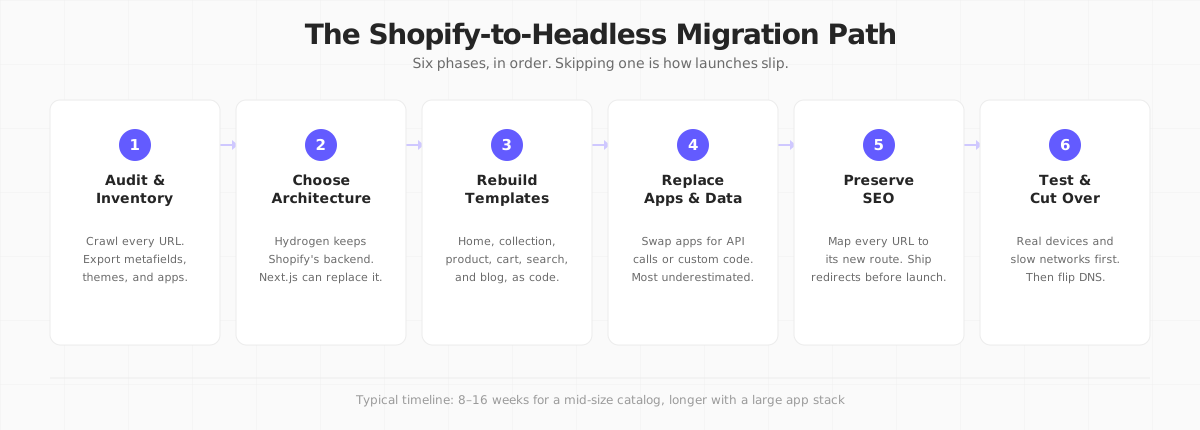
1. Audit and inventory. Crawl the live store and export every URL, template type, metafield, and installed app. This becomes two documents you'll use for the rest of the project: a redirect map (every old URL mapped to its new route) and an app-replacement checklist (which apps touch the storefront, which touch the backend, and which can simply be dropped). Shopify's own CMS migration guide is a reasonable starting checklist for the audit step, even though it's written for teams migrating onto Shopify rather than off it.
2. Choose your architecture. This is the decision from the table above. If you're staying on Shopify's backend, spin up a Hydrogen project and connect a Storefront API token. If you're leaving, this is where you pick the new commerce backend and confirm it supports your catalog: variants, bundles, subscriptions, whatever you actually sell.
3. Rebuild your templates. Home, collection, product, cart, search, blog, and policy pages, recreated as code instead of Liquid sections. This is usually the most time but the least risk: it's visible, testable work with a clear definition of done.
4. Replace apps and migrate data. The stage every checklist underestimates. Reviews, loyalty, subscriptions, upsells, email flows: each app either has a headless-compatible API, gets replaced by a different vendor, or gets built from scratch. In parallel, export and re-import products, customers, and (if you're leaving Shopify) order history into the new backend.
5. Preserve your SEO. Map every URL from the audit to its new route and ship 301 redirects before launch, not after. Update your sitemap and confirm structured data survives the rebuild. Losing organic traffic during a replatform is almost always a redirect-mapping failure, not a ranking algorithm problem. For the full technical checklist beyond redirects, see our ecommerce SEO guide.
6. Test, then cut over. Test on real devices and real (slow) networks, not just your office Wi-Fi. Once you're confident, flip DNS and watch error rates and conversion for the first 48 hours before you tear down the old environment.
Industry estimates put a fully custom headless build at 8 to 16 weeks for a mid-size catalog, longer if your app stack is large. Budget for phase 4 to take at least as long as phase 3, even though it looks smaller on the checklist.
What Nobody Tells You
The checklist above is the part every guide covers. Here's what shows up once you're actually in it.
The Storefront API has generous limits; the Admin API doesn't. Shopify's Storefront API intentionally has no fixed request-rate limit, which is why it's safe to hit from a public frontend. The Admin GraphQL API is different: it uses cost-based throttling (100 points/second on standard stores, up to 1,000/second on Plus), so a naive full-catalog export will get throttled. Use the Bulk Operations API for anything over a few thousand products; as of API version 2026-01 you can run up to five bulk operations concurrently, which meaningfully speeds up a large migration.
Checkout is the one thing Hydrogen doesn't make you rebuild. If you go the full-migration route, replicating Shopify's checkout (saved payment methods, fraud detection, tax calculation, abandoned cart recovery) is the single biggest hidden project inside the "rebuild templates" phase. Budget for it explicitly instead of discovering it in week 10.
Customer accounts and order history are the slowest data to move. Products export cleanly via CSV or the Bulk Operations API. Customers and their order history are messier: password hashes generally don't transfer (customers will need to reset), and a full order history import means reconciling refunds, partial fulfillments, and tax line items one at a time.
App replacement, not template rebuilding, is where timelines actually slip. Every app you drop is a feature your marketing team relied on. Get that team into the audit conversation in phase 1, not when they notice reviews are missing in staging.
The Real Cost of Migrating
Agencies quote headless builds at $50,000 to $150,000 for a mid-market project and $250,000 or more for enterprise, per BigCommerce's own published figures. That number is for a fully custom build: new frontend, new integration layer, new hosting, and the engineering time to keep two systems in sync.
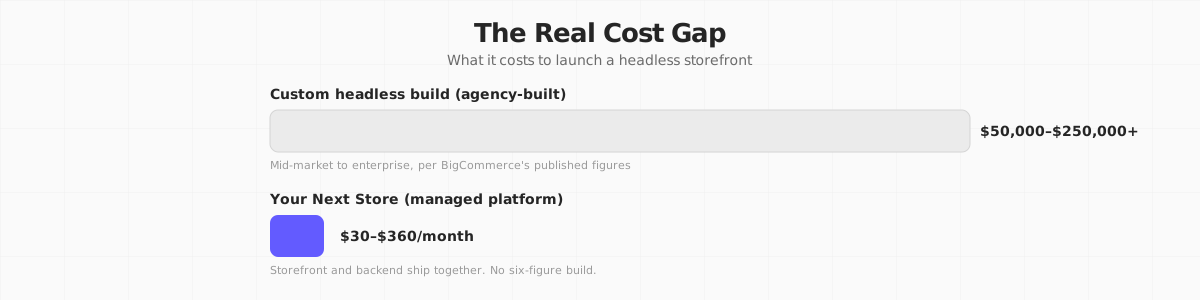
Where does that money actually go if you build it yourself?
- A second codebase. Someone maintains the frontend and someone maintains the backend integration layer, indefinitely, not just during the migration.
- Every app becomes an integration project. Reviews, loyalty, email, tax, and search all need a headless-compatible replacement or a custom build.
- Hosting for two systems. Your frontend needs its own hosting; your backend (Shopify or otherwise) needs its own uptime story.
- A senior frontend engineer, if you don't already have one. This is usually the single biggest line item, and the one most quotes bury inside "development."
If you're staying on Shopify with Hydrogen, the number is smaller: you're not paying for a new backend, but Shopify Plus (required for the full headless toolkit) starts at $2,300/month on top of the transaction fees you're already paying, and you're still budgeting real engineering time for the frontend rebuild.
If You're in the EU or UK
Migrating your frontend doesn't change your tax or data obligations, but it does change who's responsible for them. On Shopify, VAT and UK tax calculation typically run through Shopify Tax or a connected app. If you move to a new backend, confirm it (or your payment processor) calculates VAT correctly for cross-border EU sales and UK post-Brexit rules before you launch, not after your first quarter's return is due. If you self-host the storefront outside Shopify's infrastructure, also check where customer data is stored and processed: GDPR doesn't require EU hosting, but you do need a documented basis for any transfer outside the EU/UK, so this is worth a short conversation with whoever owns compliance before cutover.
Migrating Off Shopify Entirely: Where Your Next Store Fits
If phase 2 leads you to "leave Shopify's backend too," that's the situation Your Next Store is built for. (Bias flag: this is our product. Take that into account.)
YNS pairs an open-source Next.js storefront with a managed commerce backend: products, carts, orders, inventory, and customers live behind a REST API you call through the Commerce Kit SDK, and Stripe handles payment processing. It's not Hydrogen: there's no Shopify subscription underneath it, and there's no second system to keep in sync, because the storefront and the backend ship together.
A few pieces that matter specifically for a migration:
- CSV import for your existing catalog. Export products from Shopify, import them into YNS, and you skip most of phase 4's data-migration work.
- An AI-powered store builder. Instead of hand-rebuilding every template in phase 3, you describe the storefront you want and the AI agent writes the components and wires up the data.
- 0% platform transaction fees on every plan, so the fee math that pushed you off Shopify doesn't quietly reappear on the new platform.
- The open-source storefront template if you'd rather see the code than take our word for it.
Here's what the same product fetch looks like against each API. First, the Shopify Storefront API (GraphQL, the query you'd write for Hydrogen or a custom frontend):
Now the same fetch through YNS's Commerce Kit SDK, inside a React Server Component:
No GraphQL query string, no separate API client setup: the SDK call reads like a typed function, because it is one. That's less a knock on Shopify's API (GraphQL is a reasonable choice for a public storefront API) than it is a reminder that the frontend ergonomics of a migration are worth weighing alongside the backend features.
Leaving Shopify's backend, not just its theme? YNS ships the storefront, the commerce backend, and the SDK together, so migrating is one project instead of two.
Your Next Store is open source. Star the repo on GitHub: github.com/yournextstore/yournextstore
Where YNS currently falls short: no drop-in Shopify Payments equivalent for markets Stripe doesn't cover, and a smaller app ecosystem than Shopify's. If your store leans on a dozen niche Shopify apps with no headless equivalent, budget real time to replace them regardless of which backend you land on. If a self-hosted, fully open-source backend appeals more than a managed one, we've also ranked the open source Shopify alternatives worth a look.
FAQ
Do I have to leave Shopify to go headless?
No. Hydrogen (or a custom Next.js frontend against the Storefront API) lets you keep Shopify's backend, checkout, and admin while replacing only the frontend. Full migration, moving both the frontend and the backend, is a separate, bigger decision that only makes sense if Shopify's backend itself (fees, app dependency, data model) is the problem you're solving.
Will my Shopify SEO rankings survive the migration?
They can, if you treat the redirect map as a launch blocker, not a cleanup task. Map every URL from your phase-1 audit to its new route, ship 301s before cutover, and resubmit your sitemap immediately after. Most ranking losses during a replatform trace back to missed or delayed redirects, not the new architecture itself.
How long does a Shopify to headless migration actually take?
For a full custom build, industry estimates cluster around 8 to 16 weeks for a mid-size catalog, and app replacement (phase 4) is the stage most likely to blow that budget. Staying on Shopify with Hydrogen shortens the project by skipping the backend data migration and the checkout rebuild entirely, but you still build the full frontend (phase 3) on roughly the same timeline as a full migration. A platform that ships a pre-built storefront and an AI-assisted builder, like YNS, is the option that compresses the frontend rebuild itself down to days.
The Bottom Line
Every migration guide will tell you to plan your redirects and test on real devices. Fewer of them will tell you the decision that actually matters happens before any of that: whether you're replacing Shopify's frontend or replacing Shopify. Answer that question honestly, in writing, before you open a single pull request, and the rest of the six phases become a checklist instead of a series of surprises.