The ordering panel is a simple order form. It's built for buyers who know what they want and reorder often. It isn't a copy of your storefront.
## Build an order
At the top of the panel the buyer sees **Ordering as** followed by their company name. They then:
1. Use **Search products** to find items from your published catalog.
2. Enter quantities. Each line shows their unit price. When they get a discount, your retail price is shown crossed out next to it.
3. Watch the running totals: **Merchandise (net)**, **Tax**, and **Total**.
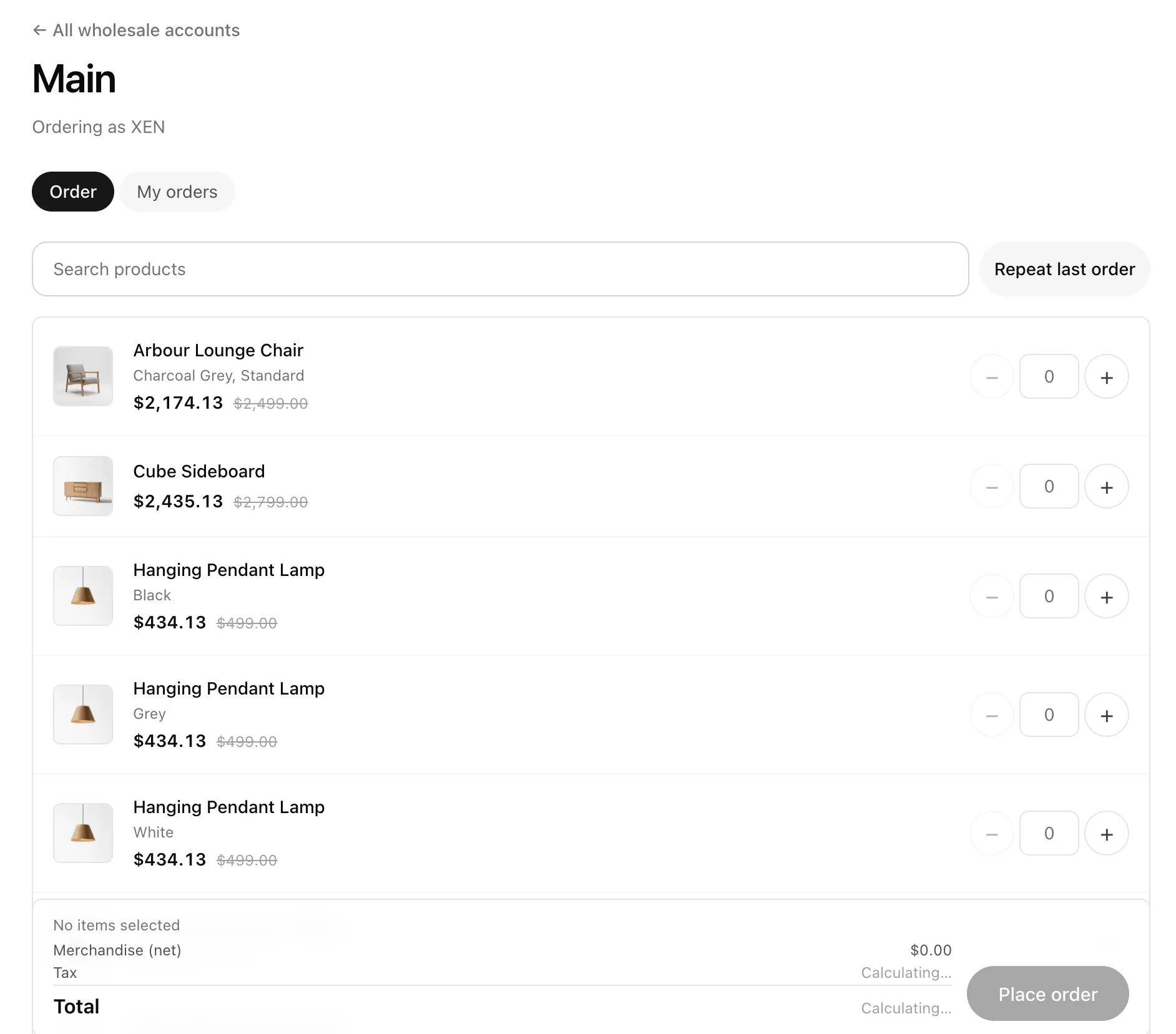 **Repeat last order** fills in everything from their previous order in one click. That's the fastest way to handle a weekly restock.
> **Tip:** If a product is out of stock, the line says "Out of stock – the store will confirm availability". Buyers can't order more than you have in stock.
## Place the order
The buyer clicks **Place order**. It becomes a **reserved** order:
- **Stock is set aside straight away**, so nobody else can buy it.
- **Nothing is charged yet.** The buyer goes to a payment page where they can pay now or later.
- The reservation lasts **14 days** by default. You can change this under **Settings → Payments → Default reservation expiry (days)**.
If your prices change while the buyer is building the order, they see "Prices changed – review the updated total" before it goes through.
## My orders
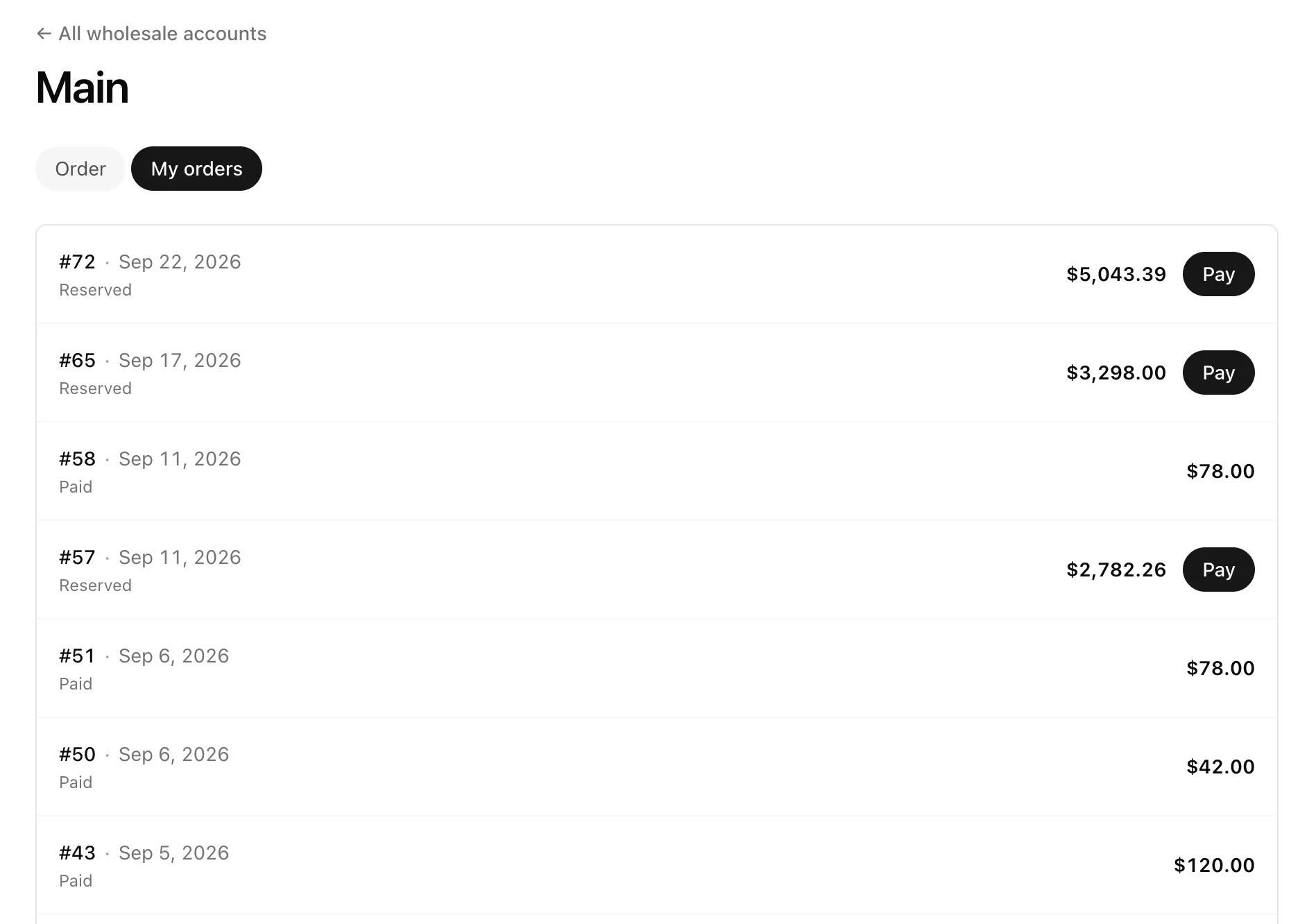
The **My orders** tab lists every order for this buyer, including any you [typed up for them](/help/wholesale/get-paid#type-an-order-for-a-client). Reserved orders that haven't been paid yet have a **Pay** button.
**Repeat last order** fills in everything from their previous order in one click. That's the fastest way to handle a weekly restock.
> **Tip:** If a product is out of stock, the line says "Out of stock – the store will confirm availability". Buyers can't order more than you have in stock.
## Place the order
The buyer clicks **Place order**. It becomes a **reserved** order:
- **Stock is set aside straight away**, so nobody else can buy it.
- **Nothing is charged yet.** The buyer goes to a payment page where they can pay now or later.
- The reservation lasts **14 days** by default. You can change this under **Settings → Payments → Default reservation expiry (days)**.
If your prices change while the buyer is building the order, they see "Prices changed – review the updated total" before it goes through.
## My orders
The **My orders** tab lists every order for this buyer, including any you [typed up for them](/help/wholesale/get-paid#type-an-order-for-a-client). Reserved orders that haven't been paid yet have a **Pay** button.
 ## What's not included
- **Shipping** isn't added to panel orders. Add it yourself when you invoice.
- **Discount codes** and loyalty points don't apply to wholesale prices.
## FAQ
### Can buyers order a product I haven't published?
No. The panel only shows products that are published in your catalog.
### Do I get notified about a new panel order?
It appears in **Orders** straight away, with a **Wholesale** badge and a **Reserved** status.
## What's next
- Collect the money: [Get paid for wholesale orders](/help/wholesale/get-paid).
## What's not included
- **Shipping** isn't added to panel orders. Add it yourself when you invoice.
- **Discount codes** and loyalty points don't apply to wholesale prices.
## FAQ
### Can buyers order a product I haven't published?
No. The panel only shows products that are published in your catalog.
### Do I get notified about a new panel order?
It appears in **Orders** straight away, with a **Wholesale** badge and a **Reserved** status.
## What's next
- Collect the money: [Get paid for wholesale orders](/help/wholesale/get-paid).