# Wix Payments vs Stripe: Fees, Payouts and Which to Use
Wix Payments vs Stripe compared on fees, payout speed, countries and fraud tools, with a real worked example and a decision framework.
*Published 2026-09-18*
Both charge 2.9% + $0.30 on a US card. That's where the similarity ends. Wix Payments is a processor welded to one website builder; Stripe is payment infrastructure that works anywhere, from a Wix site to a custom storefront to a mobile app. **This post compares Wix Payments and Stripe on fees, payout speed, country coverage and fraud tools, then gives you a straight answer on which one fits your store.**
**Bias disclosure:** I run [Your Next Store](https://yournextstore.com/), which is built on Stripe. I'll tell you when Wix Payments is the better fit, not just when Stripe is. If I get a fact wrong, [open an issue on GitHub](https://github.com/yournextstore/yournextstore/issues) and I'll fix it.
## Wix Payments vs Stripe at a Glance
| | Wix Payments | Stripe |
|---|---|---|
| **Base rate (US card)** | 2.9% + $0.30 | 2.9% + $0.30 |
| **AmEx rate** | 3.7% + $0.30 | 2.9% + $0.30 |
| **Cross-border fee** | 1.5% | 1.5% |
| **Currency conversion** | 1% | 1% |
| **Countries** | 15 | 46+ |
| **Currencies** | 6 | 135+ |
| **Payout schedule** | Daily, weekly or monthly | Daily (2-day rolling in the US) |
| **First payout** | 7-14 days (verification) | 7-14 days (verification) |
| **Instant payout option** | No | Yes, 1-1.5% fee, ~30 minutes |
| **Fraud tooling** | Basic (3D Secure) | [Radar](https://stripe.com/radar), ML-based |
| **Works off-platform** | No, Wix only | Yes, any website, app or POS |
| **Where you use it** | Toggle inside your Wix dashboard | Any website, app, or platform built on it |
Same headline rate, very different products. Wix Payments is a feature of Wix. Stripe is infrastructure other products, including Wix itself for some regions, are built on top of.
## What Each One Actually Is

Wix Payments is Wix's built-in processor: enable it in your dashboard, fill in your business details, start taking cards. It only works inside Wix. There's no API, no separate account, no way to use it on a different site. That's a deliberate trade: less setup, less flexibility. We covered [every fee layer Wix Payments charges](/blog/wix-payments) in a separate deep dive, so this post focuses on how it stacks up against Stripe rather than repeating that breakdown.
Stripe is a payment processor that thousands of platforms build on, including e-commerce platforms, SaaS products, marketplaces and point-of-sale systems. You can use it directly via the [Stripe Dashboard](https://dashboard.stripe.com/) and API, or through a platform that uses Stripe under the hood. Wix Payments itself is one example of infrastructure built on top of card networks; Stripe is what a lot of the *other* platforms use, including [ours](/blog/how-to-sell-online-with-stripe).
The practical difference: a Wix Payments account is only ever a Wix Payments account. A Stripe account is a Stripe account no matter which website, app or platform sits in front of it.
## Processing Fees, Side by Side
For a standard US card transaction, the two are identical: **2.9% + $0.30**. Neither wins on the number everyone quotes. The differences show up in the fee types that don't make it onto either homepage.
| Fee | Wix Payments | Stripe |
|-----|-------------|--------|
| Standard card (US) | 2.9% + $0.30 | 2.9% + $0.30 |
| American Express | 3.7% + $0.30 | 2.9% + $0.30 |
| Cross-border card | +1.5% | +1.5% |
| Currency conversion | +1% | +1% |
| ACH / bank debit | Not supported | 0.8%, capped at $5 |
| Sales tax calculation | Included (Avalara-powered), no extra fee | Stripe Tax, +0.5% per transaction |
| Chargeback | $15 | $15 |
| Instant payout | Not available | 1.5% in the US, 1% in most other supported countries (min $0.50) |
Two gaps stand out, one for each side. Stripe charges the same 2.9% for American Express as for any other card; Wix Payments charges 3.7%, a full 0.8 points more. If AmEx is a meaningful share of your volume, that adds up fast. Stripe also supports ACH bank debits at 0.8% (capped at $5), far cheaper than card rates for large B2B invoices, which Wix Payments has no equivalent for. Wix pulls one back on tax: its Avalara-powered automatic sales tax runs at no extra fee, where Stripe Tax charges 0.5% per transaction on top of processing.
Where Wix Payments does *not* lose: for standard product sales, it charges no platform transaction fee on top of processing, the same as Stripe used directly. That's a genuine point in Wix's favor over platforms like [Shopify](/blog/shopify-transaction-fees), which layers a fee on top of processing when you skip its own payment gateway. The catch, which we cover in the [full Wix Payments fee breakdown](/blog/wix-payments), is that Wix does add a 2-4% transaction fee specifically on subscriptions and membership plans, on top of the card rate.
## Payouts: Speed and Schedule
This is where most "which processor is better" comparisons stop at the headline rate and skip the part that actually affects your cash flow.
**Wix Payments** offers three payout schedules: daily, weekly (Mondays by default) or monthly (the 1st by default), configurable in your account settings. Once a payout is sent, it takes an average of [3-5 business days](https://support.wix.com/en/article/receiving-your-payouts-from-wix-payments) to land in your bank account. Your very first payout takes longer: Wix needs to complete identity and business verification, which commonly pushes the [first payout to 7-14 days](https://support.wix.com/en/article/receiving-your-first-payout-in-wix-payments) after your first sale. There's no way to get money out faster than the schedule you're on; Wix Payments has no instant payout option.
**Stripe** defaults to daily payouts, arriving on a [2-business-day rolling basis in the US](https://docs.stripe.com/payouts) (some regions, including much of Europe, use a 7-day rolling schedule instead). New Stripe accounts go through the same kind of verification hold, with a first payout typically arriving 7-14 days after the first successful charge. Where Stripe pulls ahead is optionality: [Instant Payouts](https://docs.stripe.com/payouts/instant-payouts) can move funds to a supported debit card or bank account in about 30 minutes, any day of the week, for a fee (1.5% in the US, 1% in most other supported countries, minimum $0.50). If a cash crunch ever means you need money out *today*, Stripe has a lever to pull. Wix Payments doesn't.
For a store running comfortably on a normal schedule, the two are close enough not to matter. For a store that occasionally needs cash same-day, Instant Payouts is a real, if narrow, advantage for Stripe.
Two gotchas neither pricing page mentions: Stripe doesn't turn on Instant Payouts the moment you sign up, it clears the same eligibility review that delays your first standard payout, so the "30 minutes" option isn't available on day one. And Wix Payments won't send a payout at all below a [$1 minimum balance](https://support.wix.com/en/article/changing-your-wix-payments-payout-schedule), which only matters in the rare month where refunds eat most of what you sold.
## Countries, Currencies and Reach
This is the widest gap between the two, and it compounds every other decision on this list.
| | Wix Payments | Stripe |
|---|---|---|
| **Countries** | 15 (US, Canada, Brazil, UK, Switzerland, plus 10 EU countries) | 46+ |
| **Currencies** | 6 | 135+ |
If your business is registered outside those 15 countries, Wix Payments isn't an option at all; you'd need a third-party processor connected to Wix instead, at which point you're paying Wix's subscription without getting Wix Payments' one-dashboard convenience. Stripe's reach covers most of Asia, Latin America, Australia and dozens of countries Wix Payments simply doesn't serve. If [selling internationally](/blog/how-to-sell-internationally) is on your roadmap at all, this single row of the table probably decides the comparison before you even get to fees.
## Fraud Protection and Chargebacks
Both charge the same $15 per chargeback regardless of outcome. Where they diverge is what happens *before* a chargeback: Stripe includes [Radar](https://stripe.com/radar), a machine-learning fraud engine with customizable rules, adjustable risk thresholds and manual review queues, available on every Stripe account at no extra cost beyond standard processing. Wix Payments relies on baseline protections: PCI compliance and 3D Secure authentication, but no comparable proactive scoring system.
For low-risk categories (apparel, home goods, most physical products at modest volume), this rarely matters. For higher-risk verticals, digital goods, high-ticket items, or anyone who's been burned by chargebacks before, Radar's rule engine is a meaningful gap in Stripe's favor.
## Portability: The Question That Outlasts the Fee Comparison
Every fee row above can shift with a pricing update. This one doesn't, and it's the reason most "should I switch" conversations eventually land here.
A Wix Payments account exists only inside Wix. If you migrate your site, add a second sales channel, or want to plug the same payment setup into a mobile app, none of that history, verification, or configuration comes with you. You start over.
A Stripe account is yours independent of what sits in front of it. The same account can process payments for a Wix site, a different website, a native app and an in-person POS terminal, and if you ever move off whichever platform you're using today, your Stripe account, transaction history and payout configuration stay exactly where they are. We go deeper on this "build vs. platform" trade-off in our guide to selling online with Stripe, linked earlier in this post.
This doesn't matter if Wix is genuinely your forever home. It matters a lot if there's any real chance you outgrow it.

## The Real Cost: A Worked Example
Take a store doing $10,000/month across 200 transactions averaging $50, with 15% of sales crossing borders.
| Cost | Wix Payments (Core, $29/mo) | Stripe direct |
|------|------------------------------|----------------|
| Platform / integration | $29 | $0 (bring your own site) |
| Card processing (170 domestic) | $298 | $298 |
| Card processing (30 intl.) | $75 | $75 |
| Currency conversion (30 txns) | $8 | $8 |
| **Total** | **$410/mo** | **$381/mo** |
Processing costs are identical, because both run the same 2.9% + $0.30 domestic rate and the same cross-border and conversion surcharges. The gap is entirely the $29 Wix subscription you're paying for the website builder and hosting that comes bundled with it, not for the payment processing itself. Stripe alone has no monthly fee, but "Stripe direct" isn't a finished store: you still need somewhere to sell, which is why most merchants comparing these two aren't really comparing a processor to a processor. They're comparing an all-in-one builder to a platform that hands you the processor and builds the rest of the store around it.
That's the comparison worth making next.
## Which to Use: A Decision Framework
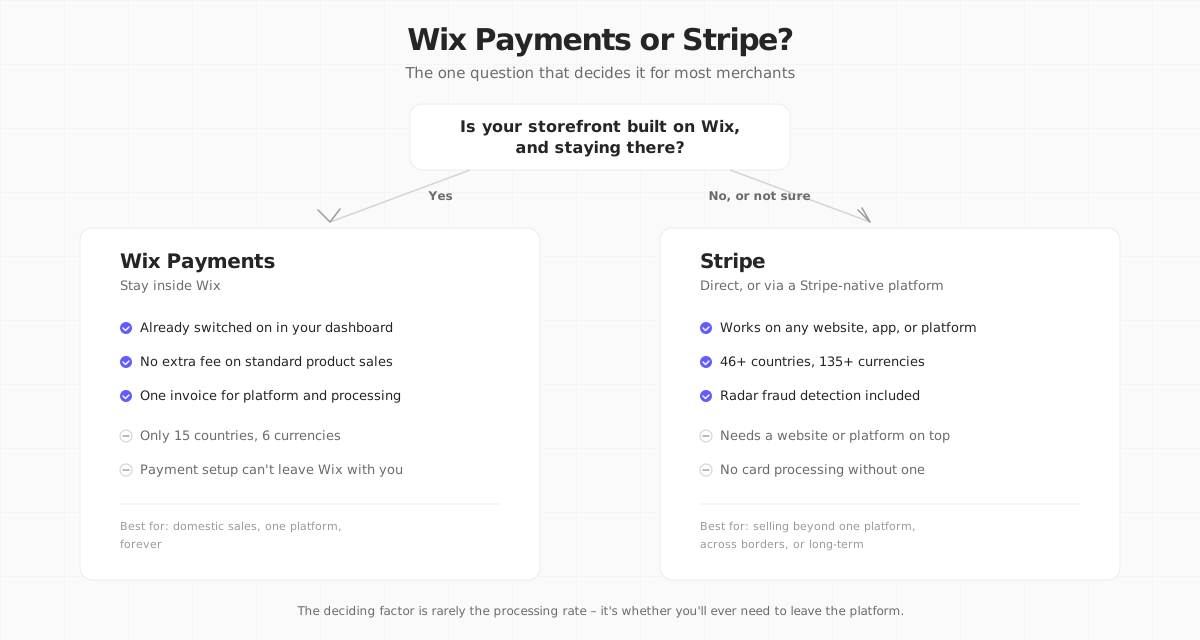
**Use Wix Payments if:**
- You're already building your site in Wix and have no plans to leave
- You sell domestically in one of the 15 supported countries
- Your products are standard e-commerce, not subscriptions or memberships
- You want payments live in minutes with zero integration work
**Use Stripe (directly, or through a platform built on it) if:**
- Your business is outside Wix Payments' 15 supported countries
- You sell, or plan to sell, across multiple channels: web, app, in person
- You want proactive fraud tooling (Radar) rather than baseline protection
- You want your payment history and account to survive a future platform switch
- You sell subscriptions and want to avoid Wix's added 2-4% Pricing Plans fee
**It's genuinely close if:** you're a small, domestic-only store on Wix already, selling simple products, with no international ambitions. In that specific case, Wix Payments' convenience is a legitimate reason to not go looking for something else.
## Where Your Next Store Fits
If you've concluded you want Stripe but don't want to hand-build a catalog, cart and admin panel on top of the raw API, that's the gap [Your Next Store](https://yournextstore.com/) is built to fill.

YNS is Stripe-native: Stripe handles all payment processing, so you get the full 46+ countries, 135+ currencies and Radar fraud detection, while YNS runs everything else: product catalog, cart, inventory, orders, refunds, customer accounts and an admin dashboard, all in a managed PostgreSQL backend. The storefront itself is an [open-source Next.js template](https://github.com/yournextstore/yournextstore) you deploy on Vercel and can customize down to the pixel; the AI-powered store builder can also generate one for you from a plain-English description.
Plans start at **$30/month with 0% platform transaction fees**, so the only per-transaction cost is Stripe's standard processing rate, exactly what you'd pay using Stripe directly. Unlike Wix Payments, your Stripe account travels with you: if you ever leave YNS, your payment relationship, transaction history and payout setup stay intact.
**Get Stripe's full reach with none of the DIY work.** Stripe-native checkout, 0% platform fees, and a store built around it.
See it running on a real catalog at{" "}
demo.yournextstore.com
## FAQ
### Is Wix Payments cheaper than Stripe?
Not for standard domestic card transactions: both charge 2.9% + $0.30. Wix Payments charges more for American Express (3.7% vs Stripe's 2.9%) and adds a 2-4% fee on subscriptions and membership plans that Stripe doesn't have an equivalent for. Stripe used directly has no monthly platform fee; Wix Payments requires a paid Wix plan starting around $29/month. Whether Wix ends up cheaper or more expensive depends heavily on whether you sell subscriptions and how much AmEx volume you process.
### Can I use Stripe on my Wix site instead of Wix Payments?
Yes. Wix supports Stripe as a connected third-party provider, so transactions run through your Stripe account instead of Wix Payments. You'll still pay your Wix subscription, and the checkout experience isn't as tightly integrated as the native option, but you gain Stripe's 46+ country reach and Radar fraud detection. It's a reasonable middle path if you like Wix's builder but need Stripe's coverage.
### Does switching from Wix Payments to Stripe mean rebuilding my store?
If you stay on Wix and just connect Stripe as your payment provider, no rebuild is needed, just a settings change. If you're leaving Wix entirely for a Stripe-native platform, yes, that's a full migration: new storefront, new product catalog, new checkout. That's exactly the pain portability is meant to prevent next time: once your payments run through your own Stripe account, a future platform switch doesn't force you to abandon that history again.
Both processors will happily take a 2.9% cut of the same sale. The question worth answering before you pick one isn't which rate is lower today, it's which account you'll still own in three years.
## Related Blog Posts
- [Wix Payments: Every Fee They Don't Show You](/blog/wix-payments)
- [Wix alternative: Your Next Store vs Wix Stores](/compare/wix)
- [How to Sell Online with Stripe in 2026: 5 Options](/blog/how-to-sell-online-with-stripe)
- [Shopify Transaction Fees: The Real Cost of Selling on Shopify in 2026](/blog/shopify-transaction-fees)
- [Best Wix Ecommerce Alternatives](/blog/wix-ecommerce-alternatives)
- [How to Sell Internationally: An Ecommerce Guide for 2026](/blog/how-to-sell-internationally)