# Multi-Currency Ecommerce: How to Sell in Local Prices
Multi-currency ecommerce done right: convert or set local prices, what FX fees cost, EU VAT and Omnibus rules, and SEO pitfalls. Price like a local.
*Published 2026-11-26*
**A German shopper doesn't want to know what $49 is in euros. They want to see €49.** Multi-currency ecommerce is how you give them that: prices, cart and checkout in the shopper's own money, while you still get paid in yours. The hard part isn't the currency symbol. It's deciding who sets the number (an exchange rate or you), who pays the conversion fee, and how VAT, discount rules and Google Shopping react when the same product has five prices. This guide walks through all of it, with the fee math and the code.
## What Multi-Currency Ecommerce Actually Means
"We support multiple currencies" can mean three very different things, and most confusion comes from mixing them up. Every sale has three currencies attached to it:
| Layer | What it is | Example |
| --- | --- | --- |
| **Display currency** | What the product page, cart and emails show | €49.00 |
| **Charge (presentment) currency** | What the card or wallet is actually charged in | EUR |
| **Settlement currency** | What lands in your bank account | USD |
[Stripe's currency docs](https://docs.stripe.com/currencies) use the same split: the *presentment* currency is what the customer is charged, the *settlement* currency is what your bank account holds, and when they differ, the processor converts.
A store that only converts the **display** (a JavaScript widget that turns $49 into "≈ €44.12") and still charges USD is not multi-currency. The shopper sees one number and their statement shows another, after their bank adds its own FX fee. Real multi-currency ecommerce charges in the currency you displayed, so the number on the product page is the number on the statement.
## Why Local Currency Pricing Converts Better
The best recent data comes from Stripe, so read it as vendor data. In a [randomized test across 1.5 million subscription checkout sessions](https://stripe.com/blog/adaptive-pricing-for-subscriptions), published in March 2026, offering prices in the shopper's local currency lifted signup conversion by 4.7% and authorization rates by 1.9% on average against a holdback group. Stripe's [Adaptive Pricing FAQ](https://support.stripe.com/questions/adaptive-pricing) claims an average of 17.8% higher international revenue for businesses that turn it on.
The older survey data points the same way. In a [FastSpring survey of more than 70,000 shoppers in Australia, Canada, Germany and the UK](https://go.fastspring.com/rs/803-UZR-015/images/fastspring-currency-whitepaper.pdf), 48% of German respondents said they were likely to abandon a purchase on discovering USD-only pricing. It dates from 2012, but nothing about human nature has made a foreign price tag more appealing since.
There is also a reason that has nothing to do with psychology: **local payment methods need local currency.** iDEAL only works in EUR, BLIK only in PLN. Stripe notes that [70% of Dutch ecommerce transactions use iDEAL](https://docs.stripe.com/payments/currencies/localize-prices/adaptive-pricing), so a store that charges Dutch shoppers in dollars hides the way most of them prefer to pay. Our guide to [European payment methods](/blog/european-payment-methods) covers which method wins in which country.
## Three Ways to Do Multi-Currency Pricing
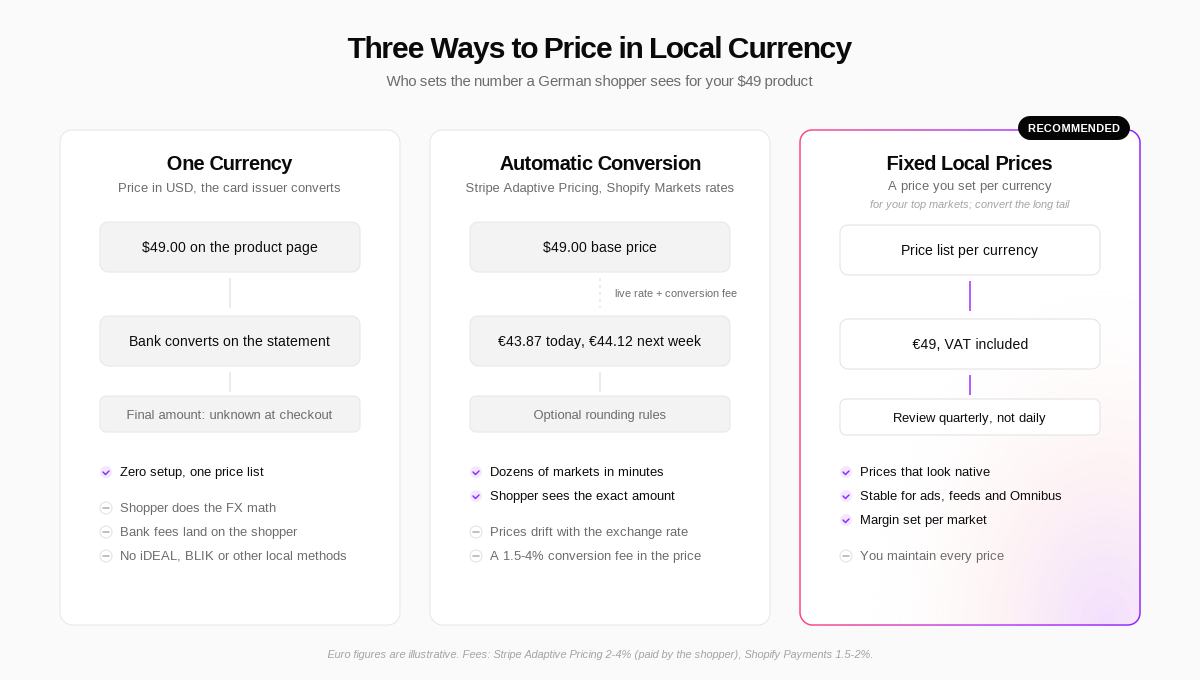
There are three models. They differ in one question: who decides the number the shopper sees?
### 1. One currency, the shopper's bank converts
You price everything in USD (or EUR, or GBP) and let the card issuer handle the rest. It's zero work, and for a store with a handful of international orders a month it's a reasonable place to start. The costs are all on the shopper's side: they do the math, their bank charges a foreign transaction fee, and they can't use local payment methods that need their currency.
### 2. Automatic conversion at a live rate
You keep one base price and a payment platform converts it for each shopper at checkout. [Stripe Adaptive Pricing](https://docs.stripe.com/payments/currencies/localize-prices/adaptive-pricing) does this for Checkout and Payment Links in more than 150 countries, using an exchange rate it guarantees for 24 hours. Shopify Markets does it at the storefront level, with [automatic or manual exchange rates and optional rounding](https://help.shopify.com/en/manual/markets/pricing); the full feature set requires Shopify Payments.

The upside is reach: dozens of markets in an afternoon, and the shopper sees the exact amount they will pay. The downsides are the price points (€43.87 doesn't look like a price anyone in Germany would choose), prices that drift with the exchange rate, and a conversion fee baked into what the shopper pays. Stripe is open about that last part: with Adaptive Pricing, [you pay 0% and your customers pay 2-4%](https://docs.stripe.com/payments/currencies/localize-prices/adaptive-pricing) through the exchange rate they're shown.
### 3. Fixed local prices you set per currency
You decide that the product costs $49 in the US, €49 in the eurozone and £45 in the UK, and you store those numbers. The exchange rate informs the decision once, then gets out of the way.

This is what established international brands do. The [Allbirds UK store](https://www.allbirds.co.uk/) shows round pound prices (£70, £110, £125) with VAT included, not dollar prices run through a calculator. Fixed prices look native, stay stable for ads and product feeds, and let you set margin per market. The cost is maintenance: every product, variant, shipping rate and fixed-amount coupon needs a price in every currency.
**Our recommendation:** fixed prices for the two or three markets that bring real revenue, automatic conversion (or a single currency) for the long tail. You get native-looking prices where it matters without hand-pricing your catalog in 40 currencies.
## What Currency Conversion Really Costs
Somebody always pays for the conversion. The question is who, and how visibly.
| Setup | Who pays | Published rate |
| --- | --- | --- |
| **Your Next Store** (fixed prices, payments through Stripe) | You, when Stripe converts the charge to your settlement currency | Stripe's standard conversion fee: [+1% in the US](https://stripe.com/pricing). None if you charge in your settlement currency |
| **Stripe Adaptive Pricing** | The shopper, inside the exchange rate | [2-4%](https://docs.stripe.com/payments/currencies/localize-prices/adaptive-pricing), set by Stripe |
| **Shopify Payments** (local currency) | Built into the shopper's price | [1.5% in the US, 2% elsewhere](https://help.shopify.com/en/manual/markets/pricing/fees) |
| **Single currency** | The shopper, through their bank | Varies by card issuer |
On top of conversion, cross-border cards cost more to process. Stripe's US pricing is 2.9% + 30¢ for a domestic card, [plus 1.5% for an international card and another 1% if currency conversion is required](https://stripe.com/pricing). A $100 order from a UK card, charged in GBP and settled in USD, costs about $5.70 in fees instead of $3.20. Platform fees come on top of that, so add them before you compare setups.
Two details that bite later:
- **Refunds.** Shopify says [conversion and card fees are not returned when you refund](https://help.shopify.com/en/manual/markets/pricing/fees). Stripe's Adaptive Pricing [refunds at the original exchange rate](https://docs.stripe.com/payments/currencies/localize-prices/adaptive-pricing), so the shopper gets back exactly what they paid. Know which one you're on before you write your return policy.
- **Settlement accounts.** If a market grows big enough, holding money in its currency can be cheaper than converting every order. Stripe supports [settlement in additional currencies](https://docs.stripe.com/payments/currencies/settlement-payouts) in some countries: add a EUR bank account, and EUR charges stop being converted.
## Setting Local Price Points
Converting is arithmetic. Pricing is a decision. Here is how to make it for each market.
### Start from net revenue, not the sticker
In the US, the shelf price excludes sales tax. In the EU and UK, consumer prices must include VAT. That changes the math more than the exchange rate does. Say your US price is $49 and you want roughly the same price tag in Europe:
| Market | Sticker price | VAT rate | What you keep before fees |
| --- | --- | --- | --- |
| US | $49 + sales tax | Varies by state | $49.00 |
| Germany | €49 | 19% | €41.18 |
| France | €49 | 20% | €40.83 |
| UK | £45 | 20% | £37.50 |
| Poland | 199 zł | 23% | 161.79 zł |
Rates from the EU's [VAT rates overview](https://europa.eu/youreurope/business/taxation/vat/vat-rules-rates/index_en.htm) and [GOV.UK](https://www.gov.uk/vat-rates). The VAT you collect in an EU country depends on where you're registered and whether you're above the €10,000 distance-selling threshold, which our [EU VAT OSS guide](/blog/eu-vat-oss) covers.
One euro-zone price is usually fine even though VAT varies between 17% and 27% across member states. Most brands take the margin difference rather than run a separate price for every euro country. Where the gap hurts (Hungary at 27%, Luxembourg at 17%), it's a margin call, not a technical one.
### Match the local price ending
Price endings are cultural. US shoppers are used to $49.99 and $49; much of Europe prices in whole euros or with ,90 and ,99 endings; Japan prices in whole yen with no decimals at all. Look at three competitors in the market and copy the pattern. Then round your converted price to the nearest ending that fits, and decide consciously whether that rounds up or down.
### Handle decimals per currency, not globally
The classic bug is multiplying every price by 100. JPY, KRW and VND have no minor unit, so ¥7,900 is sent to Stripe as `7900`, not `790000`. Let `Intl` tell you how a currency is displayed, but don't assume your processor agrees:
```typescript
const displayDecimals = (currency: string) =>
new Intl.NumberFormat("en", { style: "currency", currency }).resolvedOptions().maximumFractionDigits;
displayDecimals("EUR"); // 2
displayDecimals("JPY"); // 0
displayDecimals("HUF"); // 0, but Stripe still expects two-decimal amounts for HUF
const format = (amount: number, currency: string, locale: string) =>
new Intl.NumberFormat(locale, { style: "currency", currency }).format(amount);
format(49, "EUR", "de-DE"); // "49,00 €"
format(49, "EUR", "en-IE"); // "€49.00"
format(199, "PLN", "pl-PL"); // "199,00 zł"
```
The HUF line is real: Stripe [charges HUF in two-decimal amounts but pays it out as zero-decimal](https://docs.stripe.com/currencies#special-cases), and ISK and UGX have their own quirks. Keep a per-currency minor-unit table for the API and use `Intl` only for display. Store amounts as integers in minor units (or a decimal type), never as floats.
Note the second half of the snippet too: the same currency formats differently by locale. A shopper in Dublin and a shopper in Berlin both pay in euros but expect `€49.00` and `49,00 €` respectively. Currency and locale are two separate settings.
## EU and UK Rules for Multi-Currency Pricing
Selling in local currency into Europe pulls in a few consumer-law rules that US stores rarely meet at home.
**Prices must include VAT.** The EU's [Price Indication Directive](https://eur-lex.europa.eu/eli/dir/1998/6/oj) defines the selling price shown to consumers as the final price including VAT and all other taxes. The UK's Price Marking Order says the same: [all prices consumers can see must include VAT and other compulsory charges](https://www.businesscompanion.info/en/quick-guides/pricing-and-payment/price-marking-of-goods-for-retail-sale). A converted US price with "+ VAT" added at checkout doesn't meet that standard for consumer sales.
**Discounts need a 30-day price history in each currency.** Under the Omnibus Directive, announcing a price reduction means showing the lowest price you charged in the previous 30 days (our [Omnibus pricing guide](/blog/omnibus-directive-pricing) covers the rule and its exceptions). The rule doesn't mention currencies, but in our reading the reference price is the one the shopper actually saw, so you need a price history for every currency you sell in. That's an argument for fixed local prices: with live conversion, your euro price changes daily, the "lowest price in 30 days" moves with the exchange rate, and a Black Friday "was €49, now €39" becomes hard to back up.
**Don't force shoppers onto a country version.** The EU's [Geo-blocking Regulation](https://eur-lex.europa.eu/EN/legal-content/summary/geo-blocking-addressing-discriminatory-treatment-of-customers.html) bans redirecting customers to another country version of your store without their consent. Different prices per country site are allowed, but [automatic redirection to a national version is not](https://www.europe-consommateurs.eu/en/topics/shopping/films-music-games/geoblocking/), and even after consent the original version must stay accessible. Suggest the local store with a banner; let the shopper choose.
**Always check the current rules where you sell.** This section summarizes EU and UK price display, discount and geo-blocking rules as of November 2026. Rules change and national authorities interpret them differently, so confirm the details with a consumer-law or tax specialist in your target market before you change how you price or advertise. This is general information, not legal or tax advice.
## Multi-Currency and SEO: Don't Switch Prices by IP
The most common technical mistake in multi-currency ecommerce is swapping the currency on the same URL based on the visitor's IP address. It feels clever and it breaks two things.
**Google Shopping.** Merchant Center checks that the price and currency in your product feed match the landing page. Google's own instructions say [not to change the price on your landing page based on the user's location](https://support.google.com/merchants/answer/7055540). If Googlebot crawls from the US and sees dollars while your UK feed says pounds, your products get disapproved for a price mismatch. Merchant Center's currency conversion can show an estimated local price in ads instead, but the landing page has to keep the feed currency.

**Search results.** Crawlers mostly come from one location, so an IP-switched store has one indexable price: whichever currency the crawler saw. Your product schema markup will say `"priceCurrency": "USD"` to the UK market.
The fix is a URL per market: `/en-gb/` or `uk.example.com` shows pounds to everyone, including Googlebot, with hreflang tying the versions together. Our [international SEO guide](/blog/international-seo-ecommerce) covers the URL structure and hreflang setup. Geo-detection is still fine for *suggesting* a market ("Shopping from the UK? Switch to £") as long as the choice stays with the shopper.
## What Nobody Tells You About Multi-Currency Stores
A few things that only show up months after launch:
- **Free-shipping thresholds need local numbers too.** "Free shipping over $100" converts to an odd figure. Allbirds sets [£45 in the UK](https://www.allbirds.co.uk/) and $100 in the US, which is a pricing decision, not a conversion.
- **Fixed-amount coupons multiply.** A "$10 off" code needs a value in every currency, or it silently doesn't apply. Percentage coupons are currency-neutral, which is one reason international stores prefer them.
- **Reporting needs one currency eventually.** Store each order in the currency it was charged, then convert for revenue dashboards at a consistent rate. Converting at write time makes refunds and reconciliation drift from the shopper's statement.
- **Exchange rates move your margin even with fixed prices.** A euro price set when EUR/USD was at one level earns you fewer dollars after it drops. Review fixed prices every quarter, or when a currency moves more than 5%, rather than chasing every tick.
## Multi-Currency Ecommerce With Your Next Store
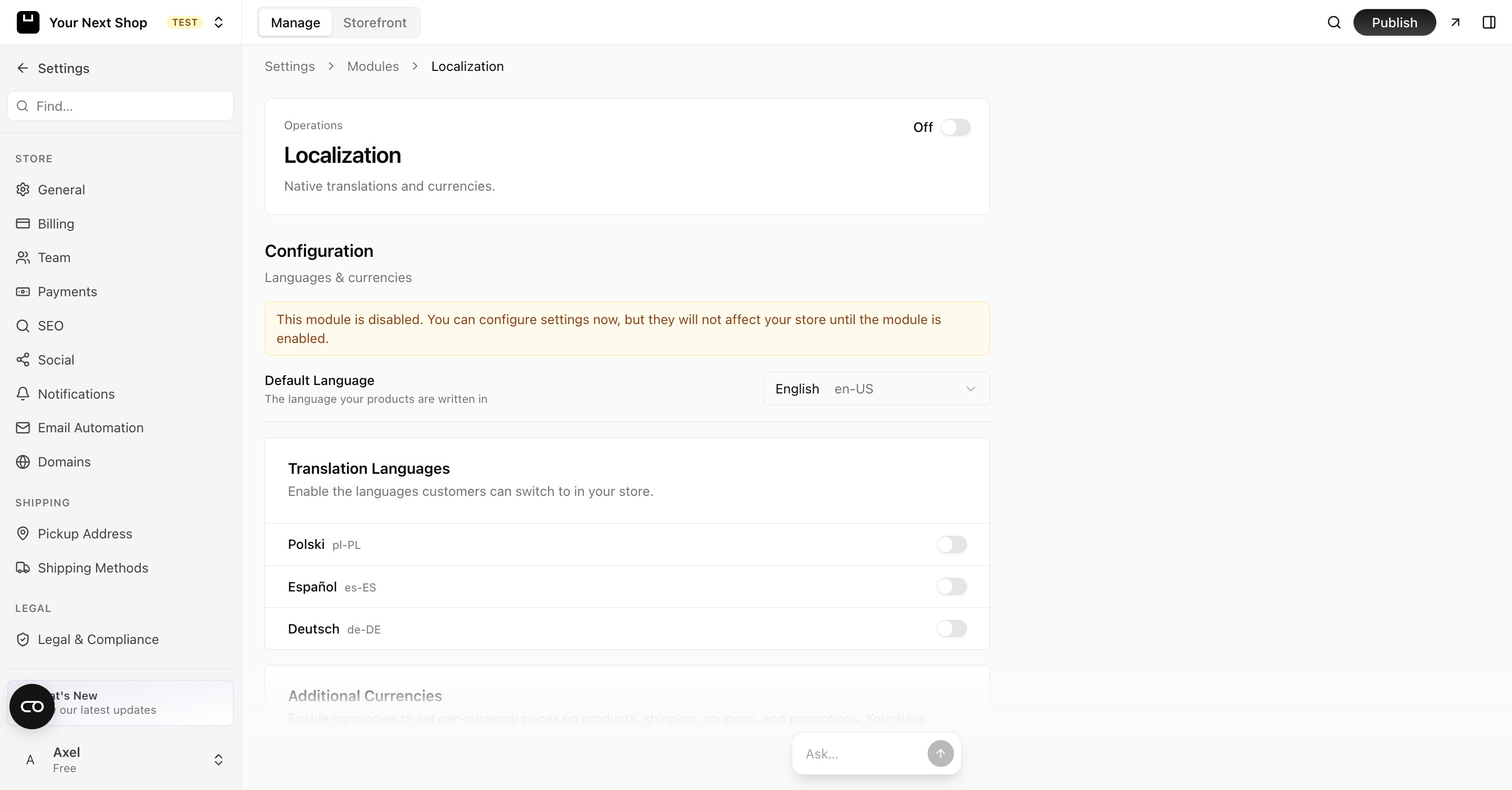
[Your Next Store](https://yournextstore.com/) takes the fixed-price approach, on purpose:
- **20 additional currencies.** Turn on the Localization module and enable extra currencies alongside your base currency, from EUR, GBP and CHF to JPY, AUD, CAD and PLN ([the full list is in the help center](/help/localization/multi-currency)).
- **Prices you set, not a live rate.** Each enabled currency gets its own price field on products and every variant, shipping methods, fixed-amount and minimum-order coupons, and promotions. You choose €49 instead of inheriting €43.87.
- **Orders stay in the shopper's currency.** An order paid in EUR on a PLN store shows in EUR in the order list, the order page and the order PDF, and edits keep it in EUR.
- **Tax display to match the market.** Choose tax-inclusive or tax-exclusive prices, with automatic tax through Stripe Tax or your own rates per country.
- **Language is separate from currency.** Translations for products, collections and legal pages are their own setting, with [13 storefront languages](/help/localization/multi-language).
Where it's weaker: there's no automatic conversion, so every enabled currency means pricing your catalog in it, and [group price lists](/help/products/group-pricing) still use fixed prices in your base currency only (a cart in another currency gets the list's percentage discount). If you want 40 currencies from one price list by tomorrow, a live-rate approach like Stripe Adaptive Pricing or Shopify Markets gets you there faster. If you want three markets with prices that look local, set them once and stop worrying about the rate.

The storefront is an [open-source Next.js app](https://github.com/yournextstore/yournextstore), so how prices are formatted and how markets map to URLs is code you (or the AI builder) can read and change. Plans start at $30/month with 0% platform transaction fees; Stripe's processing fees still apply.
## Multi-Currency Launch Checklist
- [ ] Pick the markets that bring real revenue; fix prices there, convert or skip the rest
- [ ] Set prices from net revenue after VAT, not from the exchange rate alone
- [ ] Match local price endings and free-shipping thresholds
- [ ] Price shipping methods and fixed-amount coupons in every enabled currency
- [ ] Charge in the currency you display, not just convert the label
- [ ] Turn on local payment methods that need the local currency (iDEAL, BLIK, Bancontact)
- [ ] Give each market its own URL; don't swap currency by IP on one URL
- [ ] Keep feeds, landing pages and `priceCurrency` in schema on the same currency
- [ ] Keep a 30-day price history per currency before running EU discounts
- [ ] Store orders in the charged currency; convert only for reporting
## FAQ
### What is multi-currency ecommerce?
It's selling with prices, cart and checkout in the shopper's own currency, while you receive payouts in yours. Real multi-currency charges the shopper in the currency they saw, so the price on the product page matches their card statement. Converting only the displayed label while charging in your currency is a display trick, not multi-currency.
### Should I convert prices automatically or set them manually?
Set prices manually for your biggest markets and use automatic conversion (or a single currency) for the rest. Manual prices look native (€49, not €43.87), stay stable for ads and EU discount rules, and protect your margin. Automatic conversion is faster to roll out across many countries but adds a conversion fee and prices that move with the exchange rate.
### Who pays the currency conversion fee?
It depends on the setup. With Stripe Adaptive Pricing the shopper pays 2-4% inside the exchange rate. Shopify Payments adds 1.5% (US) or 2% to the local price. If you charge in fixed local prices and Stripe converts to your bank currency, you pay Stripe's conversion fee (1% in the US). Charging in your settlement currency, or holding a bank account in that currency, avoids conversion entirely.
## The Bottom Line
Multi-currency ecommerce isn't a currency switcher. It's a pricing decision you make per market: what a shopper there expects to pay, what you keep after VAT and fees, and who absorbs the exchange rate. Convert the long tail. For the markets that matter, pick the number yourself. **A price that looks like it was set for the shopper usually was.**
## Related Blog Posts
- [How to Sell Internationally: An Ecommerce Guide for 2027](/blog/how-to-sell-internationally)
- [International SEO for Ecommerce: Hreflang Done Right](/blog/international-seo-ecommerce)
- [Omnibus Directive Pricing: How to Show Discounts in the EU](/blog/omnibus-directive-pricing)
- [EU VAT OSS for Ecommerce: Cross-Border Sales Guide](/blog/eu-vat-oss)