# European Accessibility Act: What Online Stores Must Do

European Accessibility Act for ecommerce: who it covers, the microenterprise exemption, WCAG 2.1 AA and a checkout checklist. Audit your store today.
*Published 2026-10-26*

<div className="lead">
**The European Accessibility Act (EAA) has applied since 28 June 2025, and online stores that sell to EU consumers are squarely in its scope.** If your site cannot be used with a keyboard, a screen reader or magnified text, it may breach national law in the countries you sell to. This guide explains who the Act covers, who is exempt, what "accessible" means for a store in practice, and a checklist you can work through this week.
</div>

## What the European Accessibility Act Is

The [European Accessibility Act](https://commission.europa.eu/strategy-and-policy/policies/justice-and-fundamental-rights/disability/union-equality-strategy-rights-persons-disabilities-2021-2030/european-accessibility-act_en) (Directive (EU) 2019/882) is an EU directive that sets common accessibility requirements for a list of products and services, including e-commerce. Member states had to turn it into national law by June 2022, and the rules started to apply on 28 June 2025.

Two details trip up store owners:

- **It is a directive, not a regulation.** Each country wrote its own law (Germany's is the BFSG, France and Ireland have their own versions), so enforcement, fines and authorities differ by country.
- **It protects consumers.** The Act covers e-commerce services offered to consumers. A store that sells only to businesses is generally outside it.

![The European Commission's European Accessibility Act page](/_blogposts/european-accessibility-act-ecommerce/eaa-ec.webp)

## Does the EAA Apply to Your Online Store?

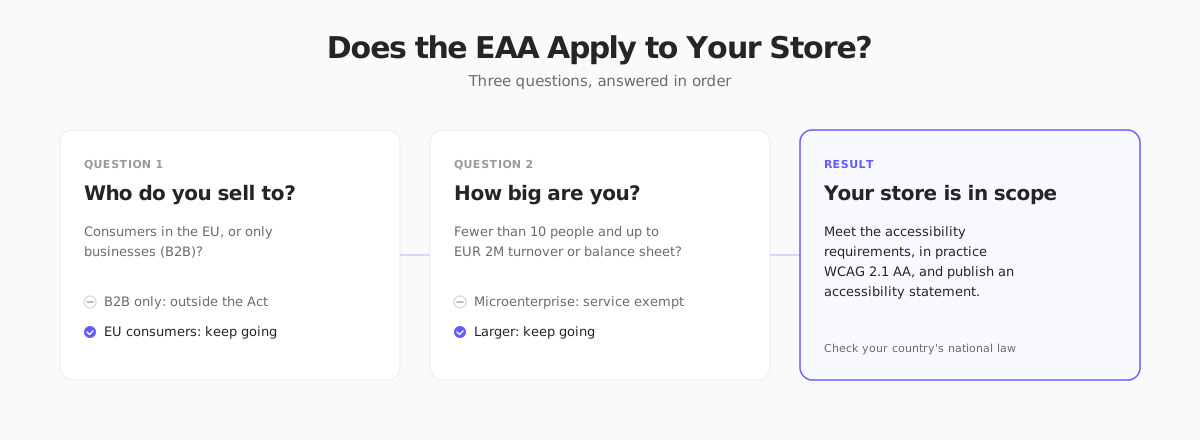
Work through three questions.
![A three-step check for whether the EAA applies to your store: consumers, size, and result](/_blogposts/european-accessibility-act-ecommerce/eaa-scope-check.svg)

### 1. Do you sell to consumers in the EU?

If your store is open to EU consumers, the Act is relevant, wherever your company is based. A US or UK store shipping to Germany or France is still offering an e-commerce service in those countries. Whether a country actively enforces against a foreign store is a separate question, and it depends on the national authority. Treat "we are not in the EU" as a weak defense once you actively target EU customers.

### 2. Are you a microenterprise?

The Act exempts **microenterprises that provide services** from the service accessibility requirements. A microenterprise is a business with **fewer than 10 employees and annual turnover or balance sheet total of €2 million or less**. An online store is an e-commerce service, so a very small store can fall under this exemption.

Three cautions before you rely on it:

- **Both limits matter.** Cross either one and the exemption ends. A store that grows from 8 to 12 people, or from €1.5 million to €2.5 million, has to comply.
- **It is a services exemption.** If you also make or import products covered by the Act (such as e-readers or payment terminals), different rules apply to those products.
- **Platforms, marketplaces and enterprise customers will not exempt you.** If you sell through a marketplace, or supply a larger retailer, they may ask you to meet the standard anyway.

<Callout emoji="💡">
**Exempt is not the same as irrelevant.** Accessible stores are easier for everyone to use: shoppers with a disability, older shoppers, people on small screens, people in bright sunlight. The fixes below also tend to improve SEO and conversion.
</Callout>

### 3. What does "accessible" mean in practice?

The Act itself talks about making sites "perceivable, operable, understandable and robust". It does not write a technical test. The usual route to demonstrate conformity is the harmonised standard **EN 301 549**, which for websites points to **WCAG 2.1 Level AA**. The [W3C's WCAG overview](https://www.w3.org/WAI/standards-guidelines/wcag/) explains the guidelines in full. WCAG 2.2 is the newer version and a superset of 2.1 for the purposes of most fixes, so building to 2.2 AA is a safe target.

![The W3C Web Accessibility Initiative WCAG 2 overview page](/_blogposts/european-accessibility-act-ecommerce/wcag-w3c.webp)

## What the EAA Requires From an Online Store

The e-commerce requirements cover more than the product pages. In practice, the whole customer journey is in scope:

| Part of the store | What has to work |
|-------------------|------------------|
| Browsing and search | Navigation, filters, sorting and search usable by keyboard and screen reader |
| Product pages | Text alternatives for images, readable contrast, clear price and variant selection |
| Cart and checkout | Forms with labels and errors that are announced, and no time limits that cannot be extended |
| Identification and payment | Login, 2FA and payment flows that do not rely on one sense (for example, only a visual CAPTCHA) |
| Customer support | Contact methods and help content in accessible formats |
| Emails and documents | Order confirmations and PDF invoices that a screen reader can read |
| Accessibility statement | A published page describing how accessible the store is and how to report problems |

You also need to keep the store accessible after launch. A site that passed an audit in January and then ships a new promo banner without alt text in March is non-compliant again.

## A Practical WCAG 2.1 AA Checklist for Stores

You do not need to read the whole standard to fix most problems. These cover the failures that show up most often in stores.

### Perceivable

- **Alt text on every meaningful image.** Describe the product ("Navy wool sweater, front view"), not the file ("IMG_2231"). Decorative images get an empty `alt=""`.
- **Contrast of at least 4.5:1** for body text and 3:1 for large text and UI components. Light grey text on white and "sale" labels on coloured badges are common failures.
- **Do not use colour alone** to show state. A red border on an error field also needs an icon or text.
- **Text must resize to 200%** without breaking the layout, and reflow at a 320px-wide viewport.
- **Captions** for product videos.

### Operable

- **Everything works with a keyboard.** Tab through your store: menus, filters, the size picker, the quantity stepper, the cart drawer and checkout. If you cannot reach or operate something, a keyboard user cannot either.
- **Visible focus.** Never remove the focus outline without replacing it.
- **No keyboard traps.** A modal that you cannot leave with Escape or Tab is a trap.
- **A skip link** to jump past the header and mega menu.
- **Touch targets** of at least 24 by 24 CSS pixels (WCAG 2.2), and bigger on mobile.

### Understandable

- **Label every form field.** A placeholder is not a label.
- **Explain errors** next to the field in text ("Enter a postal code with 5 digits"), and move focus or announce the error.
- **Set the page language** (`<html lang="de">`) and mark language changes inside the page.
- **Do not make customers re-type** data they have already given in the same checkout.

### Robust

- **Use native HTML first.** A `<button>` is keyboard and screen-reader accessible out of the box, a `<div onClick>` is not.
- **Add ARIA only to fill gaps**, such as `aria-expanded` on a menu toggle or `aria-live` for the cart count.
- **Check custom components** (carousels, accordions, modals, variant pickers), because they are where most ARIA bugs live.

```html
<!-- Fails: not focusable, no name, no role -->
<div class="add" onclick="addToCart()">+</div>

<!-- Passes: native, focusable, named -->
<button type="button" class="add" aria-label="Add Navy Wool Sweater to cart">+</button>
```

```html
<!-- Fails: placeholder only, error not tied to the field -->
<input placeholder="Email" />
<span class="error">Invalid</span>

<!-- Passes: real label, error linked and announced -->
<label for="email">Email</label>
<input id="email" type="email" aria-describedby="email-error" aria-invalid="true" />
<p id="email-error" role="alert">Enter an email address like name@example.com</p>
```

## How to Audit Your Store

A reliable audit combines three kinds of checks. Automated tools alone find only part of the problems, often cited as roughly a third of WCAG issues, so you need the manual steps too.

1. **Automated scan.** Run a free tool such as axe DevTools, Lighthouse or WAVE on the home page, a category page, a product page, the cart and each checkout step. Fix everything it flags.
2. **Keyboard pass.** Unplug the mouse. Add a product to the cart and check out using only Tab, Shift+Tab, Enter, Space and Escape.
3. **Screen reader pass.** Try VoiceOver (Mac and iOS), NVDA (Windows, free) or TalkBack (Android). Listen to a product page and the checkout. If you cannot tell what a button does by sound, rename it.
4. **Zoom and mobile pass.** Zoom to 200%, then test at 320px width.
5. **Document the result.** Keep a short log of what you tested, what failed and what you fixed. Regulators and enterprise buyers ask for this.

For a store with a custom design, a paid audit from an accessibility specialist is worth it once. For a template-based store, the main risk is the content and customizations you add on top, such as missing alt text, low-contrast brand colours and unlabeled widgets.

## The Accessibility Statement

You need a public accessibility statement. Keep it short and honest:

- What standard you aim for (for example WCAG 2.1 AA).
- Which parts are known not to conform yet, and your plan to fix them.
- How to report a problem, with a real contact method and a response time.
- The date you last reviewed the statement.
- The national enforcement body, if your country's law requires it.

Link it from the footer of every page.

## Penalties and Enforcement

Enforcement is national, so penalties differ widely. Depending on the country, authorities can issue orders to fix problems, fines, or in some cases remove a non-compliant service from the market. Some countries also allow consumer associations to take action. Fine levels in national laws reach into the hundreds of thousands of euros in some countries, but the practical exposure for a small store is usually a complaint followed by an order to fix the issue.

What to do now:

- Identify the countries where most of your customers are.
- Read how each one transposed the Act, in particular the exemption and the authority that handles complaints.
- Prioritise fixing the checkout, because it is the highest-risk part.

## UK and US: Different Laws, Same Fixes

The EAA does not apply in the UK, where the **Equality Act 2010** requires businesses to make reasonable adjustments for disabled customers, and it is the base for most UK accessibility complaints. In the US, accessibility claims against online stores are mostly brought under the **Americans with Disabilities Act (ADA)**, and WCAG is the standard that courts and settlements usually refer to. The legal route differs in each country, but the technical fixes are the same, so a store built to WCAG 2.1 AA covers all three.

<Callout emoji="⚖️">
**Always check the current rules where you sell.** This guide summarizes EU, UK and US accessibility rules for online stores as of October 2026. National laws implementing the European Accessibility Act differ in scope, exemptions, authorities and penalties, and they change, so confirm the details with your national authority or an accessibility and legal specialist before you rely on an exemption. This is general information, not legal advice.
</Callout>

## Accessibility on Your Next Store

With [Your Next Store](https://yournextstore.com/), the storefront is a Next.js app built on Tailwind and shadcn/ui components, which are built on accessible primitives with keyboard handling and focus management. That is a good starting point, but it does not make a store compliant on its own. Your product photos, alt text, brand colours, custom sections and any apps or scripts you add decide the result.

![Your Next Store homepage with the Elliot AI store assistant](/_blogposts/_shared/yournextstore-homepage.webp)

Be clear about what that means: YNS does not certify your store for the EAA or WCAG. Treat the template as a base, run the audit steps above on your live store, and fix what you find. Because the storefront is [open source](https://github.com/yournextstore/yournextstore), a developer can change any component that fails a check.

## EAA Compliance Checklist

- [ ] Confirm whether you sell to EU consumers and whether the microenterprise exemption applies
- [ ] Check which countries your customers are in and read their national law
- [ ] Run an automated scan on home, category, product, cart and checkout pages
- [ ] Complete a keyboard-only purchase from product page to confirmation
- [ ] Test with a screen reader and at 200% zoom
- [ ] Add alt text, labels and error messages where they are missing
- [ ] Check text contrast and focus outlines
- [ ] Make order emails and PDF invoices readable by assistive technology
- [ ] Publish an accessibility statement and link it from the footer
- [ ] Put a recurring audit in the calendar (quarterly is a good rhythm)

## FAQ

### Does the European Accessibility Act apply to non-EU stores?

It applies to e-commerce services offered to consumers in the EU, so a store outside the EU that sells to EU customers can be in scope. How actively each country enforces against foreign stores varies, so check the national authority of your main markets.

### Does the EAA apply to small businesses?

Microenterprises (fewer than 10 employees and turnover or balance sheet total of €2 million or less) that provide services are exempt from the service requirements. Once you pass either limit, the exemption stops applying. Marketplaces and larger customers may still ask for compliance.

### Which standard should my store meet?

Aim for WCAG 2.1 Level AA, which is the level referenced by the EN 301 549 standard that is commonly used to show conformity. Building to WCAG 2.2 AA is a safe and future-proof target.

### Is an accessibility overlay enough?

No. Overlay widgets that promise one-click compliance do not fix underlying markup problems and are criticised by many accessibility professionals and disabled users. Fix the code and content, and treat any tool as a helper for testing, not as a substitute.

## Final Takeaway

Accessibility is a quality of your checkout, not a badge. Test with a keyboard, a screen reader and a zoomed screen, fix the broken labels, contrast and focus, publish a statement, and repeat every quarter. A store that anyone can use is a store that more people can buy from.

## Related Blog Posts

- [Ecommerce Checkout Optimization](/blog/ecommerce-checkout-optimization)
- [Ecommerce Launch Checklist](/blog/ecommerce-launch-checklist)
- [How to Sell Internationally](/blog/how-to-sell-internationally)
- [EU VAT OSS for Ecommerce: Cross-Border Sales Guide](/blog/eu-vat-oss)
- [Ecommerce SEO](/blog/ecommerce-seo)
