# Ecommerce SEO Audit: A Step-by-Step Checklist
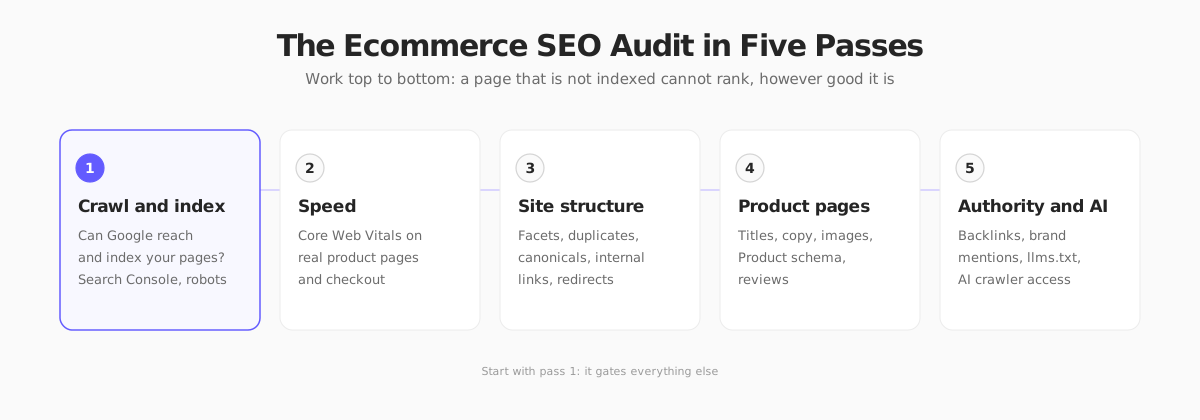
Run an ecommerce SEO audit in five passes: indexing, speed, site structure, product pages and AI visibility. Use this checklist to find what holds you back.
*Published 2026-11-04*
**An ecommerce SEO audit is a structured check of whether Google can find, load, understand and trust your store, in that order.** Most stores skip the order and jump straight to keywords, then wonder why a beautifully written category page never shows up. This checklist walks through five passes, from "is it even indexed?" to "will an AI assistant recommend it?", with the exact reports to open and the thresholds that matter.
If you want the strategy behind these checks first, our [technical ecommerce SEO guide](/blog/ecommerce-seo) covers the fundamentals. This post is the operational version: open the tools, tick the boxes, fix what fails.
## What an Ecommerce SEO Audit Is (and Isn't)
A content audit asks "is this article good?" An ecommerce SEO audit asks different questions, because stores have problems blogs don't: thousands of near-identical URLs from filters and sorting, products that come and go, variants that duplicate each other, and pages that are slow because of scripts that make money.
Plan on three things before you start:
- **A baseline.** Export clicks, impressions and indexed page counts from Search Console so you can prove the fixes worked.
- **A sample, not everything.** Pick one representative URL per template: homepage, a category, a filtered category, a product, a variant, a blog post, the cart. Most problems repeat across a template.
- **A priority rule.** Fix what blocks indexing first, then speed, then structure, then content. A better title on a page Google cannot crawl is wasted effort.
## The Tools You Need (All Free to Start)
You do not need an enterprise suite for a first audit.
| Tool | What it answers | Cost |
|------|-----------------|------|
| [Google Search Console](https://search.google.com/search-console/about) | What is indexed, what is not, and why | Free |
| [PageSpeed Insights](https://pagespeed.web.dev/) | Core Web Vitals from real users plus lab diagnostics | Free |
| [Schema Markup Validator](https://validator.schema.org/) and Google's Rich Results Test | Is your structured data valid? | Free |
| [Screaming Frog SEO Spider](https://www.screamingfrog.co.uk/seo-spider/) | Crawl your own site like a bot: status codes, canonicals, titles | Free up to 500 URLs, paid beyond |
| Your analytics | Which pages actually earn revenue | Varies |

## Pass 1: Crawling and Indexing
Everything else depends on this pass. Open Search Console and go to **Pages** (the indexing report).
### Check 1: Indexed vs submitted
Compare the number of indexed pages with the number you expect. A store with 400 products, 30 categories and 20 content pages should land near 450 to 500, not 40 and not 40,000. Both extremes are problems: too few means Google is skipping pages, too many usually means filter and parameter URLs are leaking into the index.
### Check 2: Read the "not indexed" reasons
Group the reasons and look for patterns:
- **Crawled, currently not indexed:** Google saw the page and decided it was not worth indexing. On a store this is usually thin category pages, near-duplicate variants or empty search results pages.
- **Discovered, currently not indexed:** Google knows the URL but has not crawled it, often a crawl budget or internal linking signal on large catalogs.
- **Duplicate without user-selected canonical:** you did not tell Google which version is the real one.
- **Soft 404:** the page returns 200 but looks empty, typical of out-of-stock or deleted products that still render a shell.
- **Blocked by robots.txt or noindex:** fine if intentional, a disaster if a staging setting shipped to production.
### Check 3: robots.txt and the sitemap
- Open `/robots.txt`. Confirm it does not block your product or category paths, and that it points to your sitemap.
- Open the XML sitemap. It should list only canonical, indexable, 200-status URLs. A single sitemap file is limited to [50,000 URLs or 50 MB uncompressed](https://developers.google.com/search/docs/crawling-indexing/sitemaps/build-sitemap), so large catalogs need a sitemap index.
- Submit it in Search Console and confirm the "Discovered pages" count matches your expectations.
### Check 4: Status codes and redirects
Crawl the site with Screaming Frog (or your tool of choice) and filter by response code.
- **4xx on internal links:** broken links from your own pages. Fix the link, not the symptom.
- **Redirect chains:** `A to B to C` should be `A to C`. Every hop costs speed and a bit of equity.
- **Redirected links in the navigation:** point the link at the final URL.
- **Discontinued products:** the usual approach is to keep temporarily out-of-stock products live and mark them out of stock. For products gone for good, return a 404 or 410, or 301 to the closest replacement if one genuinely exists. Do not redirect everything to the homepage.
## Pass 2: Speed and Core Web Vitals
Speed is a ranking input and a conversion input, which makes it the best-paying pass for most stores. Run PageSpeed Insights on your homepage, a category page and a product page.

The targets, from [Google's Core Web Vitals documentation](https://web.dev/articles/vitals), measured at the 75th percentile of real visits:
| Metric | What it measures | Good |
|--------|------------------|------|
| LCP (Largest Contentful Paint) | When the main content appears | 2.5 s or less |
| INP (Interaction to Next Paint) | How fast the page reacts to taps and clicks | 200 ms or less |
| CLS (Cumulative Layout Shift) | How much the layout jumps around | 0.1 or less |
Always trust the **field data** at the top (real users) over the **lab score** below it. A lab score of 62 with good field data is fine. Good lab data with failing field data means your real visitors, on real phones and with your real third-party scripts, have a worse experience than your test.
The usual store culprits:
- **Hero and product images** that are huge, unoptimized, or lazy-loaded when they are the LCP element.
- **Third-party scripts:** chat widgets, review apps, tag managers, pixels. Audit them one by one and remove what you do not use.
- **Layout shift** from banners, cookie notices and late-loading fonts or images with no reserved size.
- **Slow server response** on uncached pages, especially category pages with heavy queries.
Our guides on [ecommerce website speed optimization](/blog/ecommerce-website-speed-optimization) and [how a Next.js storefront gets fast](/blog/how-is-your-next-store-so-fast) go deeper on fixes.
## Pass 3: Site Structure and Duplicate Content
This is the pass most generic audits miss, and it is where stores bleed the most crawl budget.
### Faceted navigation and parameters
Filters such as `?color=blue&size=m&sort=price` can turn 500 products into hundreds of thousands of crawlable URLs. Google's own [faceted navigation guidance](https://developers.google.com/search/docs/crawling-indexing/crawling-managing-faceted-navigation) is clear that you must manage this deliberately. For each filter, decide:
- **Valuable and searched for** (for example "red running shoes"): give it a clean, static URL, unique title and a canonical to itself.
- **Not valuable** (sort order, price slider, pagination of filters): keep it out of the index with `noindex` or canonicalize it to the unfiltered page, and avoid linking to it with crawlable `` where you can.
### Canonicals
On a sample of pages, confirm that:
- Every indexable page has a self-referencing canonical.
- Variants (size or color options) either share the parent product's canonical or are deliberate, distinct pages.
- The canonical matches the URL in your sitemap, including protocol, host and trailing slash.
- `http` redirects to `https`, and one hostname (`www` or not) wins.
### Internal links and depth
- Key categories should be reachable in three clicks from the homepage.
- Check for **orphan products** that exist in the sitemap but receive no internal links.
- Breadcrumbs should exist and be consistent. They also help Google understand hierarchy.
- Use descriptive anchor text ("women's trail shoes"), not "click here".
### Pagination
Category pages 2, 3, 4 should be crawlable with plain links and self-canonical. Do not canonicalize every page back to page 1, because products only listed on later pages then lose their path into the index.
## Pass 4: Product and Category Pages
Now that Google can reach and load your pages, check whether they deserve to rank.
### On-page elements
For a sample of your top revenue pages, review:
- **Title tag:** unique, under about 60 characters, primary keyword near the front, a reason to click (brand, key attribute, shipping).
- **Meta description:** unique, written for humans, mentions what makes the product different. It does not rank, but it influences clicks.
- **One H1** that matches the product or category name.
- **Unique description copy.** Manufacturer text copied across dozens of retailers is the classic thin-content trap. Even two original paragraphs help. Our guide to [writing product descriptions](/blog/how-to-write-product-descriptions) covers a repeatable approach.
- **Images:** descriptive filenames, useful alt text, modern formats, sized correctly.
- **Category pages:** an intro of 100 to 200 words above or below the grid, not a wall of keyword text.
### Structured data
Product schema is what turns a blue link into a result with price, availability and ratings. Check it in the Schema Markup Validator and Google's Rich Results Test.

Per [Google's product structured data docs](https://developers.google.com/search/docs/appearance/structured-data/product), a valid product page should expose at least:
- `name`, `image` and `description`
- `offers` with `price`, `priceCurrency` and `availability`
- `sku` or a global identifier (GTIN, MPN) where you have one
- `aggregateRating` or `review` only if the reviews are real and visible on the page
Common failures: price in the markup that differs from the price on screen, `InStock` for sold-out items, and ratings marked up that customers cannot see.
Also check `BreadcrumbList`, `Organization` and (for the homepage) `WebSite` markup. In Search Console, the **Merchant listings** and **Product snippets** reports surface errors at scale.
### Reviews, trust and content signals
Pages with real reviews, clear shipping and return information, and a visible contact path convert better and give search engines clearer quality signals. Check that your return policy, shipping page and about page are linked from the footer and easy to find. If you do not have a policy yet, see our guide to writing an [ecommerce return policy](/blog/ecommerce-return-policy).
## Pass 5: Authority, Brand and AI Visibility
The last pass looks outside your own pages.
### Backlinks and brand mentions
- Check Search Console's **Links** report for your top linked pages. If your best-linked page is a 404, redirect it to the closest live equivalent.
- Look for unlinked brand mentions and ask for the link.
- Skip bulk directories and paid link packages. They look like shortcuts and behave like liabilities.
### AI search visibility
More shopping research now happens in AI assistants and AI-generated search summaries. The audit for that is short and mostly familiar:
- **Allow the crawlers you want.** Check `robots.txt` for blanket blocks on AI crawlers, and decide deliberately which to allow.
- **Make content readable without JavaScript.** If your product data only appears after client-side rendering, some crawlers will not see it.
- **Keep structured data complete and accurate.** It is the cleanest way to give a machine your price, stock and specs.
- **Consider an `llms.txt` file** that points to your key pages. Support among AI providers is still uneven, so treat it as a low-cost addition, not a ranking lever.
- **Write answer-first copy.** Clear specs, comparison tables and short FAQs are easier to quote.
For the bigger picture, see [how AI is changing ecommerce](/blog/ai-ecommerce).
## How Your Next Store Handles the Technical Layer
Much of Pass 1 to Pass 3 is plumbing, and plumbing is easiest when the platform does it by default. [Your Next Store](https://yournextstore.com/) generates a dynamic sitemap, emits JSON-LD structured data, produces Open Graph images automatically and runs on a Next.js storefront with server rendering and caching tuned for fast loads. The admin includes an SEO audit that checks for missing schema, thin category content and content hierarchy problems, plus AI discoverability checks such as `llms.txt` coverage.

The honest limit: a platform cannot write your product descriptions, earn your backlinks or decide which filters deserve their own pages. Those stay editorial decisions, and they are usually where the audit's biggest wins hide.
## The Ecommerce SEO Audit Checklist
**Crawl and index**
- [ ] Indexed page count is close to what you expect
- [ ] "Not indexed" reasons reviewed and explained
- [ ] `robots.txt` does not block money pages
- [ ] Sitemap lists only canonical 200 URLs and is submitted
- [ ] No broken internal links or long redirect chains
- [ ] Discontinued products handled with 404, 410 or a relevant 301
**Speed**
- [ ] LCP 2.5 s or less, INP 200 ms or less, CLS 0.1 or less in field data
- [ ] Unused third-party scripts removed
- [ ] LCP image is not lazy-loaded
**Structure**
- [ ] Filters and sort parameters managed with canonical or `noindex`
- [ ] Self-referencing canonicals on indexable pages
- [ ] One hostname, HTTPS everywhere
- [ ] No orphan products, key categories within three clicks
**Product pages**
- [ ] Unique titles, descriptions and H1s on top pages
- [ ] Original product copy, not manufacturer text
- [ ] Valid Product schema with matching price and availability
- [ ] Return, shipping and contact pages easy to find
**Authority and AI**
- [ ] Best-linked pages return 200
- [ ] AI crawler policy chosen on purpose
- [ ] Key content is visible without JavaScript
## FAQ
### How often should I run an ecommerce SEO audit?
Run a full audit once or twice a year and after any big change such as a replatform, redesign or catalog import. Check Search Console's indexing and Core Web Vitals reports monthly, since problems there compound quietly.
### What is the most common ecommerce SEO problem?
Index bloat from filters, sorting and duplicate variants. It wastes crawl budget, dilutes signals and buries the pages that make money. Pass 3 fixes it.
### Do I need a paid tool for an ecommerce SEO audit?
Not for a first pass. Search Console, PageSpeed Insights and a free crawler cover most of this checklist. Paid tools earn their keep on very large catalogs, backlink analysis and rank tracking.
### How long until audit fixes show results?
Technical fixes such as unblocking pages or repairing canonicals can show up in Search Console within a few weeks, since Google needs to recrawl. Content and authority work takes longer, often a few months. Measure against the baseline you took at the start.
## Final Takeaway
An SEO audit is not a list of 200 warnings, it is a sequence: reachable, fast, unambiguous, worth ranking, worth citing. Fix them in that order and each pass makes the next one pay off. The stores that win are rarely the ones with the cleverest keyword strategy. They are the ones whose pages Google can actually find.
## Related Blog Posts
- [Ecommerce SEO: A Technical Guide for Developers](/blog/ecommerce-seo)
- [Ecommerce Site Speed Optimization: The 2026 Guide](/blog/ecommerce-website-speed-optimization)
- [How to Write Product Descriptions That Sell (and Rank)](/blog/how-to-write-product-descriptions)
- [Ecommerce Launch Checklist: Check Before You Go Live](/blog/ecommerce-launch-checklist)
- [Ecommerce KPIs: The Metrics That Actually Matter](/blog/ecommerce-kpis)