# Ecommerce Content Marketing: Blogs and Buying Guides
Ecommerce content marketing that sells: what to write first, how buying guides beat blog posts, a 90-day plan and how to measure revenue from content.
*Published 2026-11-13*
**Most ecommerce content marketing fails because it's written for traffic, not for buyers.** A store blog full of "10 fun facts about coffee" can pull visitors for years and sell almost nothing, while one honest "how to choose a coffee grinder" guide can quietly become your best salesperson. And the easy traffic is shrinking: when Google shows an AI summary, users [click a regular result in 8% of visits instead of 15%](https://www.pewresearch.org/short-reads/2025/07/22/google-users-are-less-likely-to-click-on-links-when-an-ai-summary-appears-in-the-results/). This guide shows which content earns its keep for an online store, how to write a buying guide that converts, a 90-day plan, and how to tell whether any of it makes money.
## What Ecommerce Content Marketing Is (and Isn't)
Ecommerce content marketing is publishing useful material that helps people choose and use the kind of products you sell, so they find your store, trust it, and buy from it. In practice that means three formats:
- **Blog posts and articles**: how-tos, explainers, ideas, behind-the-scenes stories.
- **Buying guides and comparisons**: "how to choose…", "X vs Y", "best X for Y", size and fit guides.
- **Usage content**: care instructions, setup guides, recipes, refill and replacement reminders.
What it isn't: product descriptions (those are their own discipline, covered in [how to write product descriptions that sell](/blog/how-to-write-product-descriptions)), ads, or a news feed of your own announcements. A "New colors are here!" post is fine for your newsletter. It's not content marketing, because nobody searches for it.
The distinction matters because content for a store has a different job from content for a media site or a SaaS company. You don't need millions of readers. You need the few thousand people who are about to buy something you sell to land on your page instead of a competitor's.
## The Ecommerce Content Map: What to Write First
Every piece of content sits somewhere between "just curious" and "already bought." Where it sits decides how much traffic it can get, how much revenue it can drive, and how you should measure it.
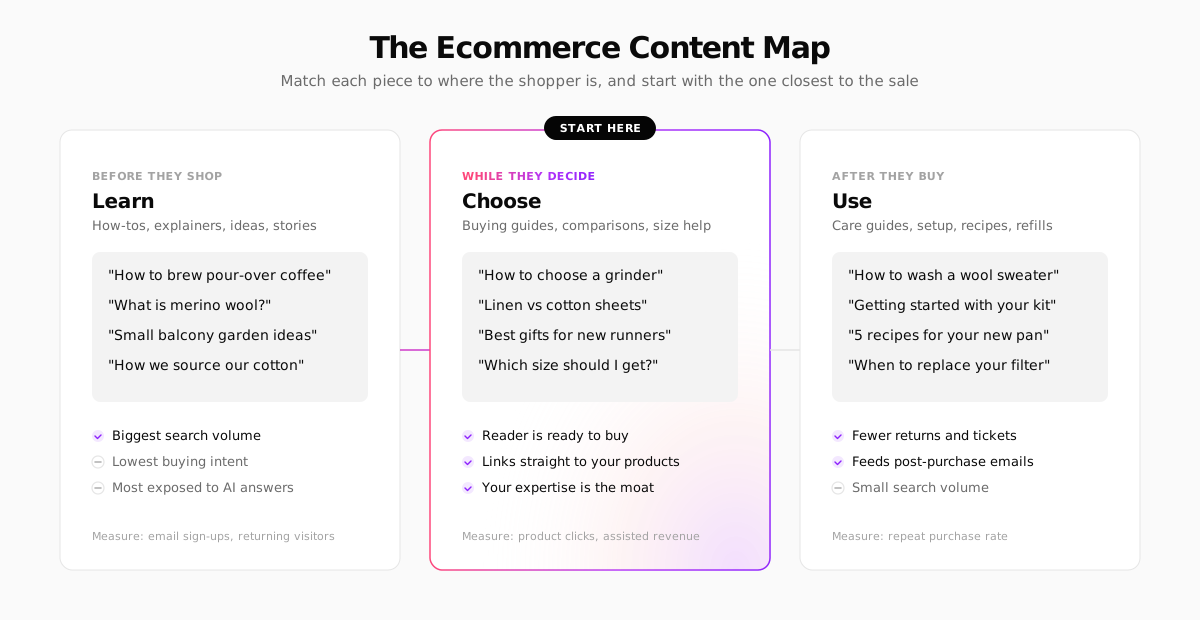
**Start with "Choose" content.** Buying guides, comparisons and fit guides target people who already want the product and are deciding which one. The search volume is smaller than "how to brew coffee," but the reader is a buyer, every guide links naturally to your product pages, and it's the format where your hands-on knowledge beats a generic AI answer.
**Add "Use" content next.** Care guides and setup instructions rarely bring big traffic, but they cut support tickets and returns, and they're the perfect thing to link from your [post-purchase emails](/blog/ecommerce-email-marketing). A customer who learns to get the most out of a product is more likely to buy the refill.
**Write "Learn" content last, and selectively.** Broad informational topics have the most volume and the most competition from publishers, encyclopedias and, increasingly, AI answers that resolve the question on the results page. Pick the ones where you have a real angle, such as original photos, a process only you know, or data from your own store.
**A quick test for any topic:** could you link to a specific product from the second paragraph without it feeling forced? If yes, it's a strong ecommerce content idea. If you'd have to bolt the link on at the end, it's probably a traffic play with little revenue behind it.
## How to Write a Buying Guide That Converts
The buying guide is the workhorse of ecommerce content marketing. Look at how the stores that do it best structure theirs.

[REI's Expert Advice](https://www.rei.com/learn/expert-advice) section is the textbook example: hundreds of "how to choose" guides, filed under the same activities as the shop (camping, hiking, cycling), each with a named author and an "updated" date. The guide and the category page reinforce each other.
[Sweetwater's InSync](https://www.sweetwater.com/insync/category/buying-guides/) does the same for music gear, with buying guides for each instrument family sitting next to tech tips, reviews and a glossary, all a click from the shop.

You don't need their scale to copy the structure. A buying guide that converts has six parts:
1. **The decision, stated up front.** "Choosing a grinder comes down to three things: burr type, grind range and how much you'll spend." Readers who know what they want can skip to it.
2. **The criteria, explained in plain language.** What each spec means for the buyer, not just what it is. "Conical burrs are quieter and more forgiving; flat burrs give a more even grind for espresso."
3. **A comparison table.** Your products (and, honestly, the alternatives) side by side on the criteria that matter.
4. **Recommendations by situation.** "Best for a first grinder", "best for espresso", "best on a budget." This is where you link to products, ideally with the product embedded so the price and stock stay current.
5. **What to avoid.** The mistakes your customer service team hears about. This is the section that builds trust, and the one AI summaries rarely reproduce.
6. **Proof of experience.** Your own photos, a named author who actually uses the products, and an "updated" date you keep honest.
Here's a skeleton you can reuse for any category:
```markdown
# How to Choose a [Product]: [Year] Buying Guide
Short answer: [the 2–3 factors that decide it] + [our pick for most people]
## What matters when choosing a [product]
### [Criterion 1]: what it means for you
### [Criterion 2]: what it means for you
### [Criterion 3]: what it means for you
## [Product] comparison table
| Model | [Criterion 1] | [Criterion 2] | Price | Best for |
## Our picks by situation
- Best for beginners: [product link]
- Best for [specific use]: [product link]
- Best on a budget: [product link]
## Mistakes to avoid
## FAQ (from real customer questions)
```
**Be honest about the alternatives.** A buying guide that only recommends your own products reads as an ad, and readers can tell. If a cheaper option elsewhere suits some buyers better, say so. The trust it buys is worth more than the one sale it costs.
## Where Ecommerce Content Ideas Come From
The best topics aren't in a keyword tool. They're in your own store:
- **Your inbox.** Every question a customer has emailed twice is a guide waiting to be written: sizing, compatibility, care, "will this work for…".
- **Your on-site search.** What people type into your search box, especially queries that return nothing, tells you exactly what they're trying to buy.
- **Your returns.** "Too small", "not what I expected", "didn't fit my…". Each return reason is a fit guide or a comparison that could have prevented it.
- **Your reviews.** The words customers use to describe your products are the words other customers search for.
Then use a keyword tool to choose wording and check demand. Free tools like [AnswerThePublic](https://answerthepublic.com/) turn a seed term into the questions people ask around it, and Google Search Console shows which queries already bring you impressions but few clicks.

## Ecommerce Content Marketing in the AI Era
Two things changed in the last two years, and both reward the same kind of content.
**AI summaries take the easy clicks.** In Pew Research's study of US browsing data, [only about 1% of visits](https://www.pewresearch.org/short-reads/2025/07/22/google-users-are-less-likely-to-click-on-links-when-an-ai-summary-appears-in-the-results/) to results pages with an AI summary included a click on a link inside the summary, and users were more likely to end their session altogether. Google disputes the methodology, but the direction is clear for simple, factual questions. "What is merino wool?" gets answered on the results page. "Which merino base layer for a week of winter hiking?" still sends people to someone who has tested them.
**AI writing is allowed, but scaled filler isn't.** Google's position is that it rewards [helpful, reliable, people-first content](https://developers.google.com/search/docs/fundamentals/creating-helpful-content) however it was produced, and it [doesn't ban AI-generated content](https://developers.google.com/search/blog/2023/02/google-search-and-ai-content). What it does penalize is [scaled content abuse](https://developers.google.com/search/docs/essentials/spam-policies#scaled-content): many pages generated mainly to rank, with little value for readers.

The practical rule: use AI to draft, outline and tidy up, then add what only you have: photos of the real product, measurements you took, mistakes customers made, opinions you'll stand behind. That's also what makes your content quotable by AI assistants, which increasingly recommend products by citing sources. Our guide to [generative engine optimization for ecommerce](/blog/generative-engine-optimization-ecommerce) covers how to make your pages easy for them to read.
## A 90-Day Ecommerce Content Plan
Consistency beats volume. One good piece every week or two, kept up for a year, beats 30 posts in a month followed by silence. Here's a realistic first quarter for a small store:
| Weeks | What to publish | Why |
| --- | --- | --- |
| 1–2 | Pull 50 real questions from your inbox, search box, returns and reviews. Group them into topics | Your backlog for the quarter |
| 3–4 | One buying guide for your best-selling category | Closest to revenue; links to your top products |
| 5–6 | One size, fit or comparison guide ("X vs Y") | Answers the question behind your most common return reason |
| 7–8 | One care or setup guide for your best seller. Link it from the shipping confirmation email | Cuts tickets, drives repeat visits |
| 9–10 | A second buying guide for your next category | Repeat what worked |
| 11–12 | One "Learn" piece where you have a unique angle (your process, your data, your photos) | Earns links and brand searches |
| 13 | Review the numbers. Update the first guide with new questions | Content compounds when you maintain it |
That's six to eight pieces in 90 days. Each one should link to two or three products and to one other guide, so readers (and crawlers) can move through your content the way they'd move through the shop. If your store sells in several languages, translate the guides that work, not every post.
## How to Measure Content Marketing for an Online Store
Pageviews are the easiest number to report and the least useful. Measure each piece against the job it was written for:
| Content type | Primary metric | Secondary |
| --- | --- | --- |
| Buying guides and comparisons | Clicks to product pages; revenue from sessions that viewed the guide | Rankings for "best", "vs" and "how to choose" queries |
| Usage and care guides | Repeat purchase rate of readers; support tickets on that topic | Opens and clicks from post-purchase emails |
| Learn content | Email sign-ups; returning visitors | Backlinks earned; branded searches |
Expect a delay. New pages often take months to rank, so judge a guide after three to six months, not three weeks. In the meantime, the clicks from guide to product page tell you early whether the content is doing its job. Our post on [ecommerce analytics](/blog/ecommerce-analytics) covers how to set up the funnel reports to see it.
**Update beats new.** Once you have 10–20 pieces, refreshing a guide that already ranks on page two (new products, new questions, a new date you've earned) usually pays off faster than writing a new one.
## Running a Store Blog With Your Next Store
[Your Next Store](https://yournextstore.com/) has a blog built into the store, so your guides live on your own domain next to the products they recommend, without a separate CMS or plugin.

- **Embed products in posts.** A buying guide can show a product's image, price and add-to-cart button, kept in step with your catalog, so a price change or a sold-out item never leaves a guide out of date. You can embed a single variant, such as one scent or one colorway, with its own photo and price.
- **Draft with AI, publish on a schedule.** The editor has an AI draft option to beat the blank page, and posts can be saved as drafts, published, or scheduled to go live on a date, so you can write a month of guides in one sitting.
- **Translate what works.** If you sell in several languages, each post has a translations tab, and published posts are translated along with your catalog when you switch a new language on.
- **See what's read.** The posts list shows views over the last seven days for each post, with categories and comments for when the blog grows.
Honest limits: it's a store blog, not a full publishing platform. If you're planning a magazine with multiple editors, complex workflows and custom layouts per article, a dedicated [headless CMS](/blog/best-headless-cms-for-ecommerce) is the better tool. For a store publishing a guide every week or two, keeping it in the same dashboard as your products removes the most common reason content programs stall: the friction of yet another tool. The [help center article on the blog](/help/marketing/blog) walks through setup.

## FAQ
### Is a blog still worth it for an ecommerce store in 2026?
Yes, if it's the right kind of blog. Generic informational posts are losing clicks to AI summaries, but buying guides, comparisons and fit guides still bring in shoppers who are ready to buy, and they give AI assistants something specific to cite. A store blog that answers your customers' real pre-purchase questions is worth it. One that chases broad traffic usually isn't.
### How often should an online store publish content?
As often as you can keep up with quality, for at least a year. For most small stores that's one solid piece every one to two weeks. Consistency and maintenance (updating guides that already rank) matter more than volume.
### What's the difference between a buying guide and a blog post?
A blog post can be about anything: a how-to, a story, an idea. A buying guide helps a reader choose a specific product: it explains the criteria, compares options and recommends picks for different situations. For a store, buying guides are usually the content closest to revenue.
## Related Blog Posts
- [Ecommerce SEO: A Technical Guide for Developers](/blog/ecommerce-seo)
- [Generative Engine Optimization for Ecommerce](/blog/generative-engine-optimization-ecommerce)
- [How to Write Product Descriptions That Sell (and Rank)](/blog/how-to-write-product-descriptions)
- [Ecommerce Email Marketing: The Flows That Drive Sales](/blog/ecommerce-email-marketing)