# Best Tech Stack for Ecommerce in 2026 (By Store Type)
The best tech stack for ecommerce in 2026: five layers, honest picks for solo founders, developers and scale-ups, and what to build vs buy.
*Published 2026-09-29*
**The best tech stack for ecommerce is the smallest one that makes your store fast, keeps checkout boring and lets you change your mind later.** Most stacks fail because founders pick tools per layer instead of thinking about which layers to build and which to buy. Here is the five-layer model we use, with concrete picks for a solo founder, a developer-led brand and a team that is outgrowing its platform.
## TL;DR: The Best Ecommerce Tech Stack by Situation
- **Non-technical founder, launching this month**: a hosted platform with an AI builder or a good template. Squarespace, Shopify or [Your Next Store](https://yournextstore.com/) all work; pick on price and how much design control you want.
- **Developer or small dev team**: Next.js and React on the storefront, a managed commerce backend behind an API, Stripe for payments, Vercel for hosting. This is the stack that gives you code-level control without running servers.
- **Scale-up with custom rules (B2B pricing, marketplaces, odd fulfillment)**: a composable setup with an open-source backend such as [Medusa](https://medusajs.com/) or [Saleor](https://saleor.io/), plus a search service and a CMS. Expect to own more infrastructure and more decisions.
- **Everyone**: buy payments, never build them, and measure Core Web Vitals before you argue about frameworks.
## What "Tech Stack" Means for an Online Store
An ecommerce tech stack is the set of tools that render your storefront, store your catalog, take payment, and get pages to shoppers quickly. That sounds obvious, but it hides the real decision: **how many of those parts you assemble yourself.**
Think of the range as a spectrum. On one end, an all-in-one platform bundles everything and you configure it. On the other, a fully composable stack lets you swap every layer at the cost of integration work. We covered that spectrum in [composable commerce](/blog/composable-commerce) and the trade-offs of splitting frontend from backend in [best headless commerce platforms](/blog/best-headless-commerce-platforms). This post is the practical version: what to actually pick.
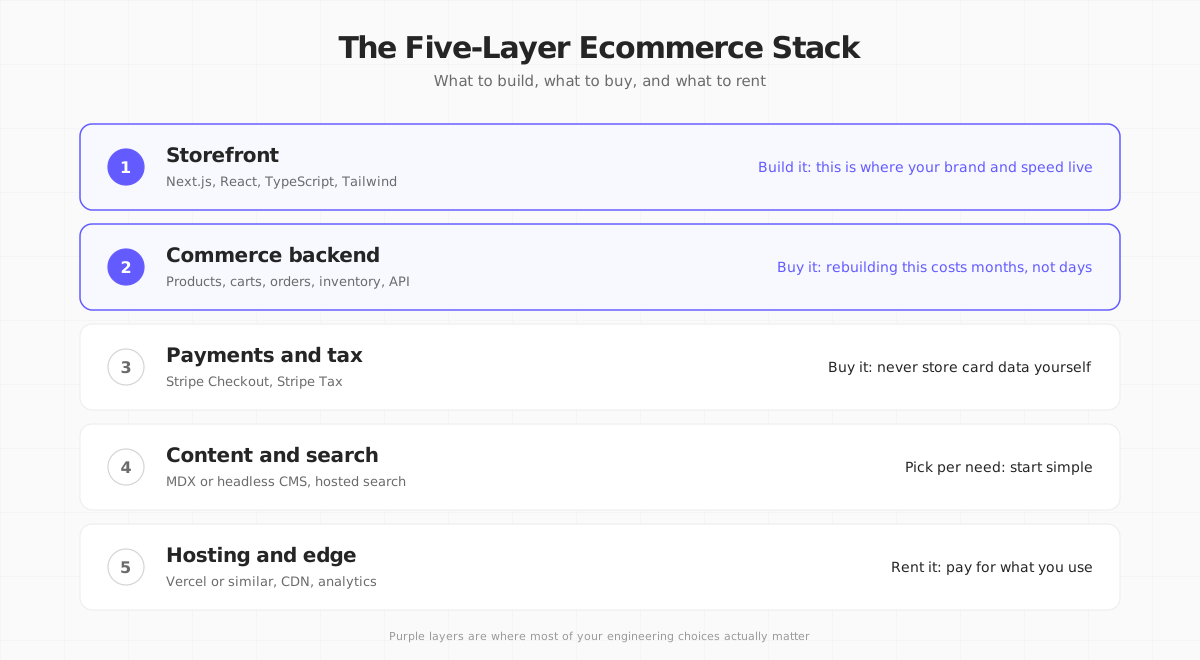
## The Five Layers of an Ecommerce Tech Stack
### Layer 1: The storefront (build this)
The storefront is everything shoppers see: product pages, cart, search, the checkout entry point. It is where your brand and your page speed live, so it is the layer worth owning.
In 2026 the default choice for a code-first storefront is [Next.js](https://nextjs.org/) with React and TypeScript. Server Components let you render product pages on the server and ship very little JavaScript, and features like [partial prerendering](/blog/partial-prerendering-in-nextjs) serve a static shell instantly while personalized parts stream in. Tailwind CSS keeps styling fast to write and small to ship.

Alternatives are legitimate. Nuxt (Vue), Remix and SvelteKit can all produce fast stores. The reasons we lean on Next.js are practical: the largest hiring pool, the most ecommerce starter kits, and the widest support from commerce vendors.
**Why speed matters here:** Google's [Core Web Vitals](https://web.dev/articles/vitals) treat a Largest Contentful Paint of 2.5 seconds or less, an Interaction to Next Paint of 200 ms or less and a Cumulative Layout Shift of 0.1 or less as "good", measured at the 75th percentile of real visits. A stack that cannot hit those numbers on mobile will cost you both rankings and conversions. Our [speed optimization guide](/blog/ecommerce-website-speed-optimization) covers the fixes.
### Layer 2: The commerce backend (buy this)
The commerce backend holds products, variants, prices, inventory, carts, orders and customers, and exposes them through an API. It is unglamorous, full of edge cases (partial refunds, split shipments, currency rounding) and rarely a competitive advantage.
Almost every team should **buy or adopt** this layer instead of writing it. Your options fall into three groups:
| Option | Examples | Best for | Trade-off |
|--------|----------|----------|-----------|
| Hosted platform backend | Shopify, BigCommerce | Teams that want the largest app ecosystem | Fees and platform rules apply; frontend choices vary by plan |
| Managed API-first backend | [Your Next Store](https://yournextstore.com/) | Developers who want a Next.js storefront and no backend to run | Newer ecosystem than Shopify |
| Open-source backend | [Medusa](https://medusajs.com/), [Saleor](https://saleor.io/) | Custom business logic, self-hosting or a hosted cloud plan | You make more decisions; more moving parts |
Pricing is worth checking rather than guessing. As of this writing, [Shopify's plans](https://www.shopify.com/pricing) start at $29/month billed annually, and Shopify charges an extra fee (2% on Basic) when you use a third-party payment provider instead of Shopify Payments. [Medusa Cloud](https://medusajs.com/pricing/) starts at $29/month and lists zero GMV fees, and you can also self-host the open-source version. Your Next Store plans start at $30/month with 0% platform transaction fees on every plan; only Stripe's processing fees apply.

For a deeper comparison of APIs and platforms, see [best ecommerce API](/blog/best-ecommerce-api) and [best ecommerce platform for developers](/blog/best-ecommerce-platform-for-developers).
### Layer 3: Payments and tax (buy this, always)
Do not build payments. Card data handling brings PCI DSS scope, fraud tooling, dispute workflows and dozens of local payment methods. Use a provider.
[Stripe](https://stripe.com/payments/checkout) is the common pick for developer-led stores: hosted Checkout, wallets such as Apple Pay, subscriptions and, optionally, Stripe Tax for calculating sales tax and VAT. Standard US online card pricing is [2.9% + 30¢ per successful transaction](https://stripe.com/pricing), with extra charges for international cards and currency conversion.

Two rules of thumb:
1. **Use hosted checkout first.** It is faster to ship, already localized and maintained by the provider. Move to embedded flows only when you have measured a conversion reason. Our [headless checkout](/blog/headless-checkout) post explains the options.
2. **Plan for tax on day one.** In the US, sales tax obligations depend on where you have nexus. In the EU and UK, VAT applies to consumer sales and rates vary by country. Either way, automate it instead of maintaining a spreadsheet.
### Layer 4: Content and search (start simple)
Product data is not all content. Editorial pages, guides and landing pages often live better in MDX files in your repo or in a headless CMS such as Sanity or Contentful. Start with MDX: it is free, version-controlled and fast. Add a CMS when non-developers need to publish daily.
Search is the same story. Built-in catalog search is fine up to a few thousand products. When you need typo tolerance, facets and merchandising rules, add a hosted search service such as Algolia, Typesense Cloud or Meilisearch. We list options in [best headless CMS for ecommerce](/blog/best-headless-cms-for-ecommerce).
### Layer 5: Hosting and edge (rent this)
Host the storefront where deploys are automatic and pages are cached close to shoppers. [Vercel](https://vercel.com/) is the natural fit for Next.js; Netlify, Cloudflare and self-hosted Node behind a CDN also work. The main rules: use preview deployments for every pull request, cache product pages aggressively, and keep an eye on function costs if your catalog is large.
Add analytics early (PostHog, Plausible or GA4) so you can tie speed changes to conversion changes instead of guessing.
## Recommended Stacks by Store Type
### The solo founder stack
**Goal:** live in days, no engineers.
- Platform: Squarespace, Shopify or an AI store builder
- Payments: whatever the platform supports natively
- Add-ons: only email marketing and reviews
Do not over-think this. The [best AI store builders](/blog/best-ai-store-builders) let you describe a store in plain English and edit it in chat. Your job is products and photos, not architecture.
### The developer-led brand stack
**Goal:** full control of the storefront, minimal ops.
- Storefront: Next.js 16, React 19, TypeScript, Tailwind
- Backend: a managed API-first backend (Your Next Store, Shopify Storefront API or Medusa Cloud)
- Payments: Stripe Checkout
- Hosting: Vercel
- Content: MDX in the repo
This is the sweet spot for most technical founders. With Your Next Store, for example, the open-source storefront talks to the managed backend through the `commerce-kit` SDK, so fetching data is a few lines:
```typescript
// lib/commerce.ts
import { Commerce } from "commerce-kit";
export const commerce = Commerce({ token: process.env.YNS_API_KEY });
// Anywhere on the server
const { data: products } = await commerce.productBrowse({ active: true, limit: 12 });
```
The storefront never touches Stripe directly; the backend stores products, carts and orders in its own database and hands payment off to Stripe Checkout. Walk through the whole build in [how to build an ecommerce website with Next.js](/blog/how-to-build-ecommerce-website-nextjs).

### The composable scale-up stack
**Goal:** custom business logic and vendor independence.
- Backend: Medusa or Saleor (self-hosted or their cloud plans)
- Storefront: Next.js, possibly multiple storefronts per region or brand
- Search: Algolia or Typesense
- CMS: Sanity or Contentful
- ERP, PIM and OMS integrations behind queues
This gives you the most flexibility and the most to maintain. Budget for a platform engineer. If you are leaving one of these and want a comparison, read [Medusa alternatives](/blog/medusa-alternatives).

## What to Build vs Buy: A Decision Table
| Capability | Build? | Why |
|------------|--------|-----|
| Storefront UI and brand experience | Build | This is your differentiator |
| Product catalog and orders | Buy | Edge cases eat months |
| Payments, fraud, tax | Buy | Compliance and risk |
| Email and transactional messages | Buy | Deliverability is a full-time job |
| Custom pricing or bundling rules | Build (on a flexible backend) | Only if it truly differentiates |
| Search relevance tuning | Buy | Hosted engines do this well |
## How to Choose: Six Questions
1. **Who will maintain it in a year?** If the answer is "nobody technical", pick a hosted platform.
2. **How many SKUs and locales?** Thousands of products or many languages favor an API-first backend with translation support.
3. **What does your team already know?** A React team ships faster on Next.js than on a new paradigm.
4. **What are your true fees?** Add plan price, payment fees, third-party gateway fees and app subscriptions. Compare at your expected revenue, not at zero.
5. **How much of the stack do you want to own?** Every layer you self-host is a layer you patch.
6. **Can you move later?** Prefer tools with standard APIs and exportable data.
**Measure before you migrate.** Run PageSpeed Insights on your current store and note mobile LCP. If it is already under 2.5 seconds, a re-platform will not fix your conversion problem. Look at offers, photos and shipping costs first.
## Where Your Next Store Fits
[Your Next Store](https://yournextstore.com/) sits in layers 1 and 2 of the model above. The backend is managed: products, variants, carts, orders, inventory, customers, search and translations are stored in the platform's database and exposed via a REST API, with Stripe handling payment processing only. The storefront is an [open-source Next.js template](https://github.com/yournextstore/yournextstore) you can customize and host on Vercel.
You can also skip code and let the AI builder create and change the storefront for you, then hand the same codebase to a developer later. Plans start at $30/month with 0% platform transaction fees. To be fair about the trade-offs: the ecosystem of third-party apps is smaller than Shopify's, and the template is a storefront only, so it requires the managed backend. If you need a bespoke backend with custom domain logic, Medusa or Saleor will give you more room. See [Next.js vs Shopify](/blog/nextjs-vs-shopify) for the wider comparison.
## Common Mistakes When Choosing an Ecommerce Stack
- **Starting composable too early.** Six vendors for a store with ten products means six invoices and six failure points.
- **Choosing by logo.** Enterprise references do not tell you whether a tool fits a five-person team.
- **Ignoring fees.** A cheap plan with a payment-provider surcharge can cost more than a pricier plan without one.
- **Skipping observability.** Without error tracking and analytics you will not know checkout is broken until revenue drops.
- **Building custom checkout.** Almost never worth it early on.
## FAQ
### What is the best tech stack for a small ecommerce business?
For a small business without developers, a hosted platform such as Shopify, Squarespace or an AI store builder is the best tech stack: fewer decisions and no servers to run. If you have a developer, Next.js plus a managed commerce backend and Stripe gives you more control at similar cost.
### Is Next.js good for ecommerce?
Yes. Server Components, caching and streaming let Next.js render product pages quickly, and most commerce platforms offer a Next.js starter or API. The catch is that you own the frontend code, so you need someone comfortable with React and TypeScript.
### Should I use headless commerce?
Use headless when you need a custom frontend, multiple storefronts or tighter performance control. Skip it if a standard theme meets your needs; the extra flexibility comes with more code to maintain. Our [headless commerce platforms comparison](/blog/best-headless-commerce-platforms) helps you decide.
## Final Word
**Buy the boring layers, build the one your customers see.** A stack is good when a new developer can understand it in a day and a customer never has to think about it.
## Related Blog Posts
- [Best Ecommerce Platform for Developers in 2026](/blog/best-ecommerce-platform-for-developers)
- [Best Headless Commerce Platforms](/blog/best-headless-commerce-platforms)
- [How to Build an Ecommerce Website with Next.js](/blog/how-to-build-ecommerce-website-nextjs)
- [Composable Commerce Explained](/blog/composable-commerce)
- [Next.js vs Shopify: An Honest Take from a Developer](/blog/nextjs-vs-shopify)